web
You’re offline. This is a read only version of the page.
close
Skip to main content

Notifications

Announcements

No record found.

Community site session details

Community site session details

Session Id :
Microsoft Dynamics NAV (Archived)

Error During Installation

(0) ShareShare
ReportReport
Posted on by

Hello everyone,

I am currently getting the attached error during a NAV 2016 Client Installation.

I tried installing a newer framework version but while doing that, it says that I already have that version or a newer one installed.
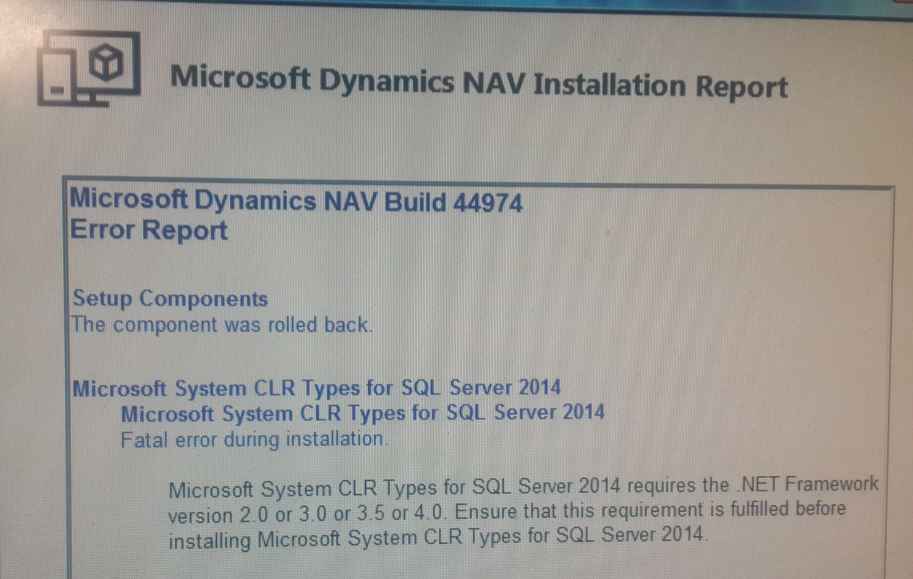
2072.Capture.JPG

Has anybody else faced this issue before?

*This post is locked for comments

I have the same question (0)
  • Community Member Profile Picture
    on at

    Go to Control Panel -> Programs and Features -> Turn Windows features on or off and make sure that the .Net Framework 3.5 or 4.0 is selected. If not please select and then run the setup again. It will work.

  • Community Member Profile Picture
    on at

    It's framework 3.5. Already tried your suggestion, then restarted and I'm still getting the same error.

  • Suggested answer
    Saurav.Dhyani Profile Picture
    14,380 Super User 2025 Season 2 on at

    Hi,

    Try This -

    1. Run setup as administrator.

    2. What is the Operating System on client Machine?

    3. Put a screen shot of components that you are installing.

  • Community Member Profile Picture
    on at

    Hi Saurav,

    I'm installing the NAV Client component and it stops when trying to install the CLR Types for SQL Server 2014 (see my first screenshot). I don't know if that's what you are referring to.

    The framework feature was already turned on when I run the NAV client setup. So I uncheck it, restart the machine and then check it again. Then I ran the NAV Client setup one more time and still got the same error.

    I'm going to try I few  more things and I'll let you know if I was able to solve it. Either ways if you have any other suggestion please let me know.

    Thank you.

  • Suresh Kulla Profile Picture
    50,243 Super User 2025 Season 2 on at

    Try to install from the prerequisite components folder the Microsoft .NET Framework i will believe it will 4.5.2 and then run the installation as Administrator.

  • Verified answer
    Community Member Profile Picture
    on at

    Hello everyone,

    Run the setup as administrator, install framework 4.5.2, turn off and turn on framework feature from the control panel and restart the computer, run Microsoft´s framework repair tool... We tried it all and nothing worked.

    Apparently it all came down to a problem with the windows installer service and we were not able to repair it or reinstall it so we reinstall windows (windows 7 SP1) on that computer and that solved the issue for us.

    Thank you all for your suggestions.

Under review

Thank you for your reply! To ensure a great experience for everyone, your content is awaiting approval by our Community Managers. Please check back later.

Helpful resources

Quick Links

Responsible AI policies

As AI tools become more common, we’re introducing a Responsible AI Use…

Neeraj Kumar – Community Spotlight

We are honored to recognize Neeraj Kumar as our Community Spotlight honoree for…

Leaderboard > 🔒一 Microsoft Dynamics NAV (Archived)

Last 30 days Overall leaderboard

Featured topics

Product updates

Dynamics 365 release plans



