web
You’re offline. This is a read only version of the page.
close
Skip to main content

Announcements

No record found.

News and Announcements icon
Community site session details

Community site session details

Session Id :
Finance | Project Operations, Human Resources, ...
Answered

Changing the default Name sequence for 'Display as'?

(0) ShareShare
ReportReport
Posted on by 235

Hi all,

When hiring a worker, the field 'Display as' defaults to the Name sequence FirstMiddleLast as seen below.
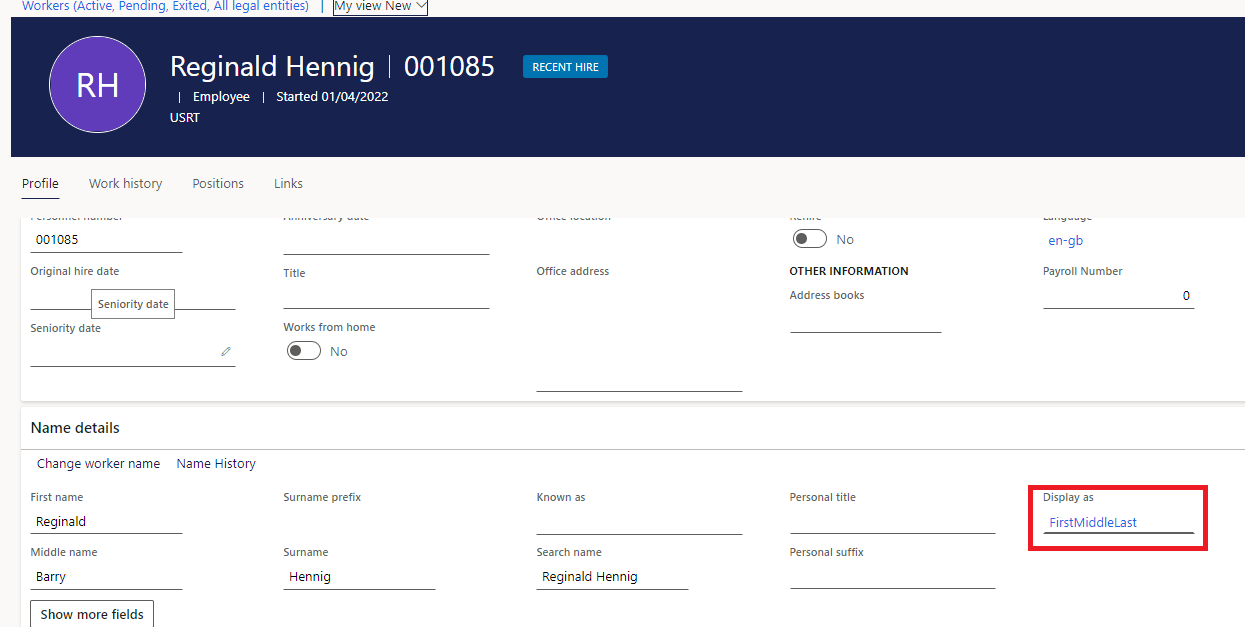
dsddadsa.png

I have rummaged through the system but there doesn't seem to be a way for us to have it default to any other Name sequence. Am I missing something obvious here, or is this simply not a possibility?

A customer has requested this defaults to FirstLast which is sensible, but it seems like I may have to advise them that they must update this field themselves upon hiring a new worker.

I have the same question (0)
  • Verified answer
    Parag Chapre Profile Picture
    12,254 Most Valuable Professional on at

    Hi Sytse,

    You can change this setting in the global address book parameter.

    pastedimage1648834318273v1.png

  • Sytse Korts Profile Picture
    235 on at

    Thanks Parag, useful as ever.

    I had already gone through the parameters, but what I didn't realize was that updating the name sequence here does not change the 'Display as' field for existing workers. Only for for those that are hired after the change does the name display default to the newly set sequence.

    Hopefully this will helpful to anyone stumbling upon this question in the future.

  • Mdelatorre Profile Picture
    32 on at

    I have the same issue. Did you find out how to update for existing workers?

  • Sytse Korts Profile Picture
    235 on at

    Sent you a PM.

  • JD-27040851-0 Profile Picture
    2 on at
    I have the same issue. Can someone tell me how to update for existing parties?

Under review

Thank you for your reply! To ensure a great experience for everyone, your content is awaiting approval by our Community Managers. Please check back later.

Helpful resources

Quick Links

Introducing the 2026 Season 1 community Super Users

Congratulations to our 2026 Super Stars!

Meet the Microsoft Dynamics 365 Contact Center Champions

We are thrilled to have these Champions in our Community!

Congratulations to the March Top 10 Community Leaders

These are the community rock stars!

Leaderboard > Finance | Project Operations, Human Resources, AX, GP, SL

#1
André Arnaud de Calavon Profile Picture

André Arnaud de Cal... 608 Super User 2026 Season 1

#2
Giorgio Bonacorsi Profile Picture

Giorgio Bonacorsi 564

#3
CP04-islander Profile Picture

CP04-islander 396

Last 30 days Overall leaderboard

Product updates

Dynamics 365 release plans
