web
You’re offline. This is a read only version of the page.
close
Skip to main content

Notifications

Announcements

No record found.

Community site session details

Community site session details

Session Id :
Finance | Project Operations, Human Resources, ...
Answered

VAT calculation against Sales Invoice Journal lines

(0) ShareShare
ReportReport
Posted on by 98

Good afternoon, 

I am using the DEMF company in the Contoso database and when I generate an invoice, there is no VAT set against the invoice journal. I've adjusted the General Ledger parameters as follows:

pastedimage1665074280486v1.png

On the invoice posting screen when I click VAT, it gives me values against the lines, but they aren't applied to the journal.

Can someone point me in the right direction please?

I have the same question (0)
  • Suggested answer
    Ramit Paul Profile Picture
    22,797 Most Valuable Professional on at

    Hi,

    Have you checked the below setup?

    Sales tax value is coming in lines before posting ?

    If Yes, have you checked in general ledger -- periodic task-- subledger journal not yet transfered?

  • André Arnaud de Calavon Profile Picture
    300,911 Super User 2025 Season 2 on at

    Hi Phil,

    Can you share screenshots of the invoice posting screen, the VAT and the invoice journal? I wonder what exact VAT settings are used on the invoice entry.

  • Suggested answer
    BillurSamdancioglu Profile Picture
    19,703 Most Valuable Professional on at

    Hi ,

    Can you share the screen shots for invoice journal and vat transactions and voucher please. Also the vat code setup and definition of percentage.

  • Phil Matthews Profile Picture
    98 on at

    Hi all, thank you for your responses, I'll try to answer all of your questions.

    So for example on creation of a new Sales Order, it is automatically assigned the AR-DOM tax group.

    Sales Order Lines > Financials > VAT shows the calculated tax correctly:
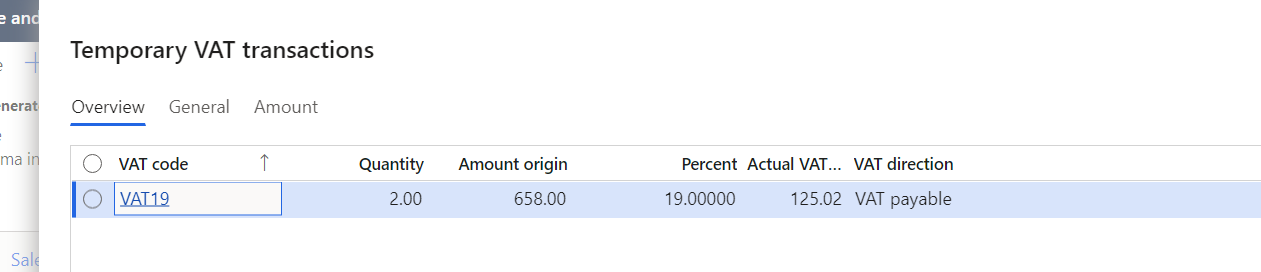
    pastedimage1665130166669v2.png

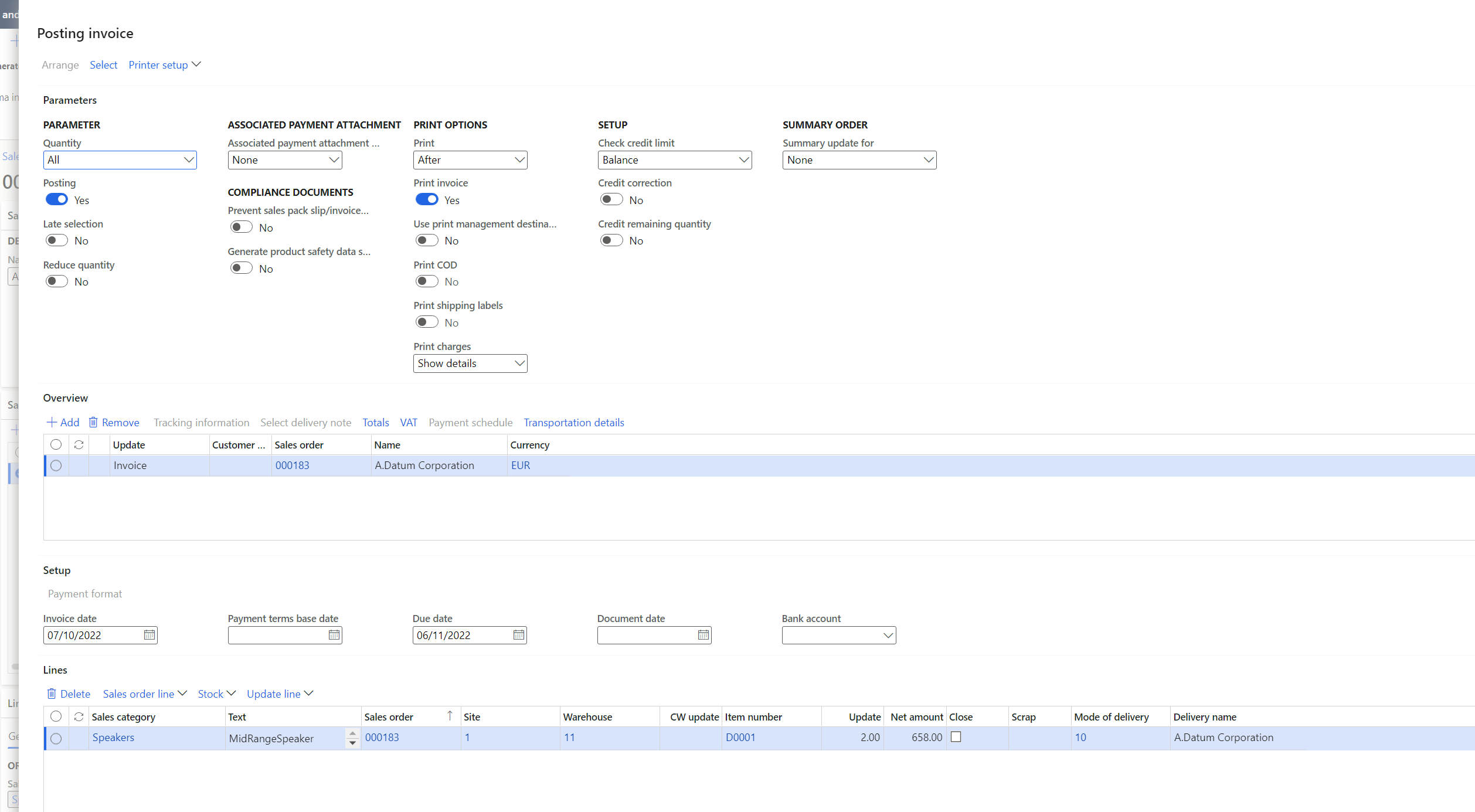
    Invoice posting screen thus:

    pastedimage1665130195524v3.png
    Clicking VAT shows the same values as when doing so from the Sales Order.

    Invoice journal. As you can see Amount against the lines is excluding VAT and VAT Included in amount is 0.
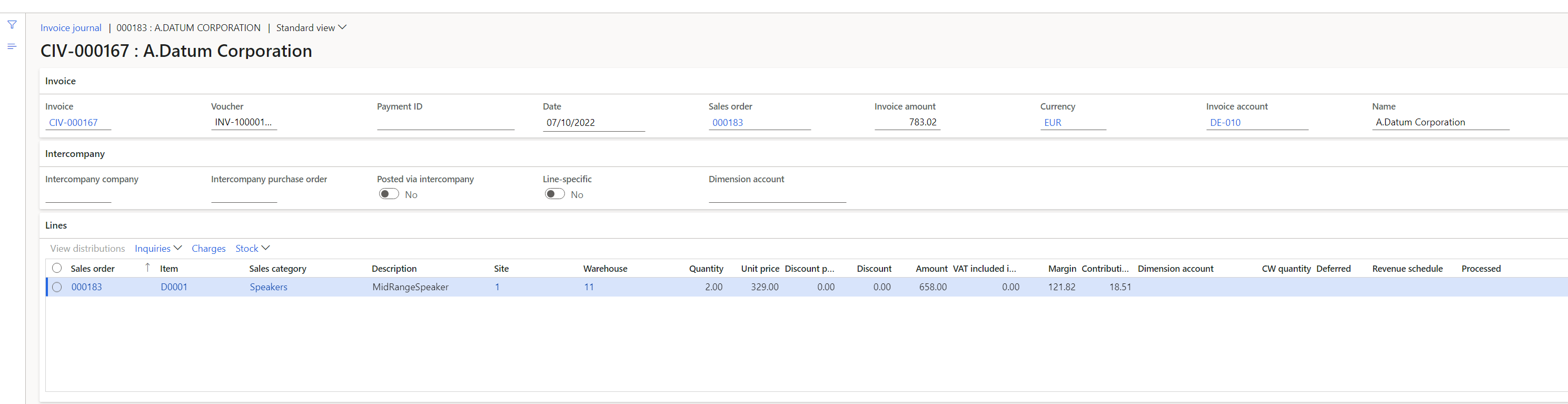
    pastedimage1665130384746v4.png

    VAT has been posted against the invoice header, but isn't saved per line:

    pastedimage1665130471980v5.png

     Voucher transactions:
    pastedimage1665130543742v6.png

    I'm assuming that there's just a parameter somewhere that I've missed. It's calculating VAT correctly and posting it, it's just not putting it against the lines in the invoice journal, only the header.

    I think I've answered all of your questions above, please flag up if I've missed one.

  • Phil Matthews Profile Picture
    98 on at

    Also, my apologies, I have just realised that I missed a critical word in my initial post which would have made it clearer. The VAT is missing against the invoice LINES.

  • Verified answer
    Alireza Eshaghzadeh Profile Picture
    14,672 Super User 2025 Season 2 on at

    Hi Phil,

    I have just tested in company DEMF with contoso data. I have activated following setup on GL parameters:

    pastedimage1665130836556v1.png

    I have used a valid combination of Sales tax group and Item sales tax group:

    pastedimage1665130887723v2.png

    Then, I get sales tax code for the invoice journal line:

    pastedimage1665130918990v3.png

  • Phil Matthews Profile Picture
    98 on at

    Hi all,

    Infuriatingly, I think this is actually working. I have just checked in the SQL database and the tax IS being filled in against the lines, it is just not showing in the application. I'm going for the usual clearing of user data etc.

    Thank you for your help.

    Phil

Under review

Thank you for your reply! To ensure a great experience for everyone, your content is awaiting approval by our Community Managers. Please check back later.

Helpful resources

Quick Links

Responsible AI policies

As AI tools become more common, we’re introducing a Responsible AI Use…

Neeraj Kumar – Community Spotlight

We are honored to recognize Neeraj Kumar as our Community Spotlight honoree for…

Leaderboard > Finance | Project Operations, Human Resources, AX, GP, SL

#1
Martin Dráb Profile Picture

Martin Dráb 660 Most Valuable Professional

#2
André Arnaud de Calavon Profile Picture

André Arnaud de Cal... 549 Super User 2025 Season 2

#3
Sohaib Cheema Profile Picture

Sohaib Cheema 307 User Group Leader

Last 30 days Overall leaderboard

Product updates

Dynamics 365 release plans