web
You’re offline. This is a read only version of the page.
close
Skip to main content

Notifications

Announcements

No record found.

Community site session details

Community site session details

Session Id :
Customer experience | Sales, Customer Insights,...
Answered

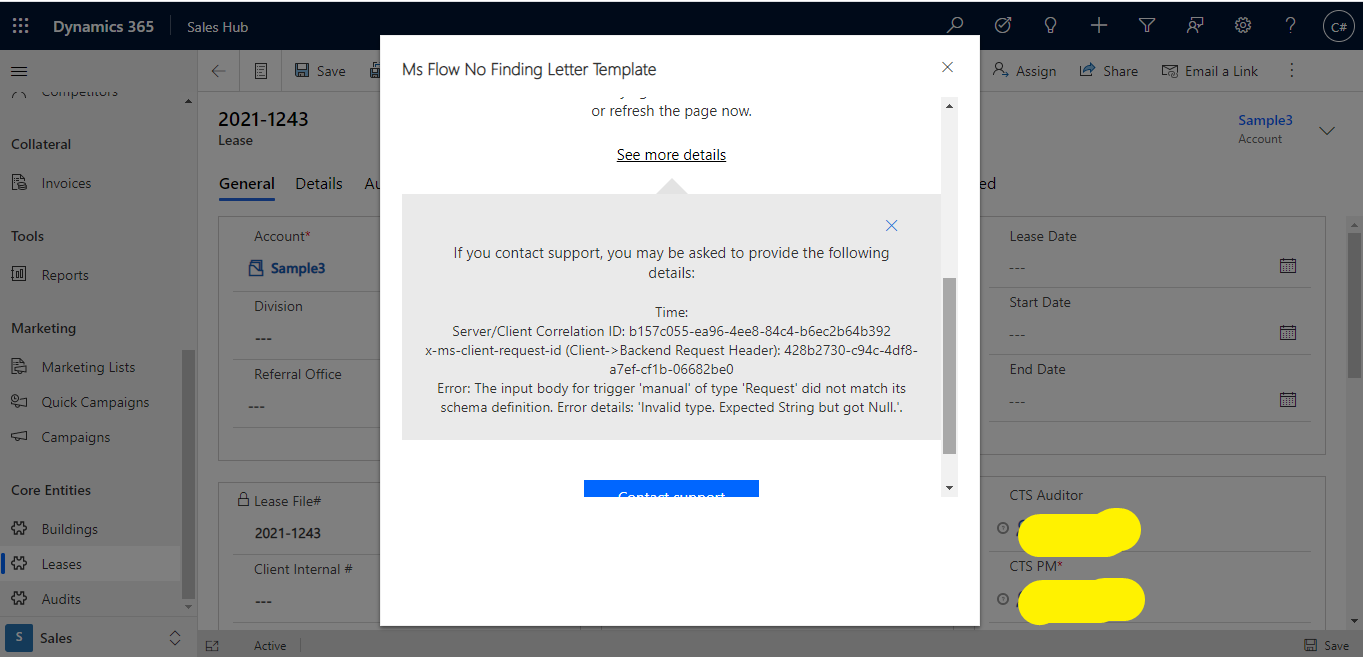
Flow Is Generating an Error " The input body for trigger 'manual' of type 'Request' did not match its schema definition. Error details: 'Invalid type. Expected String but got Null.'."

(0) ShareShare
ReportReport
Posted on by 425

Hi ,

I have Created MS flow for custom entity (Lease) and I can trigger it from top navigation bar with the help of flow button, But Ms flow is generating an error while triggering it.

I am using "When A Record is Selected " Trigger Point.

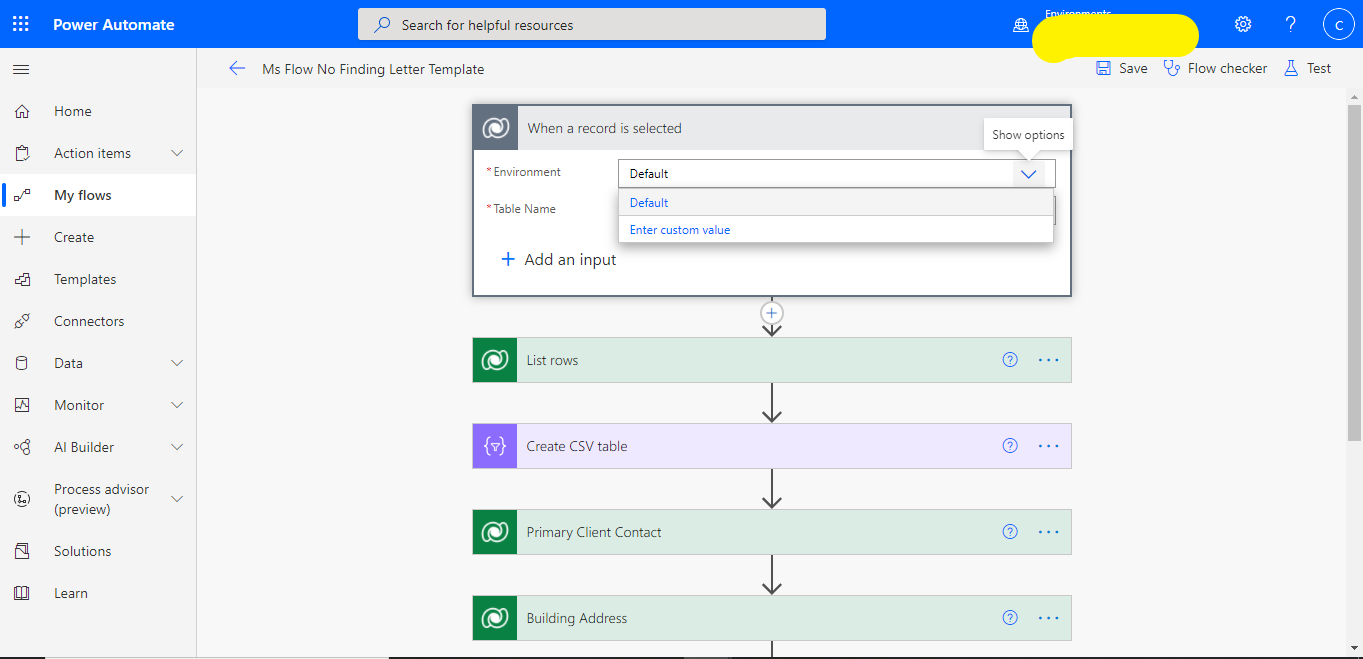
I am Performing this operation in the Production Instance and I have Only Option in ms flow to select the Default environment. If I want to type my environment (Production environment)manually, is there Standard to write the environment name
3426.flow.png

1780.flow3.png

I have the same question (0)
  • Suggested answer
    meelamri Profile Picture
    13,216 User Group Leader on at

    Hi Himanshu, 

    I reproduce the same problem in my environment. Before the last update, you could see the list of environments without problems. This problem is only observed for the "When a record is selected" trigger.

    pastedimage1620047829158v1.png

    If you use another trigger like "When a row is added" you can see the list of environments without any problem.

    pastedimage1620047880851v2.png

    To solve the problem quickly, you can use your URL Instance. This is a temporary solution until we get more information: 

    pastedimage1620047981513v3.png

  • Himanshu Kamboj Profile Picture
    425 on at

    Hi Mehdi,

    I did the same as you mentioned, but after putting the production url into the environment section, the flow is not available in the custom entity Navigation bar(flow button) .

  • Suggested answer
    meelamri Profile Picture
    13,216 User Group Leader on at

    Hi, 

    This problem is not reproducible in my home. I think you need to activate the Flow buttons on your environment. Please refer to this blog: https://d365demystified.com/2019/07/22/enable-flow-button-on-d365-ribbon/

  • Himanshu Kamboj Profile Picture
    425 on at

    hi Mehdi,

    I go through the link provided by you and according to the blog, I have checked my system setting and found that my flow button is already enabled.

  • Runi Juul Thomsen Profile Picture
    10 on at

    Tried the same - with same result as Himanshu.

  • Runi Juul Thomsen Profile Picture
    10 on at

    I have the same problem. Please share your findings if you reach an answer.

  • Suggested answer
    Marcel Lathouwers Profile Picture
    175 on at

    Hi @Runi,

    I encountered the same issue today. But strangely my flow was somethimes working and sometimes giving the error you mentioned.

    When inspecting the trigger with 'peek code' it showed two field that it is using further down in the flow. So it looks like a automatic 'rollup' of all fields that are used.

    Unfortunatiely the fields are flagged as 'required'

    So that is why my flow sometimes works. As long as all field are filled, it works. I like it this way, because I need both fields.

    If one of them is optional, this workaround is great.  sharepains.com/.../

  • psychobunny83 Profile Picture
    75 on at

    I'm sorry but this is such bullshit.  Your response has NOTHING to do with the OP's question.  All you people do is come on here fishing for points and "solutions."  It's honestly so annoying.  It would be so much nicer if people came on here to actually help vs just trying to increase their solution count.  There's literally NO need to sign every post with "Remember to mark my super hasty response as a solution!"

  • Marcel Lathouwers Profile Picture
    175 on at

    I think you are overreacting just a notch here. Everybody is trying to get answers or help here.

    But you are right that the real question is not what all of us are responding to. It would have been better to have a subject that is closer to the question.

  • Suggested answer
    Marcel Lathouwers Profile Picture
    175 on at

    Why do you want to write the environment in your trigger? This on demand flow is always triggered from the environment where you start the flow.

    If you want to do this to get rid of the error then your solution is to do a’ get recordz’n right behind the trigger and in all following step do not refer to values from the trigger

Under review

Thank you for your reply! To ensure a great experience for everyone, your content is awaiting approval by our Community Managers. Please check back later.

Helpful resources

Quick Links

Responsible AI policies

As AI tools become more common, we’re introducing a Responsible AI Use…

Neeraj Kumar – Community Spotlight

We are honored to recognize Neeraj Kumar as our Community Spotlight honoree for…

Leaderboard > Customer experience | Sales, Customer Insights, CRM

#1
Tom_Gioielli Profile Picture

Tom_Gioielli 170 Super User 2025 Season 2

#2
#ManoVerse Profile Picture

#ManoVerse 70

#3
Jimmy Passeti Profile Picture

Jimmy Passeti 50 Most Valuable Professional

Last 30 days Overall leaderboard

Product updates

Dynamics 365 release plans
