web
You’re offline. This is a read only version of the page.
close
Skip to main content

Announcements

News and Announcements icon
Community site session details

Community site session details

Session Id :
Dynamics 365 Community / Forums / Finance forum / Automated Statement of...
Finance forum

Automated Statement of Accounts - Customer

(0) ShareShare
ReportReport
Posted on by 16

I wanted to know how do I setup an automated Statement of Account for a entity. The system should be able to generate the SOA and send to each customer every month.

I have the same question (0)
  • Ludwig Reinhard Profile Picture
    Microsoft Employee on at

    Hello praveens007,

    Do you mean that on the last day of a month each customer should get a customer account statement automatically created and send to their email box or do you want to have the report only generated/printed and send it by ordinary mail?

    Is it always the last day of a month where you want to have this created or on the day the month end close is executed/finished, which might be some days later in the following month.

    Would be great if you could clarify.

    Many thanks and best regards,

    Ludwig

  • praveens007 Profile Picture
    16 on at

    Dear Ludwig,

    Yes i would like to have the SOA to be sent out last day of the month by email. Thanks very much for your help.

  • Suggested answer
    Ludwig Reinhard Profile Picture
    Microsoft Employee on at

    Hi praveens007,

    You can do the following:

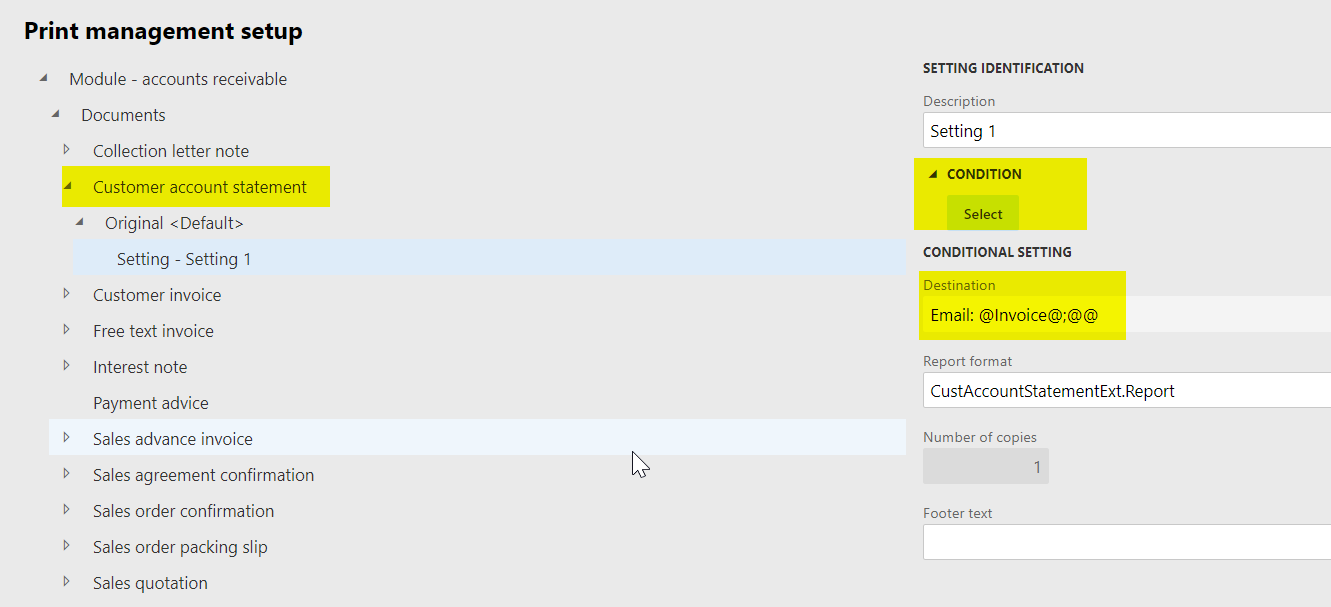
    1. AR/setup/forms/formsetup/print management button
    send1.png

    Here you can specify a condition that looks for example for the existance of a specific email. If the email is missing then the default print setting is used. That is, the document can then e.g. be printed on a printer

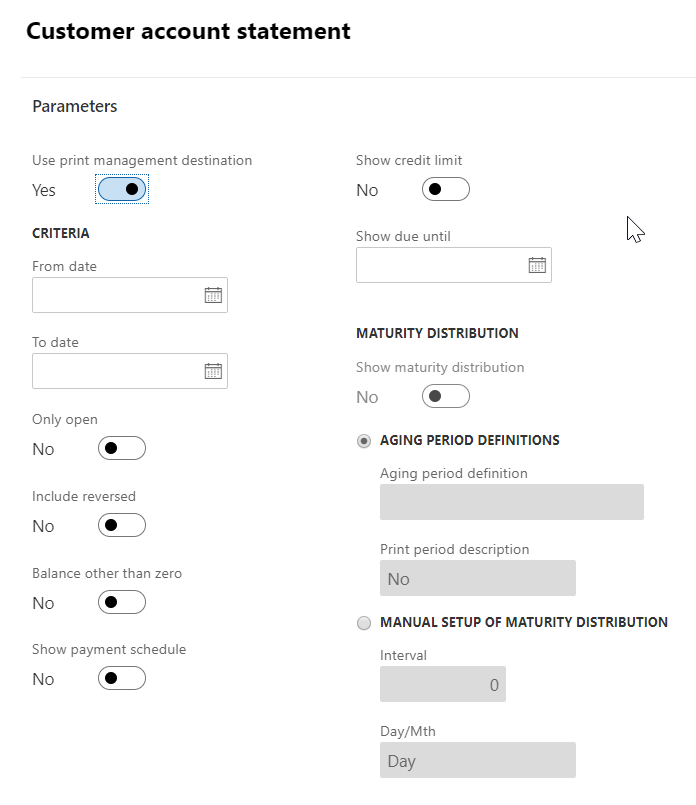
    2. Then open the customer account statement and make sure that the print management setting is selected. 

    Note that I did not make a selection in the from and to date fields. If you want you can select the 'open only' button to list only open transactions in the statement. 
    send2.png

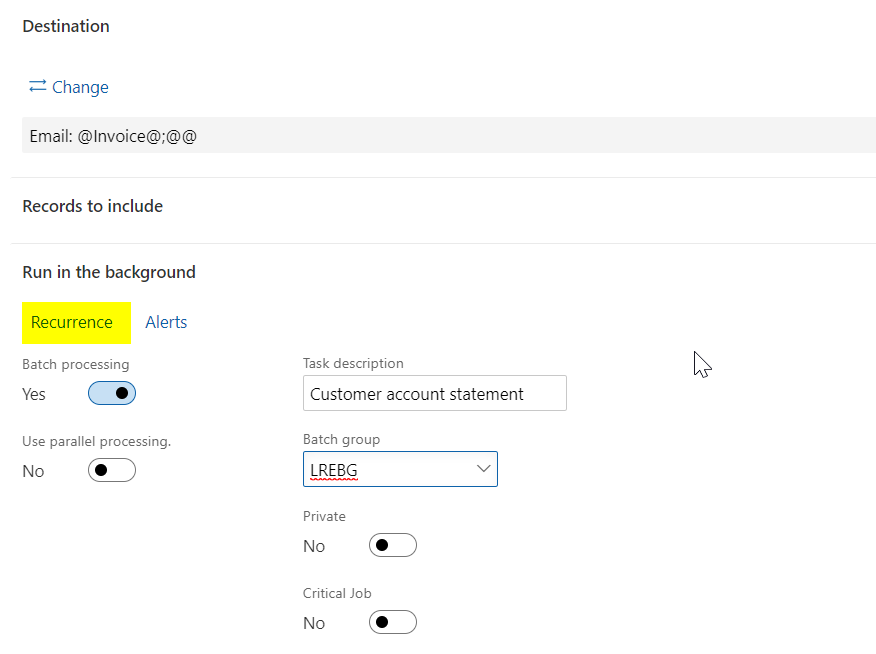
    The destination defaults from the print settings and you have to define the recurrence (e.g. monthly)
    send3.png

    Also ensure that you enable the batch processing parameter and select a batch group.

    That's basically the process. 

    If you need more examples, have a look at my blog where I posted similar things for sending payment advices and other things. 

    The key to all of that is that you have good and complete customer master data that have all an email assigned. 

    Best regards, 

    Ludwig

  • ar989 Profile Picture
    15 on at

    Hi Ludwig,

    I am trying to get this working too, and I came across this post and had a couple of questions regarding what you mentioned. I was wondering if you could clarify those for me, please?

    • In Step 1, you mentioned adding a condition - is this only so that the email is sent out IF there is an email address held against the Customer account with Purpose = 'Statement'? If so, can this not be achieved also through going into Print Destination settings and specifying it there (as in screenshot below)? Or are those not the same?

    pastedimage1646993434813v2.png

    • In Step 2 you mentioned you haven't specified the from & to dates - is it done so that the monthly batch job picks up all open transactions (if 'Open only' is set to Yes) for that customer account - regardless of a From date (as it's empty), but a To date = the date when the batch job runs? So this way, we by-pass the issue of specifying a fixed From date (e.g. 01/04/2022) & To date (e.g. 31/04/2022) when setting up the recurring batch job to run every month end, causing it run with the right date range in April 2022 but to not include the right date ranges for subsequent months. Is my understanding correct on this?

    Your clarification will help me understand if I need to do anything additional to what I have already done to set this up.

    Thanks in advance for your help. 

    Regards,

    Anish

  • Suggested answer
    Sreenivas23 Profile Picture
    5 on at

    Hi Praveen,

    Hope you are doing well!

    Just wanted to check if you were able to achieve this in sending statements via email automatically.

    If yes it would be great if you can share more on that.

    Thanks in advance.

    Regards,

    Sree

Under review

Thank you for your reply! To ensure a great experience for everyone, your content is awaiting approval by our Community Managers. Please check back later.

Helpful resources

Quick Links

November Spotlight Star - Khushbu Rajvi

Congratulations to a top community star!

Forum Structure Changes Coming on 11/8!

In our never-ending quest to help the Dynamics 365 Community members get answers faster …

Dynamics 365 Community Platform update – Oct 28

Welcome to the next edition of the Community Platform Update. This is a status …

Leaderboard > Finance

Last 30 days Overall leaderboard

Featured topics

Product updates

Dynamics 365 release plans
