web
You’re offline. This is a read only version of the page.
close
Skip to main content

Notifications

Announcements

No record found.

Community site session details

Community site session details

Session Id :
Microsoft Dynamics AX (Archived)

Management Reporter has become unusable

(0) ShareShare
ReportReport
Posted on by

Hello everyone,


We are experimenting constant slowdowns in Management Reporter; it is not the reports themselves that are slow but the delay after which the datamart gets the updated data from AX. It went from a couple of minutes to several hours. To the point where last Friday we had to turn off Management Reporter services as it was preventing our AX aos from being restarted. It seems like several locks were hold in the AX database (not the datamart, the AX production database!) from the Management Reporter scheduled tasks.


Our servers, either the SQL machine or the aos, don’t seem to be too intensely sollicitated. There’s no sign of peak usage when looking at the performance.


The Management Reporter services resides on one of our aos server.


The Management Reporter SQL server is the same as the AX SQL Server.


There is one extremely slow process in the M.R. scheduled tasks, General Ledger Transactions To Fact. It can run for several hours with a slow increase in its estimated progress status. We are having this issue even with our PRE-PROD environment. The following stats are actually pulled from PRE-PROD.


This query shows performance of the scheduled task for M.R.:


SELECT CIG.[Description]

, T.Name

, CASE TS.StateType

WHEN 3 THEN 'PROCESSING'

WHEN 5 THEN 'COMPLETE'

WHEN 7 THEN 'ERROR'

ELSE Convert(varchar(max),TS.StateType)

END AS StateType

, TS.Progress

, TR.Id AS TriggerId

, CASE TR.IsEnabled

WHEN 1 THEN 'ENABLED'

WHEN 0 THEN 'DISABLED'

ELSE Convert(varchar(max),TR.IsEnabled)

END AS TriggerStatus

, TR.Interval

, CASE TR.UnitOfMeasure

WHEN 4 THEN 'DAYS'

WHEN 3 THEN 'HOURS'

WHEN 2 THEN 'MINUTES'

WHEN 1 THEN 'SECONDS'

ELSE Convert(varchar(max),TR.UnitOfMeasure)

END AS IntervalTiming

, DATEADD(minute, DATEDIFF(minute,GETUTCDATE(),GETDATE()), TS.[LastRunTime]) as LocalLastRunTime

, DATEADD(minute, DATEDIFF(minute,GETUTCDATE(),GETDATE()), TS.[NextRunTime]) as LocalNextRunTime

--, TS.[LastRunTime] as UTCLastRunTime

--, TS.[NextRunTime] as UTCNextRunTime

FROM Scheduling.Task T with (nolock)

JOIN Scheduling.TaskState TS with (nolock) ON T.Id = TS.TaskId

JOIN Scheduling.[Trigger] TR with (nolock) ON TR.Id = T.TriggerId

JOIN Connector.IntegrationGroup CIG with (nolock) on CIG.[IntegrationId] = T.CategoryId

WHERE T.TypeId in ('55D3F71A-2618-4EAE-9AA6-D48767B974D8', '6F6B935B-FC0A-46B9-8F53-27C6AF7437F0', 'D81C1197-D486-4FB7-AF8C-078C110893A0')

ORDER BY CIG.[Description], T.Name


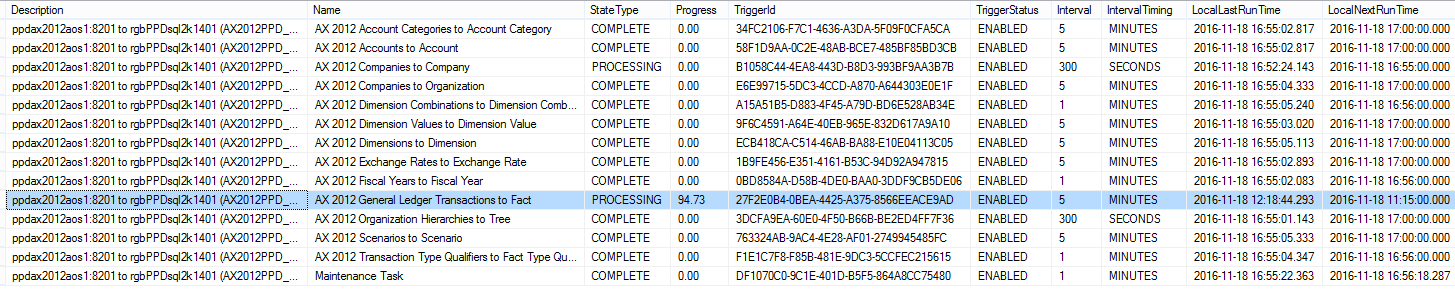
This is the result from PRE-PROD on Friday around 5pm:
MRStats1.png


General Ledger Transactions To Fact process was completed at 94.73% and it was started since 12h20 by looking at the LocalLastRunTime column.


Upon looking at the stats for General Ledger Transactions To Fact since I reloaded the PRE-PROD datamart on Thursday, we see that the initial load took 6630 seconds to insert more then 25 millions of rows and delete 259643 rows. But when checking the last three synchronization attempt that we see a major down in performance… notablt taking more than 10 hours (36531 seconds) to write 117175 rows and delete 177102.


select * from Scheduling.MessageSummary

where TaskName='AX 2012 General Ledger Transactions to Fact'

order by Time DESC

MRStats2.png


What that can we do to fix this problem^ It has come to the point where we are starting to look for a better alternative than M.R. With AX 2009, we had none of this problem as the report was reading directly into AX db; but the datamart and its synchronization architecture seems like a flawed and cumbersome approach.


Thanks in advance for any hints or help,

Eric


*This post is locked for comments

I have the same question (0)
  • Community Member Profile Picture
    on at

    Additional details:

    AX is cu10, M.R. is cu14

  • pnwguy Profile Picture
    245 on at

    Since MR and AX databases are on same instance/server, did you investigate disk at all, as a potential bottleneck?  

  • Verified answer
    Community Member Profile Picture
    on at

    No disk i/o bottlenecks, no heavy memory usage, temps db was only used to 25%. We opened a ticket with Microsoft and someone did a lot of monitoring on our systems, without finding the source of the awful slowdowns.

    We decided to upgrade the pre-prod server with cu15 and luckily! performance is fast! So it seems that on our server setup (Windows 2012 R2, not sure the precise release), cu14 just aint able to work properly with the datamart.

    cu15 requires .net 4.6, on the server and on the client

  • Community Member Profile Picture
    on at

    Hi

    We are also facing the same issue.

    General Ledger Transactions To Fact. It can run for several hours with a slow increase in its estimated progress status.

    The slowness occur during moth end when there huge transactions.

    Below are our configuration.

    AX : AX2012 R3 CU8.

    MR: MR CU16 with Latest hotfix.

    OS: Window Server 2008 R2.

    Please suggest some resolution.

    Thanks !

    Kamlesh

  • Ludwig Reinhard Profile Picture
    Microsoft Employee on at

    Hi Kamlesh,

    This is already an old thread and I just found your note by accident because the thread was already verified.

    Can you please enter your issue in a new thread and provide some additional information on what issue you face exactly?

    Ideally provide some additional screenprints and information if possible.

    Many thanks and best regards,

    Ludwig

  • Suggested answer
    guk1964 Profile Picture
    10,888 on at

    Prior to MR CU10, the data was pulled from the AX database and fully processed in the MR services before inserting into the data mart. Processing  the records this way caused a number of performance issues with larger AX data sets.

    With CU10 and later, MR loads the separate sets of data into staging tables in the data mart and does the processing/validation in SQL stored procedures. The processing of the staging data in the data mart is done by the Maintenance Task which runs every minute. When it cannot resolve the staging data on the first attempt, it will continue to try to resolve the data at an increasing (exponential) interval. ( i.e. after 1 attempt the next try is 3 min, the next 9 min, the next 27 min etc, so by the time you get to 6 attempts you are at about 12 hours between retries.

    Check in the data mart Archive table for retry information for the staging data.

    When MR is not able to resolve the staging data due to invalid AX data (maybe a new dimension combination never previously posted) and the unresolved data will be not available in reports until the data is fixed. You may then need to rebuild the data mart after it is fixed.

    In the Management Reporter 2012 configuration console view log files created by the data mart integration. Check there are no errors. If there are errors then those need to be resolved. There are multiple possible  causes.

Under review

Thank you for your reply! To ensure a great experience for everyone, your content is awaiting approval by our Community Managers. Please check back later.

Helpful resources

Quick Links

Responsible AI policies

As AI tools become more common, we’re introducing a Responsible AI Use…

Neeraj Kumar – Community Spotlight

We are honored to recognize Neeraj Kumar as our Community Spotlight honoree for…

Leaderboard > 🔒一 Microsoft Dynamics AX (Archived)

#1
Martin Dráb Profile Picture

Martin Dráb 4 Most Valuable Professional

#1
Priya_K Profile Picture

Priya_K 4

#3
MyDynamicsNAV Profile Picture

MyDynamicsNAV 2

Last 30 days Overall leaderboard

Featured topics

Product updates

Dynamics 365 release plans



