web
You’re offline. This is a read only version of the page.
close
Skip to main content

Notifications

Announcements

No record found.

Community site session details

Community site session details

Session Id :
Microsoft Dynamics AX (Archived)

Change the Payment Status from approved to None/Reject

(0) ShareShare
ReportReport
Posted on by 165

Hi guys, 

I wanna ask how to change  the payment status from "Approved" to "None/Reject".

I created the payment journal and select the payment status "Approved" then I want to delete that payment journal and the message says "Only transactions having payment status None or Rejected can be deleted" 

But I found that the button Payment status is disabled
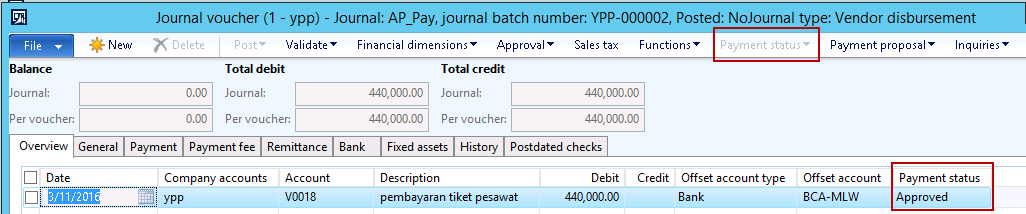
16_2D00_03_2D00_2016-10_2D00_12_2D00_06.png

anyone can help me to solve this problem?

Thank you

*This post is locked for comments

I have the same question (0)
  • Suggested answer
    Ludwig Reinhard Profile Picture
    Microsoft Employee on at

    Hello Febriani Vira,

    It looks as if your journal is already posted. Is that correct? If so, you cannot change the payment status anymore and generate the payment.

    Ludwig

  • Febriani Vira Profile Picture
    165 on at

    Hi Ludwig,

    Actually, my journal is not validated/posted yet.

    I just input the transaction data and select the payment status to "approved" and I close the form.

    then, when I 'll try to change the "Payment Status" to Reject/None the button is disabled.

    I've tried from the other Legal Entity the "Payment Status" button is enabled.

    so I think whether there is any missing in setup...

    is there any settings that affected the problem? (such as the settings to activate the button?)

    Can you help me?

    Thanks :)

  • Suggested answer
    Ludwig Reinhard Profile Picture
    Microsoft Employee on at

    Hi,

    Have you setup a workflow or implemented a customization that prevents you from changing the status or do you have insufficient rights?

    Please check if you can change the status in the payment transfer form just below the payment journal.

    Best regards,

    Ludwig

  • Febriani Vira Profile Picture
    165 on at

    I've check the payment transfer form and I can change the payment status through that form.

    then, can you help me to explain how can I make the "change payment status" just through the payment journal form?

    thanks so much for your help :)

    Regards,

    Vira

  • Verified answer
    Ludwig Reinhard Profile Picture
    Microsoft Employee on at

    Hello Vira,

    Standard AX allows you changing the payment status just the way you described above in your screenshot for the flight ticket by selecting the "payment status" button.

    I believe that your payment Journal "AP_pay" is setup with an approval workflow does not now allow you a direct Change of the Status. This is something I cannot identify from your screenshot and descriptions above. Please check the Journal setup in GL-set-journals-Journal names to verify whether this workflow prevents you from changing the payment Status directly in your Journal.

    Hope this helps,

    Ludwig

  • Suggested answer
    Community Member Profile Picture
    on at

    Febriani Vira

    in the payment journal the payment status automatically change when we post the journal. so it cant be change manually.  

  • Febriani Vira Profile Picture
    165 on at

    Thank you for help Ludwig,

    my problem about payment status button is solved

  • Verified answer
    Ludwig Reinhard Profile Picture
    Microsoft Employee on at

    Great  would be good if you could either verify one of the posts above or provide a description of your solution and verify it. Many thanks, Ludwig

  • Suggested answer
    Community Member Profile Picture
    on at

    I was facing same problem as Febriani Vira. I was able to change the status in 'Payment transfer' as you suggested Mr. ludwig Reinhard .

    Helped me a lot... Thanks you so much!

Under review

Thank you for your reply! To ensure a great experience for everyone, your content is awaiting approval by our Community Managers. Please check back later.

Helpful resources

Quick Links

Responsible AI policies

As AI tools become more common, we’re introducing a Responsible AI Use…

Neeraj Kumar – Community Spotlight

We are honored to recognize Neeraj Kumar as our Community Spotlight honoree for…

Leaderboard > 🔒一 Microsoft Dynamics AX (Archived)

#1
Martin Dráb Profile Picture

Martin Dráb 4 Most Valuable Professional

#1
Priya_K Profile Picture

Priya_K 4

#3
MyDynamicsNAV Profile Picture

MyDynamicsNAV 2

Last 30 days Overall leaderboard

Featured topics

Product updates

Dynamics 365 release plans



