web
You’re offline. This is a read only version of the page.
close
Skip to main content

Notifications

Announcements

No record found.

Community site session details

Community site session details

Session Id :
Microsoft Dynamics AX (Archived)
Answered

WHS Question: Receive-Put items with License Plates of Cases

(0) ShareShare
ReportReport
Posted on by

Dear all,

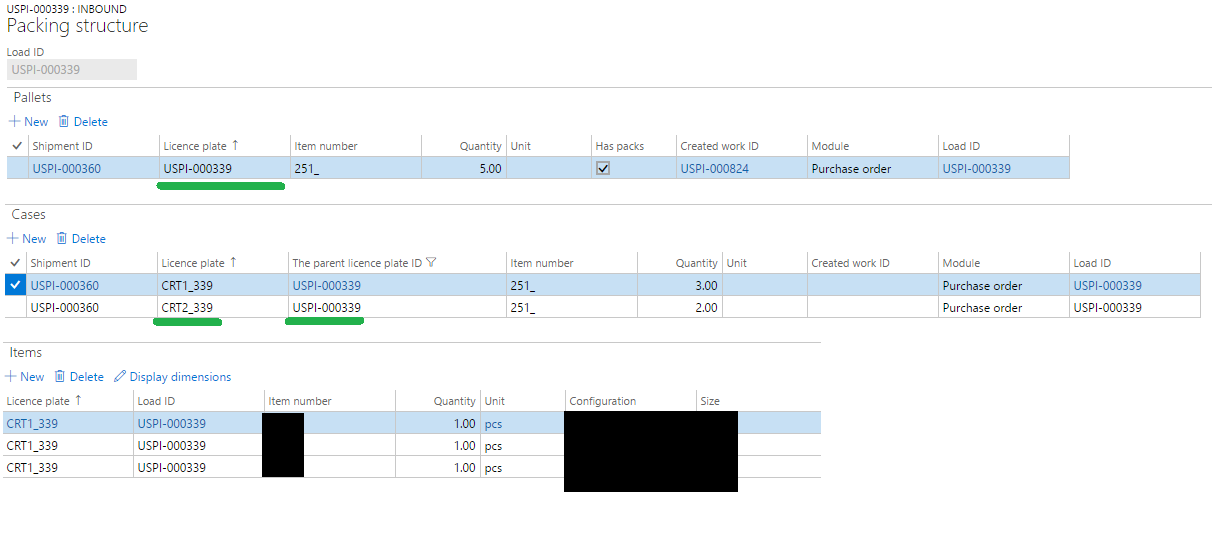
I am using AXs new warehouse and the ASN's to receive items fast. Here I build up a packing structure like this.
ASN.png

You can see that the pallet is the leading license plate. The LP of the cases are childs of the pallet. Only 3 items are shown, because 2 are in the other carton.

When I finish my work now, all 5 items are put on the pallets license plate. Look here:

5758.Work.png

I want to pick them (receive them) on the pallet LP, but I want to put them on the box LP.

Imagine I receive a pallet with 2 boxes on it. Now I want to unpack the pallet und just place the boxes on the receiving area. But I have no idea how to. Can you help?

Best regards

Patrick

*This post is locked for comments

I have the same question (0)
  • Verified answer
    Ivan (Vanya) Kashperuk Profile Picture
    on at

    That is not possible out of the box, the items are always stored in their inventory unit and on the parent LP.

    We have as part of cross docking feature enabled a similar scenario - see if you can get it to work for your case.

    Specifically, I am talking about this:

    5.I believe you are missing the “Pack to Nested License Plate” step in this process.  After performing LP Receiving on the mobile device, all of the quantity will still be under the parent license plate.  You will need to run the “Pack to Nested License Plate” function to move the quantities to the child license plates, before doing anything else with the transfer orders

    community.dynamics.com/.../147327

    community.dynamics.com/.../145678

  • Community Member Profile Picture
    on at

    Ha! It works! Thank you Vanya! :)

    I have to use "Pack to nested" as Menu Item. When I try to do it on template Level in my process, the system says it is not a valid work type. Do have an idea how to integrate this step in my purchase receive? Just hard coded as custom work method?

    Cheers! Patrick

  • Ivan (Vanya) Kashperuk Profile Picture
    on at

    Great to hear, I was about to investigate your original reply on it not working when I saw this one. Can you please mark the above reply as "Answer" then, so others can find it easier?

    As for having it as an automatically executed step - we did not build that in. You can try using a custom step, that should work, I guess. Shouldn't be too difficult, but does require a bit of coding.

  • Community Member Profile Picture
    on at

    Sorry for confusing you with the initial post. For some reason the "license plate" field in Work Details or List Pages is left blank after packing to nested LP. But when I check my On-Hand inventory I can find the items with the new LP. Thats good enough for me.

    I think we have to do the step as custom method. Would be more handy :)

    Once again, thank you. In my small AX WMS-World you are like a Rockstar. I appreciate getting your help! Keep up your awesome work!

Under review

Thank you for your reply! To ensure a great experience for everyone, your content is awaiting approval by our Community Managers. Please check back later.

Helpful resources

Quick Links

Responsible AI policies

As AI tools become more common, we’re introducing a Responsible AI Use…

Neeraj Kumar – Community Spotlight

We are honored to recognize Neeraj Kumar as our Community Spotlight honoree for…

Leaderboard > 🔒一 Microsoft Dynamics AX (Archived)

#1
Martin Dráb Profile Picture

Martin Dráb 4 Most Valuable Professional

#1
Priya_K Profile Picture

Priya_K 4

#3
MyDynamicsNAV Profile Picture

MyDynamicsNAV 2

Last 30 days Overall leaderboard

Featured topics

Product updates

Dynamics 365 release plans



