web
You’re offline. This is a read only version of the page.
close
Skip to main content

Notifications

Announcements

No record found.

Community site session details

Community site session details

Session Id :
Service | Customer Service, Contact Center, Fie...
Answered

Service Task checkbox completion

(0) ShareShare
ReportReport
Posted on by 60

Hello,

in the field service documentation there is a describtion and screenshot showing the app and how to mark tasks as completed. Inside the screenshot it shows that we can mark them as completed with "one click" like a checkbox.

When I open my Field Service Mobile App (newest version) and open a booking it will show me Service Tasks and Services but with an "old" mobile grid.

I can then open the service or service task and mark it as complete but that requires opening the task.

How can I set it to use the checkbox like View?

This is from the documentation:

docs.microsoft.com/.../mobile-power-app-use
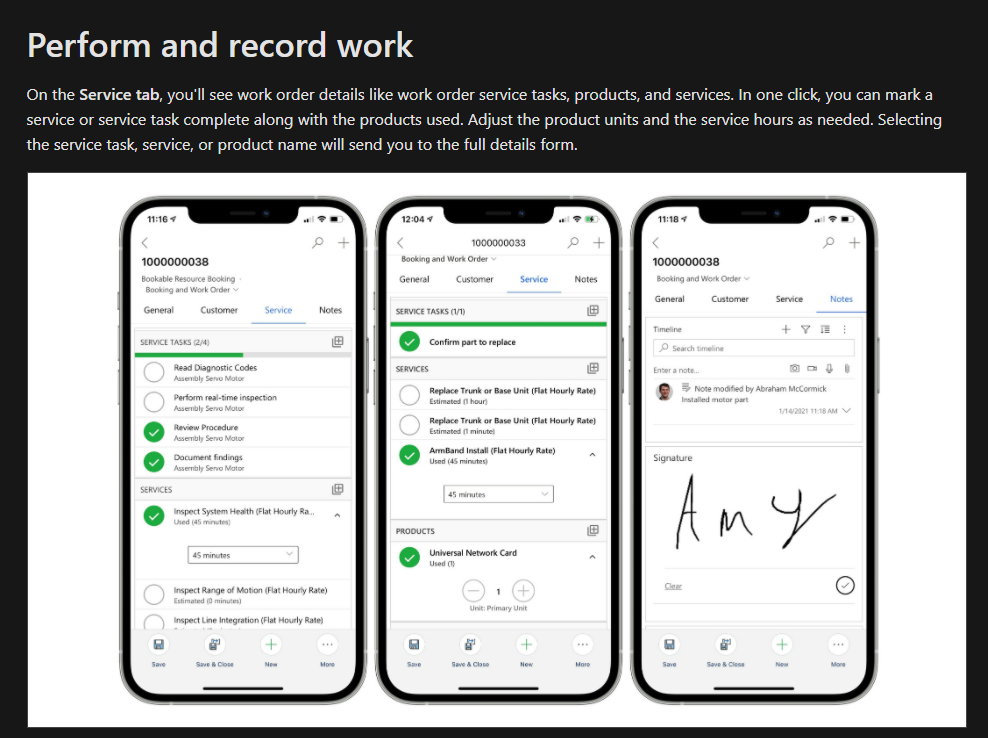
pastedimage1618584727299v1.png

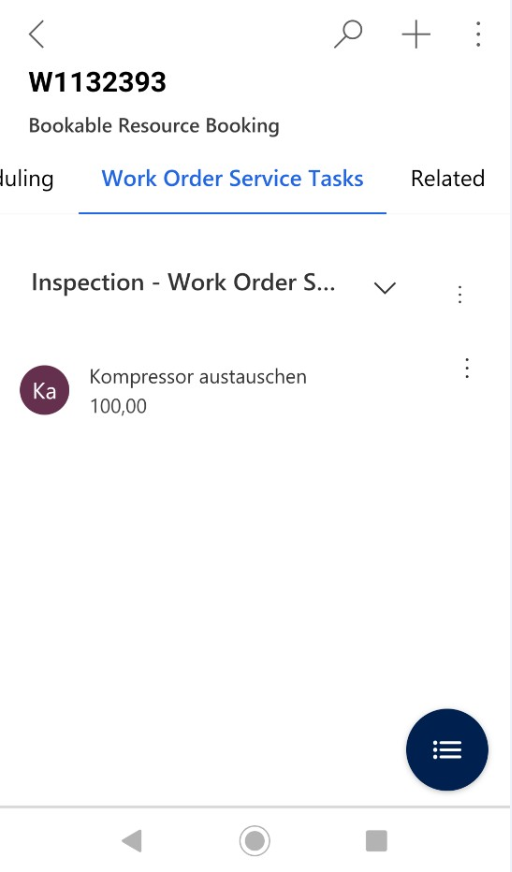
This is my current app screenshot:

pastedimage1618584850372v2.png

I have the same question (0)
  • Suggested answer
    Al Iggs Profile Picture
    on at

    Hi Marcel, you are using the wrong form, it should be the combined "Booking and Work Order" form, not the "BRB" one. Check your FS Mobile app definition and the security role of the mobile user.

  • Marcel Maier Profile Picture
    60 on at

    Hello Herr Heinze,

    good to see you again! 

    I checked the security roles and you are right that they were only visible to the field service roles and not to system administrator.

    I changed that and now I have the correct forms. However they still don't show the service tasks under the service tab.

    That form does not have any subgrid to service tasks or services at all. Is this something that you have to add yourself?

    I tried to add a subgrid on my own but this will still display like the one I already showed.

    pastedimage1618825858127v1.pngpastedimage1618825874668v2.png

  • Thomas David Dayman Profile Picture
    11,323 on at

    There should be a Service section on the 'Booking and Work Order' form.

    Are the PCF Controls enabled in these sections?

  • Verified answer
    Al Iggs Profile Picture
    on at

    For some reason this is still the wrong form. It should look like this:

    pastedimage1618842465431v1.png

    As this is a combined form with BRBs and WOs, can you check that the user also has access to the correct WO forms? Check this: Edit the Field Service (Dynamics 365) mobile app SiteMap, forms, and views | Microsoft Docs

  • Marcel Maier Profile Picture
    60 on at

    Hello again,

    this did the trick. I edited the security role for the Bookable Resource Booking forms but not for the Work Order Forms.

    After editing these security roles as well I can now see the checkboxes in the app.

    Thanks for the help

Under review

Thank you for your reply! To ensure a great experience for everyone, your content is awaiting approval by our Community Managers. Please check back later.

Helpful resources

Quick Links

Responsible AI policies

As AI tools become more common, we’re introducing a Responsible AI Use…

Neeraj Kumar – Community Spotlight

We are honored to recognize Neeraj Kumar as our Community Spotlight honoree for…

Leaderboard > Service | Customer Service, Contact Center, Field Service, Guides

#1
Tom_Gioielli Profile Picture

Tom_Gioielli 45 Super User 2025 Season 2

#2
Daniyal Khaleel Profile Picture

Daniyal Khaleel 27 Most Valuable Professional

#3
Soundari Profile Picture

Soundari 15

Last 30 days Overall leaderboard

Featured topics

Product updates

Dynamics 365 release plans