web
You’re offline. This is a read only version of the page.
close
Skip to main content

Notifications

Announcements

No record found.

Community site session details

Community site session details

Session Id :
Microsoft Dynamics AX (Archived)

When AX2012 (UAT) is launched, a logon error message is displayed "Unable to logon to Microsoft Dynamics AX"

(0) ShareShare
ReportReport
Posted on by

The user's are already given access to UAT, their roles are set and ready to go. Even after all that, the problem still persists. 

(Their roles are "system user" and "vendor (external)"

When ever they try to access UAT, they're prompted with an error message saying " unable to login to Microsoft Dynamics AX"

PS. The user requested for the default entity to set to DAT. 
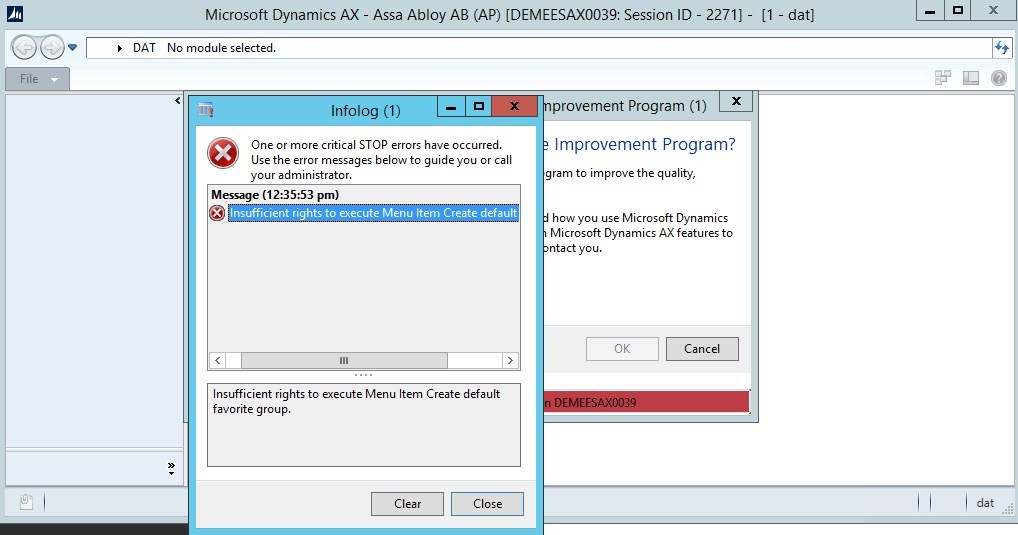
Error-message-_2800_1_2900_.jpg

*This post is locked for comments

I have the same question (0)
  • Ludwig Reinhard Profile Picture
    Microsoft Employee on at

    Hi,

    Do you have all users configured in the system admin module and imported?

    Are those users linked to the employee records in the HR module?

    Is any user able to log on to this environment?

    Would be great if you could clarify.

    Many thanks and best regards,

    Ludwig

  • Community Member Profile Picture
    on at

    Hi Ludwig,

    Thank you very much for your reply.

    1. Do you have all users configured in the system admin module and imported? - As far as I know, yes 

    2. Are those users linked to the employee records in the HR module? - yes 

    3. Is any user able to log on to this environment? - Users can access AX but cannot access UAT 


    Regards.

  • Suggested answer
    André Arnaud de Calavon Profile Picture
    301,146 Super User 2025 Season 2 on at

    Hi 8chkay,

    The vendor (external) role is a role intended to be used with enterprise portal features; not the AX client. Have you tested another role to see if the users will get access then? What options do you expect those users to see?

    Also check if the role assignment is done for which organizations. Did you exclude the 'DAT' company from the system user and vendor (external) roles? Should they have 'DAT' as startup company? This is usually not a company which is used for the daily work. It is a company for global data and shared setup.

  • SSRS REPORT ISSUE Profile Picture
    on at

    Microsoft Dynamic AX-2012 R3 is working on live server with Admin credentials and when user try to login from his local account they are unable to login . Message display "Unable to log on to Microsoft Dynamics AX". Need your support to resolve the issue at earliest thanks.

  • Suggested answer
    Komi Siabi Profile Picture
    13,109 Most Valuable Professional on at

    Hello,

    Have you tried creating a new configuration file for the user to logon ?

Under review

Thank you for your reply! To ensure a great experience for everyone, your content is awaiting approval by our Community Managers. Please check back later.

Helpful resources

Quick Links

Responsible AI policies

As AI tools become more common, we’re introducing a Responsible AI Use…

Neeraj Kumar – Community Spotlight

We are honored to recognize Neeraj Kumar as our Community Spotlight honoree for…

Leaderboard > 🔒一 Microsoft Dynamics AX (Archived)

#1
Martin Dráb Profile Picture

Martin Dráb 4 Most Valuable Professional

#1
Priya_K Profile Picture

Priya_K 4

#3
MyDynamicsNAV Profile Picture

MyDynamicsNAV 2

Last 30 days Overall leaderboard

Featured topics

Product updates

Dynamics 365 release plans
