web
You’re offline. This is a read only version of the page.
close
Skip to main content

Notifications

Announcements

No record found.

Community site session details

Community site session details

Session Id :
Finance | Project Operations, Human Resources, ...
Answered

Error: Invalid relations between Entities

(0) ShareShare
ReportReport
Posted on by 465

I'm creating a composite entity containing these two entites: SalesInvoiceHeaderV2Entity and SalesInvoiceLineV2Entity 

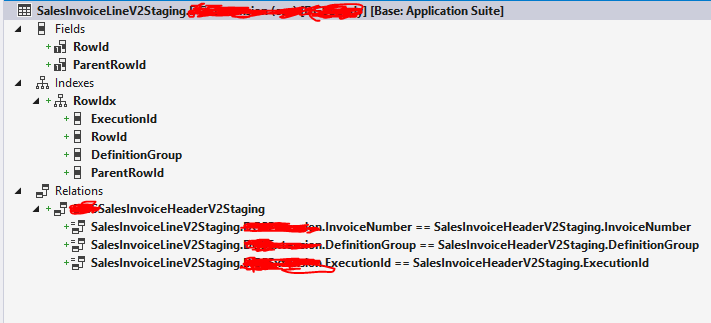
Here is what i amended
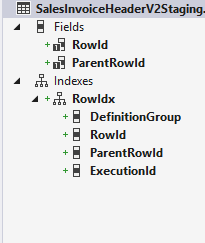
pastedimage1591003962016v1.pngpastedimage1591006999737v1.png

The standard line entity already has a relation with the header, so i left as is 
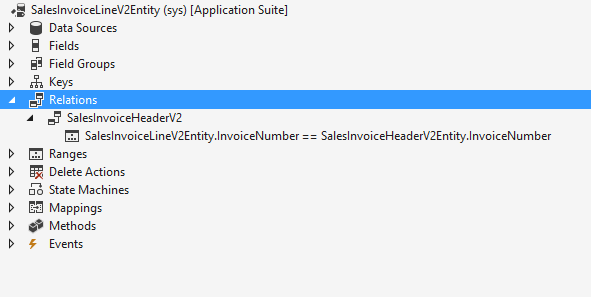
pastedimage1591006373363v4.png

then i created the composite entity with header and lines and i put the standard relation on the line entity in the relation property of the composite entity.

but when i export the project, i get this error: Invalid relations between Entities

I have the same question (0)
  • Sergei Minozhenko Profile Picture
    23,093 on at

    Hi  D365FO user,

    Could you, please, share the properties you set on the relation in the entity?

  • D365FO user Profile Picture
    465 on at

    this is a standard relation, i didn't do anything about it

    pastedimage1591014018214v1.png

    but i know that the custInvoiceTrans has more field relations than the invoice number with custInvoiceJour

  • Sergei Minozhenko Profile Picture
    23,093 on at

    Hi D365FO user,

    And could you share also properties on staging table you created?

  • D365FO user Profile Picture
    465 on at

    i used the standard staging table for SalesInvoiceHeaderV2Staging and SalesInvoiceLineV2Staging.. i mentioned this in the first post

    and here is the relation property i created on the Line staging table

    pastedimage1591089504772v1.png

  • Suggested answer
    Sergei Minozhenko Profile Picture
    23,093 on at

    Hi D365FO_user,

    Could you, please, fill properties similar to relation SalesOrderHeaderV2Staging on table SalesOrderLineV2Staging?

    Build, sync and try export again.

  • D365FO user Profile Picture
    465 on at

    Done i filled the cardinality, related cardinality and RelationShip type ( but without Role and Related Role)

    still same error. could it be because i need to add relation to invoiceId,InvoiceDate,SequenceGroup and SalesId? or maybe i should delete the composite entity i created and create it again, could it be caching issue?

    when i try to delete it from here, i get this error:

    pastedimage1591108593211v1.png

    and this is the error when exporting

    pastedimage1591109065696v1.png

  • Sergei Minozhenko Profile Picture
    23,093 on at

    Hi D365FO_user,

    At least it works fine in my case with relation by InvoiceNumber and I have filled all properties on the relation (including roles). Which version are you using?

  • D365FO user Profile Picture
    465 on at

    I don't think the roles are my problem.. But how to fill these properties? I noticed they are just words? Not a drop down.. So i could fill them with anything or what?

    And what do u mean which version? If u're asking about the entity version then it's V2

  • Sergei Minozhenko Profile Picture
    23,093 on at

    Hi D365FO_user,

    F&O version. There is a similar bug related to composite entity deletion in 10.0.11.

    Also, in my case, I fill roles properties with values.

    Related table role = SalesInvoiceHeaderV2

    role = SalesInvoiceLineV2

    Have you check event log if you can find more details about relation error there?

    Here is a documentation about roles properties docs.microsoft.com/.../hh803130(v=ax.60)

  • D365FO user Profile Picture
    465 on at

    Hi Sergie,

    it is 10.0.11  could this be the reason why my composite is not working and why i'm getting relation error? and how to fix this?

    i also tried deleting it from AOT, built the model and full sync but i still see it in data entities in data management.

    i tried  again with ur role properties, it didn't work.  Where can i find the event log? there is another place for errors other than the errors i showed?

    btw here are my composite properties, dunno if it will help
    pastedimage1591134319517v1.png

Under review

Thank you for your reply! To ensure a great experience for everyone, your content is awaiting approval by our Community Managers. Please check back later.

Helpful resources

Quick Links

Responsible AI policies

As AI tools become more common, we’re introducing a Responsible AI Use…

Neeraj Kumar – Community Spotlight

We are honored to recognize Neeraj Kumar as our Community Spotlight honoree for…

Leaderboard > Finance | Project Operations, Human Resources, AX, GP, SL

#1
André Arnaud de Calavon Profile Picture

André Arnaud de Cal... 467 Super User 2025 Season 2

#2
Martin Dráb Profile Picture

Martin Dráb 420 Most Valuable Professional

#3
BillurSamdancioglu Profile Picture

BillurSamdancioglu 241 Most Valuable Professional

Last 30 days Overall leaderboard

Product updates

Dynamics 365 release plans