web
You’re offline. This is a read only version of the page.
close
Skip to main content

Notifications

Announcements

No record found.

Community site session details

Community site session details

Session Id :
Microsoft Dynamics AX (Archived)

What am I missing in setting up a simple XDS security policy in Dynamics 365 for Operations?

(1) ShareShare
ReportReport
Posted on by 230

We have a requirement to filter some information (e.g. Purchase Orders) visible to certain users by an internal attribute - Depots. A user may have access to multiple depots, so I have created a custom table, UserDepot, which contains fields UserId and Depot, and have populated this via a Data Entity using a Logic Apps. I have checked the contents using the .../Data/UserDepots URL.

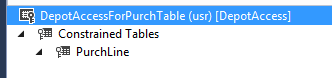
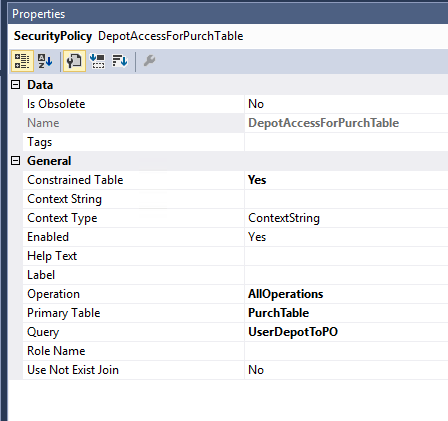
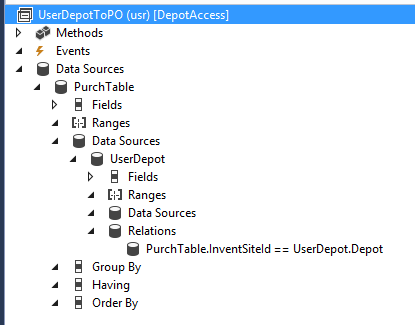
Ignoring for the moment the issues of selecting Depots by Userid (I am thinking of creating a 'temp' table MyDepots in the same way MyLegalEntities and MyDepartments are created at login) and the current requirement that a user with no Depots listed should have access to all Depots, as an initial test I created a query to link PurchTable to UserDepot and then created a Security Policy to apply this query to constrain both PurchTable and PurchLines.

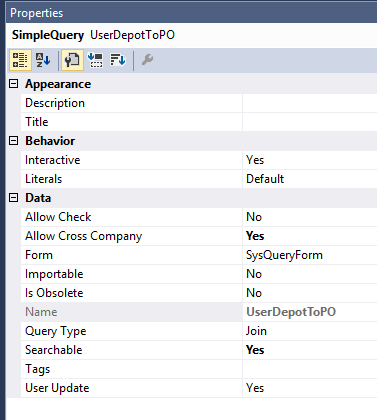
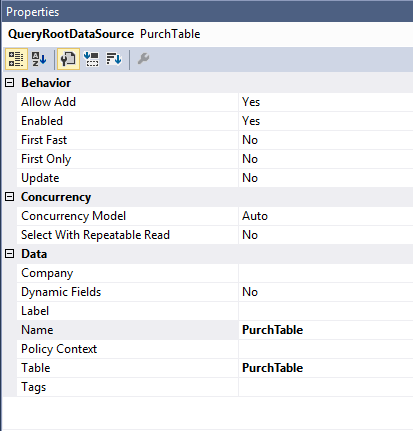
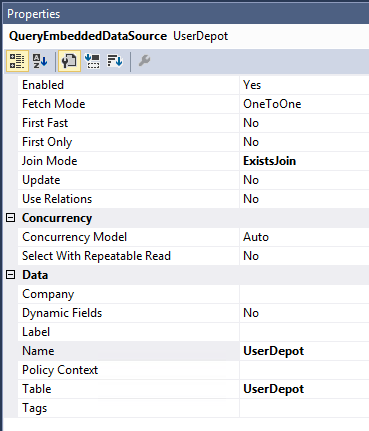
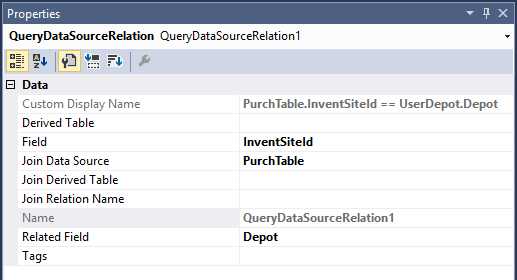
The query looks like this:
5340.Capture1.PNG

8054.Capture2.PNG7416.Capture3.PNG7416.Capture4.PNG1121.Capture5.PNG

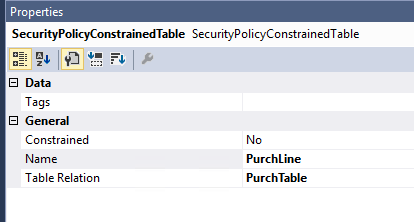
And the security policy is:

4744.Capture6.PNG

3286.Capture7.PNG6811.Capture8.PNG

The DepotAccess model references ApplicationFoundation, ApplicationPlatform and ApplicationSuite.

To test, I'm using the workspace Purchase Order Preparation (mi=PurchOrderMaintainWorkspace) which, I believe uses view PurchOrderApprovedView which is based on table PurchTable and hence, I beleive, should be constrained as a result of the constraint on PurchTable.

The problem is that it doesn't work. With only 1 valid Depot in the UserDepot table a user with limited access (i.e. not System Admin) can still see all Purchase Orders.

I've tried linking the Security Policy to Role SystemUser (change Context Type to RoleName and insert SystyemUser in the Role Name on the security policy properties) and also tried synchronising the database, all to no effect.

Unless I've seriously misunderstood how XDS works, I can't see why this shouldn't work, but can't see what I've failed to configure or where my test doesn't work.

What am I missing?

*This post is locked for comments

I have the same question (0)
  • Suggested answer
    Jonathancm Profile Picture
    416 on at

    The constrained table in your case should be the PurchTable and not the PurchLine - you want to filter the header. The purchLines will be filtered as a consequence of this.

    Also check the constrained table properties, selecting "Yes" in the "ConstrainedTable" property.

  • DD-19021315-0 Profile Picture
    230 on at

    I thought that PurchTable was already constrained by the fact that it's the PrimaryTable and Constrained Table is set to Yes.

    I agree that I've not set  the Constrained Table property on the added entry, but if I change the Constrained Table to:

    4035.Capture2.PNG4035.Capture2.PNG

    I get the error:

    4035.Capture3.PNG

    It's not clear what to put in as a relation of a table to itself!

    I also tried simply removing the additional Constrained Table completely, but the header lines still aren't filtered, so I still don't know what the problem is.

  • Verified answer
    DD-19021315-0 Profile Picture
    230 on at

    After further testing, it seems the policy is working, but not on the Purchase Order Preparation workspace page!

    If I open this in my test user I see...

    4062.Capture4.PNG

    Note that although the list shows 4 approved orders, the count on the Approved tile is 1.

    Clicking on the Approved tile shows:

    2806.Capture2.PNG

    And if I click either on this or the same line from the workspace page, I get:

    1348.Capture3.PNG

    While if I click on any of the other headers on the workspace page I get:

    4062.Capture4.PNG

    Which shows that the policy is blocking the user from seeing the details, but the workspace page itself is bypassing the restriction!

    So I've wasted 2 days chasing the wrong problem! Now I just need to work out what the page is doing to get information which XDS should be restricting!

  • Suggested answer
    André Arnaud de Calavon Profile Picture
    301,075 Super User 2025 Season 2 on at

    Hi Derek,

    The view PurchOrderApprovedView is based on the table PurchTable, but is for XDS a complete different table. You have to also include this view as constrained table in your policy. In your query I don't see a reference to the MyDepots table. Is this something not finished yet?

    You are correct that the PurchTable is constrained on the top level, so adding the same table as contrained node again is not required and even not possible.

  • DD-19021315-0 Profile Picture
    230 on at

    Thanks Andre.

    As you noticed, the MyDepots table doesn't exist yet. I doing baby steps so I can demonstrate the principle to people before writing too much code. As you probably guessed, the current implementation simply restricts all non-admins to viewing the same set of Depots as there's no user link. That the next step.

    Regards

    Derek.

  • DD-19021315-0 Profile Picture
    230 on at

    Unfortunately, trying to put PurchOrderApprovedView as a constrained table with relation either

       PurchOrderApprovedView.RecId == PurchTable.RecId

    or

       PurchTable.RecId == PurchOrderApprovedView.RecId

    gives the error

       Path: [AxSecurityPolicy/DepotAccessForPurchTable/ConstrainedTables/PurchOrderApprovedView/Name]:

           Table 'PurchOrderApprovedView' does not exist.

    The view is in model Application Suite, which I'm already referencing. How do I constrain it?

  • DD-19021315-0 Profile Picture
    230 on at

    Relation "PurchOrderApprovedView.PurchId == PurchTable.PurchId" doesn't work either so it's not that the view doesn't expose RedId.

  • André Arnaud de Calavon Profile Picture
    301,075 Super User 2025 Season 2 on at

    Hi Derek,

    Did you use the option to include a new table based on Constrained Expression like mentioned in your other question?

  • DD-19021315-0 Profile Picture
    230 on at

    No. That fixes the error, but the list still opens without applying the constraint. I've now implemented the MyDepots temp table (and tested it works) so set a breakpoint in the method. This is when it first gets hit.

    3757.Capture.PNG

    As you can see, it's a ready displayed the list. I presume it's using a different view?

  • André Arnaud de Calavon Profile Picture
    301,075 Super User 2025 Season 2 on at

    Hi Derek,

    Indeed, it may be a different view. I assumed you did lookup the correct one. If you right click on the form, you can choose in the pop-up menu Form information > Form name: ..... Then on the slider window open the Administration fast tab for datasource information.

    Or the link may not be recognized correctly

Under review

Thank you for your reply! To ensure a great experience for everyone, your content is awaiting approval by our Community Managers. Please check back later.

Helpful resources

Quick Links

Responsible AI policies

As AI tools become more common, we’re introducing a Responsible AI Use…

Neeraj Kumar – Community Spotlight

We are honored to recognize Neeraj Kumar as our Community Spotlight honoree for…

Leaderboard > 🔒一 Microsoft Dynamics AX (Archived)

#1
Martin Dráb Profile Picture

Martin Dráb 4 Most Valuable Professional

#1
Priya_K Profile Picture

Priya_K 4

#3
MyDynamicsNAV Profile Picture

MyDynamicsNAV 2

Last 30 days Overall leaderboard

Featured topics

Product updates

Dynamics 365 release plans