web
You’re offline. This is a read only version of the page.
close
Skip to main content

Notifications

Announcements

No record found.

Community site session details

Community site session details

Session Id :
Dynamics 365 Community / Forums / Sales forum / How to change the list...
Sales forum

How to change the list of records users can create via the top command bar Plus Sign on model driven apps?

(0) ShareShare
ReportReport
Posted on by

I have Ribbon Workbench, and I've used it to make a few small changes on Form or View button bars, but I can't figure out how to change the very top level options.  We want to force creation of opportunities and some custom entities from the Account Form, where links and rules are enforced.  How do I remove those options from the create dropdown?

0066.Capture.PNG

Categories:
I have the same question (0)
  • Suggested answer
    amb2000 Profile Picture
    1,385 on at

    The area you have indicated in the red circle is the "Quick Create" option. So, if you were to select one of the options in the list, it will pop open a panel on the right-hand side with the words "Quick Create" at the top of the panel. 

    To add additional options to this list, you will need to go to the entity in your solution and make sure "Allow Quick Create" is selected.

    Entity-_2D00_-Allow-Quick-Create.png

  • Community Member Profile Picture
    on at

    Users need to be able to use the Quick Create forms - but only from the Account page, where links and fields can be auto-populated.  I just want to remove some entities from this main command bar.  

  • LuHao Profile Picture
    40,892 on at

    Hi Msolomon,

    If I misunderstand your needs, please correct me.

    1. You want to use the quick creation feature directly in the Account form and automatically populate some fields in the quick create form.
    2. Also, there are unwanted entities in the current Quick Create list, and you want to delete those entities in the Quick Create list.

    Is your demand these two points?

    1, If you want to quickly create other related entity records within the Account form, I recommend you use the sub-grid for quick creation.

    The steps to add a subgrid are as follows:

    Go to the Account form of the web client and click the FORM button on the command bar to enter the form editor.
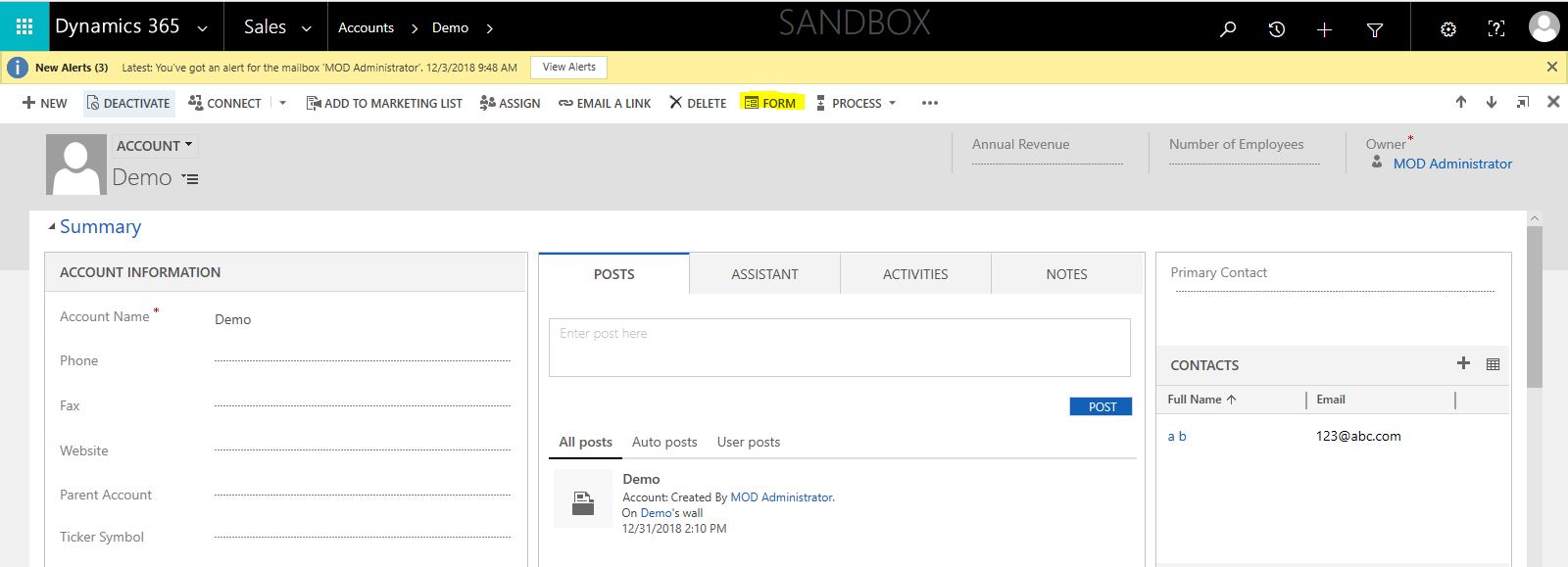
    1854.4.PNG

    Click the Sub-Grid button under the INSERT tab of the form editor. Enter Name in the Set Properties window, select the Entity you want, and click OK. Don't forget to save and publish.

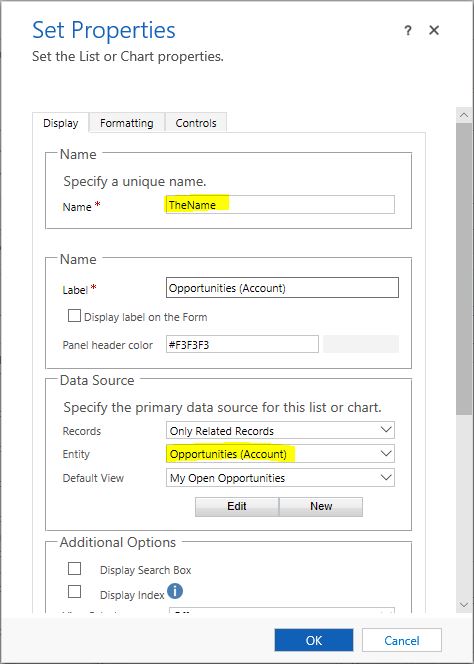
    3007.2.JPG    8322.3.JPG

    The effect is as follows:

    When I click "···" in the sub-grid on the unified interface, and then click the Add New Opportunity button, the quick create form will pop up, and the Account field will automatically fill the current Account.

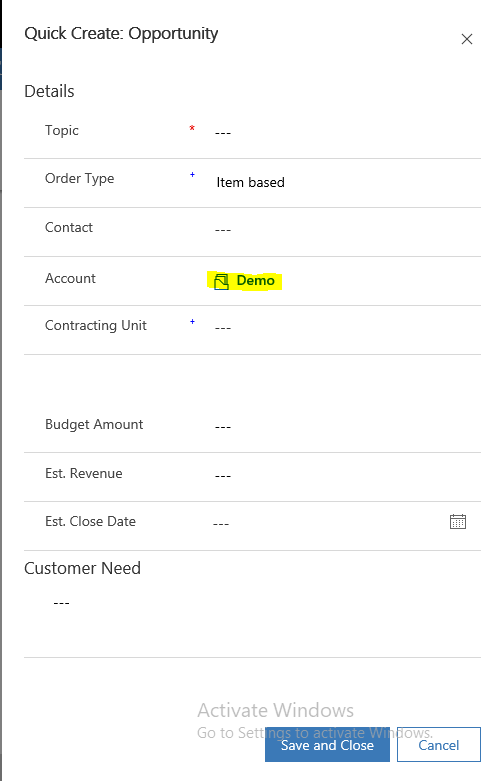
    1854.4.PNG    3021.5.PNG

    2, If you use the method in the first point, then you only need to create the sub-grid of the required entity in the Account form, and don't create sub-grids of other entities you don't need. This will meet your second needs.

    If you still want to delete unwanted entities in the quick create list, then please refer to the previous reply. Uncheck Allow quick create.

    Hope this helps.

    Best Regards,

    Lu Hao

  • Alex Fun Wei Jie Profile Picture
    33,628 on at

    Hi,

    Since you are using UCI. You need open app designer

    select the entity, after that form, uncheck the quick create form, save and publish.

    7587.6.PNG

    but in the end you still see the quick create form. I dont know whether this is a bug or what. (at least in my instance). I removed the whole entity , that it is working.

  • Community Member Profile Picture
    on at

    I can't remove the entity or even the form from the solution - I need them.  I just don't want them to appear on that menu dropdown.

  • Suggested answer
    Alex Fun Wei Jie Profile Picture
    33,628 on at

    Hi,

    this is why I mentioned that I dont know whether this is a bug or standard behaviour of UCI.  I would suggest you to contact Microsoft after you tested in your environment.

  • Suggested answer
    LuHao Profile Picture
    40,892 on at

    Hi Msolomon,

    You need to do two steps:

    1. Go to Settings > Customizations > Customize the System. Go to the entity you don't want to appear in the list, uncheck the Allow quick create button.

    0361.7.JPG        0815.2.PNG

    2. Go to Settings > My Apps, click "···" of the Unified Interface APP, then click the OPEN IN APP DESIGNER button.

    3808.4.JPG        6471.5.JPG

    Click on the Forms button of the entity you don't want to display in the list, uncheck the All button on the right, and check the other forms except the last Quick Create Forms.

    3731.6.JPG        0361.7.JPG

    The effect is as follows:

    The Account entity is not in the list.

    7318.1.PNG

    This is feasible in my environment. So you need to test in your environment. If this is not possible, you will need to raise a Microsoft support ticket.

    Hope this helps.

    Best Regards,

    Lu Hao

  • Community Member Profile Picture
    on at

    Users need to be able to use the Quick Create forms (so I can't turn off "Allow Quick Create" - but we want it only from the Account page, where links and fields can be auto-populated (already built using the sub-grid, thanks anyway).  I just want to remove some entities from this main command bar, because if the record is created from there, the fields can't auto-populate.  

  • Suggested answer
    Alex Fun Wei Jie Profile Picture
    33,628 on at

    Hi,

    I am afraid there is nothing you can do . I will recommend you build a workflow or plugin to sync the data if user create from homepage quick create.

Under review

Thank you for your reply! To ensure a great experience for everyone, your content is awaiting approval by our Community Managers. Please check back later.

Helpful resources

Quick Links

November Spotlight Star - Khushbu Rajvi

Congratulations to a top community star!

Forum Structure Changes Coming on 11/8!

In our never-ending quest to help the Dynamics 365 Community members get answers faster …

Dynamics 365 Community Platform update – Oct 28

Welcome to the next edition of the Community Platform Update. This is a status …

Leaderboard > Sales

Last 30 days Overall leaderboard

Featured topics

Product updates

Dynamics 365 release plans



