web
You’re offline. This is a read only version of the page.
close
Skip to main content

Notifications

Announcements

No record found.

Community site session details

Community site session details

Session Id :
Customer experience | Sales, Customer Insights,...
Answered

Version Number Field

(1) ShareShare
ReportReport
Posted on by 416

I want to add a field that contains the version number - every time something/specific records are changed, the version number is incremented. I am aware that there is an OOTB system field called Version Number (versionnumber with a data type of time stamp), however it is not being displayed on the form editor. Is there a way to add this field? 

Alternatively, I would like to display a field (possibly a custom field?) that will increment every time a user revises/makes changes to a record. Is there any work around/solution to this?

Thank you. 

I have the same question (0)
  • Suggested answer
    Nya Profile Picture
    29,060 on at

    Hi,

    You can refer to the following documentation to add the field into your forms.

    Add a column to a model-driven app form in Power Apps - Power Apps | Microsoft Docs


    It works with both OOTB fields and custom fields.


    If this helped you, I'd appreciate it if you'd mark this as a Verified Answer, which may in turn help others as well.

    Best Regards,

    Nya

  • urklnme Profile Picture
    439 on at

    WHERE WOULD ONE FIND THE VERSION NUMBER?  

    Adding a column to a table is not the question. I have customized many things in powerapps. 

    Where does powerapps keep the version number?  Can I access it or is it restricted?

  • fran2105 Profile Picture
    416 on at

    Thank you @Nya for your answer. Unfortunately, this is not what I was looking for.

    My question is:

    I would like to display a field (possibly a custom field?) that will increment every time a user revises/makes changes to a record. Is there any work around/solution to this?

  • fran2105 Profile Picture
    416 on at

    @urklnme You should find the field on the Solution. However, it is not displayed as an available field on the form editor.

  • Verified answer
    Nya Profile Picture
    29,060 on at

    Hi,

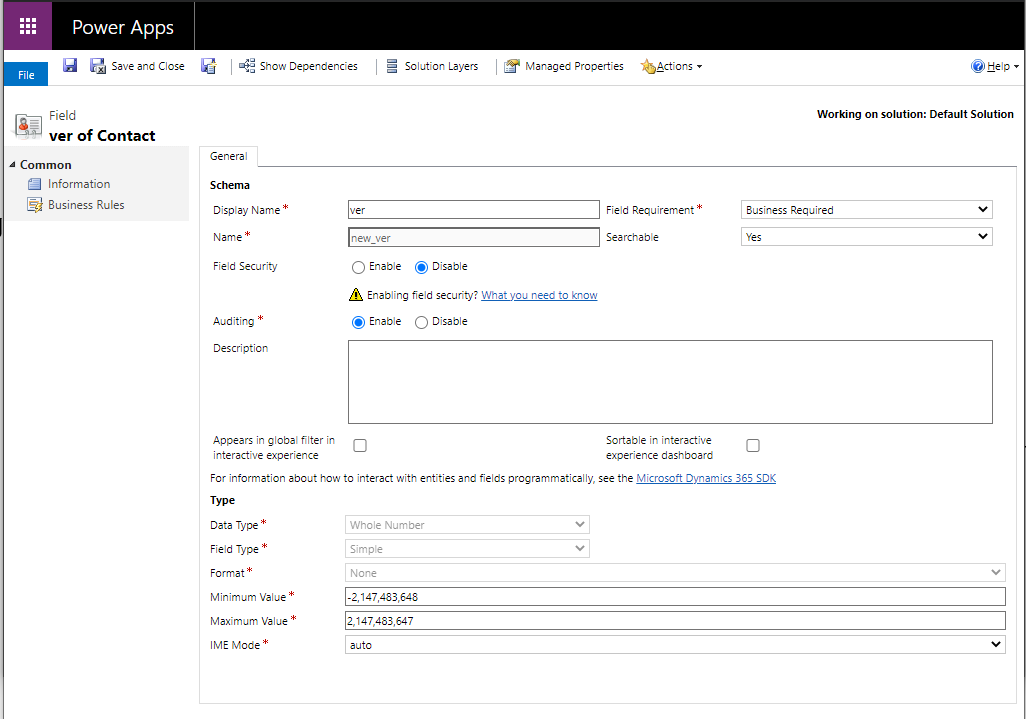
    I tried to create a field called “ver”, whose data type is Whole Number. It is a required field.
     pastedimage1618563883925v1.png

    My idea is to create Flow via Automate to add 1 to this field every time a record is updated.

    However, as this field itself is cumulative is also a type of update, it will also trigger this flow and the value of this field will keep getting bigger.


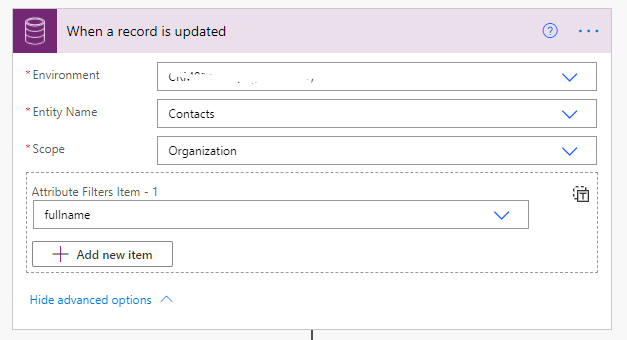
    At the moment I can only do this by adding a field update condition to the flow's trigger, e.g. the flow is only triggered when the fullname is updated.
     pastedimage1618563893727v2.png

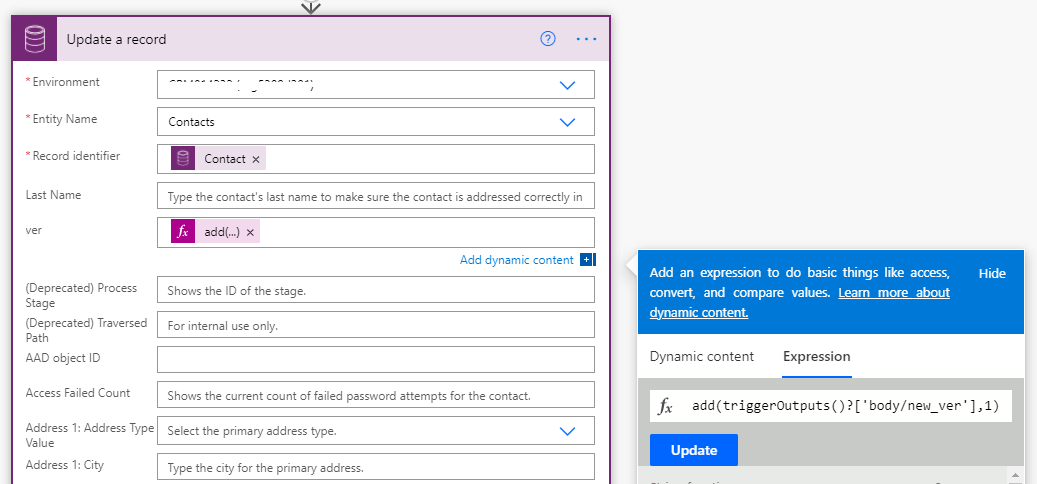
    Then add 1 to the ver field for each update.
     pastedimage1618563900514v3.png

    This can be cumbersome for entities with a large number of fields, requiring a list of all the fields to be statistically updated.

    However, since the Version Number that comes with the system cannot be added directly in the Form, nor can it participate in Calculate or Process assignment, this is the best solution that I can think of at the moment.


    If this helped you, I'd appreciate it if you'd mark this as a Verified Answer, which may in turn help others as well.

    Best Regards,

    Nya

  • urklnme Profile Picture
    439 on at

    Curious to know if an environment variable would be a good idea in this effort?  I haven't used one to this point.

    Thoughts, concerns?

Under review

Thank you for your reply! To ensure a great experience for everyone, your content is awaiting approval by our Community Managers. Please check back later.

Helpful resources

Quick Links

Responsible AI policies

As AI tools become more common, we’re introducing a Responsible AI Use…

Neeraj Kumar – Community Spotlight

We are honored to recognize Neeraj Kumar as our Community Spotlight honoree for…

Leaderboard > Customer experience | Sales, Customer Insights, CRM

#1
Tom_Gioielli Profile Picture

Tom_Gioielli 170 Super User 2025 Season 2

#2
#ManoVerse Profile Picture

#ManoVerse 61

#3
Gerardo Rentería García Profile Picture

Gerardo Rentería Ga... 52 Most Valuable Professional

Last 30 days Overall leaderboard

Product updates

Dynamics 365 release plans



