web
You’re offline. This is a read only version of the page.
close
Skip to main content

Notifications

Announcements

No record found.

Community site session details

Community site session details

Session Id :
Customer experience | Sales, Customer Insights,...
Answered

Revising another owner's quote. What permissions?

(0) ShareShare
ReportReport
Posted on by 129

Does anybody know what permissions a user's security role needs to have to allow somebody to revise a quote that is in someone else's name?

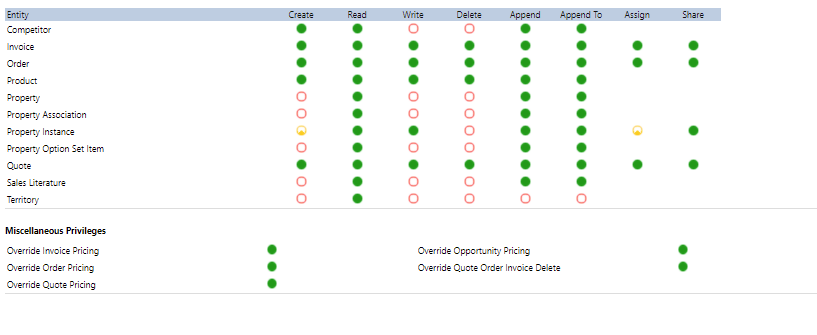
Obviously at System Administrator level, it's no issue but I need to allow a user the ability to do this.  I've given organisation level privileges across the board for Quote, Order, Invoice and Account but still the user is unable to revise a quote unless it is owned by them or their team. 7
pastedimage1612879463921v1.png

Does anybody know how I would do this?

I have the same question (0)
  • Suggested answer
    meelamri Profile Picture
    13,216 User Group Leader on at

    What about the opportunity entity ?

    Question: Users are able to see the button ? If yes, what is the error message ?

  • AI123456789 Profile Picture
    129 on at

    Yes, I've given organisation level permissions across the board for opportunity too.

    Users can see the button, they just get a permissions error when they click it (if the record is owned by somebody else)

    pastedimage1612881517369v1.png

  • meelamri Profile Picture
    13,216 User Group Leader on at

    Can you download the log file when you get the error and share it please ?

  • AI123456789 Profile Picture
    129 on at

    Sure, here it is:

    Exception Message: You do not have enough privileges to access the Microsoft Dynamics 365 object or perform the requested operation. For more information, contact your Microsoft Dynamics 365 administrator.

    ErrorCode: -2147187962

    HexErrorCode: 0x80048306

    Error Details: {"ActivityId":"","errorCode":2147779334,"message":"You do not have enough privileges to access the Microsoft Dynamics 365 object or perform the requested operation. For more information, contact your Microsoft Dynamics 365 administrator.","stacktrace":"","Timestamp":1612881343568}

    Activity Id: 1ebaac2f-916a-4741-9256-a9de567ff906

  • Verified answer
    meelamri Profile Picture
    13,216 User Group Leader on at

    Unfortunately, we cannot decide on the privilege that is missing from this error log.  You need to open your console, click F12 and perform your action "Revise". you will get something like the image below: 

    pastedimage1612884054243v1.png

    Do the same and share your Error 

  • AI123456789 Profile Picture
    129 on at

    Thank you, that was a big help.  It turns out that I needed to give permission for the activity entity.

    All working now

  • meelamri Profile Picture
    13,216 User Group Leader on at

    You are welcome !

  • Suggested answer
    Vin.k.S Profile Picture
    95 on at

    You will need a BU Level CREATE privilege on the Activity Entity in order to revise an Active Quote.

    Once you click Revise the UI will make 3 different request to the server.

    1. RetrieveDefaultStatusForState
    2. CloseQuote
    3. ReviseQuote


    You are receiving this error on the 2nd request, in order to Close an Active Quote the System will make a request like 

    //closeQuote
    Entity quoteClose = new Entity("quoteclose");
    quoteClose["quoteid"] = new EntityReference("quote", quote.Id);
    quoteClose["subject"] = "Quote Close (Revised)";
    
    //then
    CloseQuoteRequest request = new CloseQuoteRequest()
    {
        QuoteClose = quoteClose,
        Status = new OptionSetValue(7)//Revise
    };

    That will create Close Quote Activity, and it seems the calling user cannot create it due to missing privilege. This won't work even with the out of box SalesPerson role. So i can conclude this as an issue with Platform only as i never encountered in CRM 2015

Under review

Thank you for your reply! To ensure a great experience for everyone, your content is awaiting approval by our Community Managers. Please check back later.

Helpful resources

Quick Links

Responsible AI policies

As AI tools become more common, we’re introducing a Responsible AI Use…

Neeraj Kumar – Community Spotlight

We are honored to recognize Neeraj Kumar as our Community Spotlight honoree for…

Leaderboard > Customer experience | Sales, Customer Insights, CRM

#1
Tom_Gioielli Profile Picture

Tom_Gioielli 137 Super User 2025 Season 2

#2
#ManoVerse Profile Picture

#ManoVerse 57

#3
Jimmy Passeti Profile Picture

Jimmy Passeti 50 Most Valuable Professional

Last 30 days Overall leaderboard

Product updates

Dynamics 365 release plans
