web
You’re offline. This is a read only version of the page.
close
Skip to main content

Notifications

Announcements

No record found.

Community site session details

Community site session details

Session Id :
Customer experience | Sales, Customer Insights,...
Suggested Answer

Workflow for FormatDateTime - How to use it (Ultimate Workflow Tookit)

(0) ShareShare
ReportReport
Posted on by 104

Hi guys,

in one of our scenarios, I want to take only the year of a given date (say 2020), and then set another date to the 31st of December of the mentioned year (so, 31-12-2020). For this, I want ti use formatdatetime () function as described for PowerAutomate here , but using a Workflow instead of a Flow. So in PowerAutomate, the function would be something like this:

formatDateTime([timedatefield],’31.12.yyyy’)

I found a promising Workflow from the Ultimate Workflow Toolkit for this issue


pastedimage1615381552123v1.png

Unfortunately, it does not seem to work. Here is what I did:

- I added a workflow step usinh the UWT Toolkit 

pastedimage1615382300688v3.png

- Then I filled in the workflow form with the needed information:
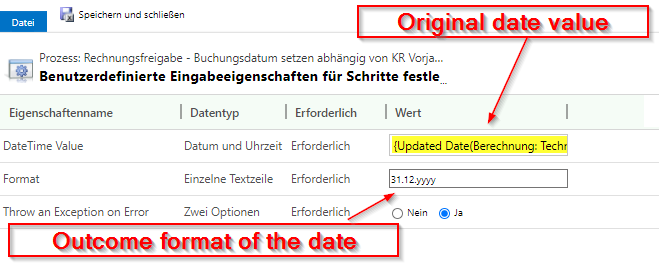
pastedimage1615382180556v2.png

- Now, I want to use the result of the UWT workflow in a "update record" workflow step. 

But when I look for local values in the formlar assistant, I can find my UWT workflow step "Cut date to 31.12.yyyy", but there is nothing I can select. 
pastedimage1615382816066v5.png

Am I missing something? Does anybody know how to use "FormatDateTime" in a workflow?

BR

Flo

I have the same question (0)
  • Suggested answer
    a33ik Profile Picture
    84,331 Most Valuable Professional on at

    Hello,

    I'm the author of the UWT. Just heads up - the project has its own GitHub over here - github.com/.../issues and you have higher chances to attract my attention creating the issue over there.

    The explanation why it doesn't work is simple enough - FormatDateTime step, as a result, produces a string, not DateTime and that is why you can use that value to populate the other DateTime field. Also, I don't have the step that parses a string to DateTime.

    As a potential workaround you can use the other Custom Workflow Steps toolkit - github.com/.../CRM-DateTime-Workflow-Utilities - it contains "ToDateTime" step that can give you what you need.

  • Florian S. Profile Picture
    104 on at

    Thanks Andrew, I put it on your site: github.com/.../43

Under review

Thank you for your reply! To ensure a great experience for everyone, your content is awaiting approval by our Community Managers. Please check back later.

Helpful resources

Quick Links

Responsible AI policies

As AI tools become more common, we’re introducing a Responsible AI Use…

Neeraj Kumar – Community Spotlight

We are honored to recognize Neeraj Kumar as our Community Spotlight honoree for…

Leaderboard > Customer experience | Sales, Customer Insights, CRM

#1
Tom_Gioielli Profile Picture

Tom_Gioielli 83 Super User 2025 Season 2

#2
Gerardo Rentería García Profile Picture

Gerardo Rentería Ga... 49 Most Valuable Professional

#3
#ManoVerse Profile Picture

#ManoVerse 40

Last 30 days Overall leaderboard

Product updates

Dynamics 365 release plans
