web
You’re offline. This is a read only version of the page.
close
Skip to main content

Notifications

Announcements

No record found.

Community site session details

Community site session details

Session Id :
Microsoft Dynamics AX (Archived)

Not Able to Post Open statements

(0) ShareShare
ReportReport
Posted on by

Dear All,

My Client is Using AX2012 R3.

He is getting error on Posting of Open Statement.
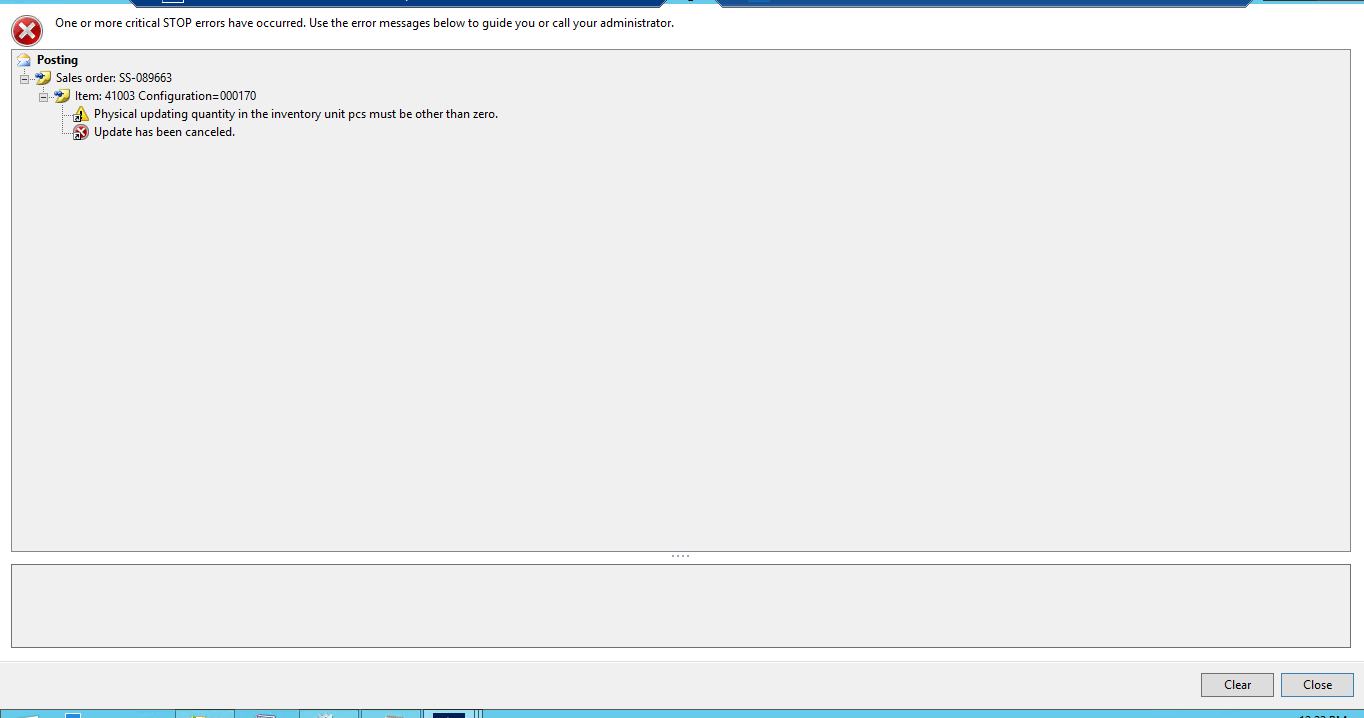
0045.Screenshot_5F00_1.png

When I Try to check Sales Order, but there is no such Sales Order.

Please guide me 

waiting for your vaulable reply.

regards

Amol Bhad

*This post is locked for comments

I have the same question (0)
  • Suggested answer
    Mea_ Profile Picture
    60,284 on at

    Hi AMOL BHAD,

    You need to check unit conversion for this item, probably there is an error there so during conversion from sales unit to inventory unit (pcs) it get rounded to 0.

  • Community Member Profile Picture
    on at

    hi ievgen Miroshnikov

    i checked in the system, In Sales Unit and Invnetory Units both are same (i.e. pcs).

    kindly suggest.

    regards

    Amol bhad

  • Suggested answer
    Mea_ Profile Picture
    60,284 on at

    Also it could be a bug, there are several hotfixes vailable for this error

    fix.lcs.dynamics.com/.../Resolved

    fix.lcs.dynamics.com/.../Resolved

  • Community Member Profile Picture
    on at

    Hi Amol

    You will not find the sales order on all sales order form because it is committed SO number it will be differ every time when you try to post the retail statement.

    You are getting this error due to conversion factor from XX unit to XX unit had to many decimals thus creating a false impression that the Physical remaining was something other then zero. Please check purchase unit of this item and unit conversions.

  • Community Member Profile Picture
    on at

    I install hotfixes but still no luck.

    regards

    Amol Bhad

  • Community Member Profile Picture
    on at

    hi pranav,

    for this Item Sales Unit, Invnetory Unit and Sales Unit are same i.e. pcs.

    this product have only one UOM i.e. pcs.

    Kindly suggest.

    Regards

    Amol Bhad

  • adam260 Profile Picture
    1,871 on at

    I have ran into this a couple times and it is usually because the values in RetailTransactionSalesTrans did not get populated correctly and you need to manually go in and fix the values. Usually when this happens to me it is because an incorrect inventdimid was populated in this table for the transaction.

    I would start by doing a transaction in the back office against the same item and complete the sales order. check out the inventdimid on the saleline and compare to inventdimid on RetailTransactionSalesTrans. Make sure your qty fields are correct on the retail sales trans table too.

    It is good to note that a sale in the back office may have a different inventdim than the pos because of where it is shipping from. You may need to take a look at the inventdim table and determine manually which inventdimid it should have

  • Community Member Profile Picture
    on at

    hi Adam Chronister

    I follow the steps as you mention. but still no luck.

    please help me in error.

    regards

    Amol Bhad

  • Verified answer
    adam260 Profile Picture
    1,871 on at

    At this point you need to debug your code to see if it is pulling in the correct inventory and everything on the transaction is associated correctly. If at any point you have sold this item before and it posted it might be a good idea to compare the sales transaction records to see if there is any difference.

Under review

Thank you for your reply! To ensure a great experience for everyone, your content is awaiting approval by our Community Managers. Please check back later.

Helpful resources

Quick Links

Responsible AI policies

As AI tools become more common, we’re introducing a Responsible AI Use…

Neeraj Kumar – Community Spotlight

We are honored to recognize Neeraj Kumar as our Community Spotlight honoree for…

Leaderboard > 🔒一 Microsoft Dynamics AX (Archived)

#1
Martin Dráb Profile Picture

Martin Dráb 4 Most Valuable Professional

#1
Priya_K Profile Picture

Priya_K 4

#3
MyDynamicsNAV Profile Picture

MyDynamicsNAV 2

Last 30 days Overall leaderboard

Featured topics

Product updates

Dynamics 365 release plans



