web
You’re offline. This is a read only version of the page.
close
Skip to main content

Announcements

No record found.

News and Announcements icon
Community site session details

Community site session details

Session Id :
Customer experience | Sales, Customer Insights,...
Suggested Answer

Calling External WCF Service getting exception there was no endpoint listening at https://xyz??

(1) ShareShare
ReportReport
Posted on by 80

Hello Experts,

I am calling a (using generated client) from (CRM 365 OnPrimise) plugin registered on isolation mode NONE.

Getting the following exception:-
There was no endpoint listening at xyzdomain.domain.com:8443/WebITL.svc that could accept the message.
This is often caused by an incorrect address or SOAP action. See InnerException, if present, for more details.
Inner Exception - Unable to connect to the remote server

My WCF Service web.confg is:


Plugin Code Calling : 

var myClient = GetTALClient(EndPoint);
GetCustomerDetailsRequest request =  new GetCustomerDetailsRequest();
request.enroll = "ABC123333";

myClient.Open();
GetCustomerDetailsResponse response= myClient.GetCustomerDetails(request);
myClient.Close();

private WebTALClient GetTALClient(string EndPoint)
            {
                BasicHttpBinding myBinding;
                if (EndPoint.ToLower().Contains("https://"))
                {
                    myBinding = new BasicHttpBinding(System.ServiceModel.BasicHttpSecurityMode.Transport);
                    ServicePointManager.ServerCertificateValidationCallback  = (sendr, cert, chain, sslPolicyErrors) => true;
                    myBinding.Security.Mode = BasicHttpSecurityMode.Transport;
                    
                }
                else
                {
                    myBinding = new BasicHttpBinding();                
                    myBinding.Security.Mode = BasicHttpSecurityMode.None;
                }

                myBinding.Name = "basicHttpBinding";
                myBinding.MaxReceivedMessageSize = int.MaxValue;
                ServicePointManager.SecurityProtocol = SecurityProtocolType.Tls12;
                myBinding.Security.Transport.ClientCredentialType = HttpClientCredentialType.None;
                myBinding.Security.Transport.ProxyCredentialType = HttpProxyCredentialType.None;
                myBinding.Security.Message.ClientCredentialType = BasicHttpMessageCredentialType.UserName;
                var endPointAddress = new EndpointAddress(EndPoint);
                var myClient = new WebTALClient(myBinding, endPointAddress);

                return myClient;
            }

Binding is :
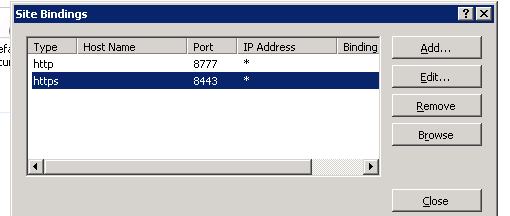
 pastedimage1583754911090v1.png

I have tried a lot to fix it but maybe something I am unable to figure out, it works fine in the development environment but not on SIT/UAT environment. 

Please suggest what am I missing here ??

Thanks

I have the same question (0)
  • saurabhtiwarii Profile Picture
    Microsoft Employee on at

    Hello Shubh,

    Thanks for reaching Dynamics community forum. I am not sure if this small detail which could have been overlooked and could be invoking this issue as the exception is very clear which is "There was no endpoint listening at xyzdomain.domain.com:9443/WebITL.svc that could accept the message."

    The bindings used within the code ::

    <serviceMetadata httpGetEnabled="true" httpsGetEnabled="true"
    httpsGetUrl="https://xyzdomain.domain.com:9443/WebITL.svc" />

    Whereas the bindings configured for the listening endpoint appears to be ::

    pastedimage1583990284701v1.png

    Please configure the bindings accordingly. I would also recommend using a single binding in case it is not being used for hosting any other web service endpoint.

    Please mark my answer as verified if this helps. :-)

    Thanks,

    Saurabh

  • Shubh_K Profile Picture
    80 on at

    Thanks, Saurabh for replying, please ignore that. 

  • Suggested answer
    saurabhtiwarii Profile Picture
    Microsoft Employee on at

    Hey Shubh,

    Let me know if this has been resolved or you are still seeing the above exception post ensuring the binding configurations were accurate.

    Please mark my comments as answered if it helped.

Under review

Thank you for your reply! To ensure a great experience for everyone, your content is awaiting approval by our Community Managers. Please check back later.

Helpful resources

Quick Links

Introducing the 2026 Season 1 community Super Users

Congratulations to our 2026 Super Stars!

Meet the Microsoft Dynamics 365 Contact Center Champions

We are thrilled to have these Champions in our Community!

Congratulations to the April Top 10 Community Leaders

These are the community rock stars!

Leaderboard > Customer experience | Sales, Customer Insights, CRM

#1
ManoVerse Profile Picture

ManoVerse 73 Super User 2026 Season 1

#2
Muhammad Shahzad Shafique Profile Picture

Muhammad Shahzad Sh... 69 Most Valuable Professional

#3
11manish Profile Picture

11manish 50

Last 30 days Overall leaderboard

Product updates

Dynamics 365 release plans
