web
You’re offline. This is a read only version of the page.
close
Skip to main content

Notifications

Announcements

No record found.

Community site session details

Community site session details

Session Id :
Microsoft Dynamics AX (Archived)

AX2012 R3 CU13 Analysis service component installation for default cube deployment

(0) ShareShare
ReportReport
Posted on by 3,475

Hello,

i'm trying to install Analysis service component. I want to deploy the default cubes.

I installed the component, i got the message as successfully installed.

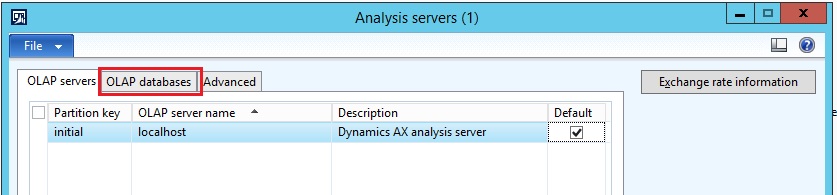
but when i goto Analysis server under system administration , there are not server or database.

so when i try to install i get analysis server not present issue.
3414.1.jpg

Any suggestions are welcome, f1

*This post is locked for comments

I have the same question (0)
  • Guy Terry Profile Picture
    28,924 Moderator on at

    Per point 6. here, add the OLAP server yourself (by pressing Ctrl + N).

    technet.microsoft.com/.../dd309683.aspx

    Looks like the OLAP database will be added for you.

  • NaveenKumar S Profile Picture
    3,475 on at

    Hello Guy,

    thanks for the response.

    I added the olap server manually, do i need to add OlapDB? if yes, then how do i do it? bcoz ctrl + n is not working

    12641.2.jpg

    If i proceed without entering the OLAP db, and try to deploy the cube i get the below error

    12641.2.jpg

  • Guy Terry Profile Picture
    28,924 Moderator on at

    Does DEVAXSRV04 have SQL Server with the Analysis services component installed on it?

  • Suggested answer
    Mahmoud Hakim Profile Picture
    17,887 on at

    You can follow this steps

    www.google.ae/.../amp

  • NaveenKumar S Profile Picture
    3,475 on at

    Hello Guy,

    Yes Analysis services is installed

  • NaveenKumar S Profile Picture
    3,475 on at

    Hello Mahmoud,

    I tried your steps, i'm getting the below error when i click on 'Next' on the SQL Server Analysis Services Project wizard. Any other solution you could help me with?

    31327.2.jpg

  • NaveenKumar S Profile Picture
    3,475 on at

    Hello All,

    When i checked the event viewer, i can see the below error for the analysis serverdb, can anybody give me the clarity on this, how do i resolve this

    3005.3.jpg

  • NaveenKumar S Profile Picture
    3,475 on at

    Hello, 

    I had one doubt, while installing the analysis service in SQL, I selected Multidimensional instead of table, is this the reason for this error?

  • Guy Terry Profile Picture
    28,924 Moderator on at

    No, I don't think so. Per the System requirements document, SSAS must be in Multidimensional mode.

    www.microsoft.com/.../details.aspx

  • NaveenKumar S Profile Picture
    3,475 on at

    Then what could be the issue? Any suggestions

Under review

Thank you for your reply! To ensure a great experience for everyone, your content is awaiting approval by our Community Managers. Please check back later.

Helpful resources

Quick Links

Responsible AI policies

As AI tools become more common, we’re introducing a Responsible AI Use…

Neeraj Kumar – Community Spotlight

We are honored to recognize Neeraj Kumar as our Community Spotlight honoree for…

Leaderboard > 🔒一 Microsoft Dynamics AX (Archived)

#1
Priya_K Profile Picture

Priya_K 4

#1
Martin Dráb Profile Picture

Martin Dráb 4 Most Valuable Professional

#3
Ali Zaidi Profile Picture

Ali Zaidi 2

Last 30 days Overall leaderboard

Featured topics

Product updates

Dynamics 365 release plans



