web
You’re offline. This is a read only version of the page.
close
Skip to main content

Notifications

Announcements

No record found.

Community site session details

Community site session details

Session Id :
Microsoft Dynamics AX (Archived)

Set Offset Account for Journal Movement

(0) ShareShare
ReportReport
Posted on by

Hi all,

I am actually creating a new Journal movement, in which I need to add 'journal lines', as shown below;

2015_2D00_10_2D00_29_5F00_103943.jpg

However, when creating a new line, a default 'Offset account' number is assigned to the line.

Now, my task is that, I should override this default value by the 'Main account' number of the ItemGroup;
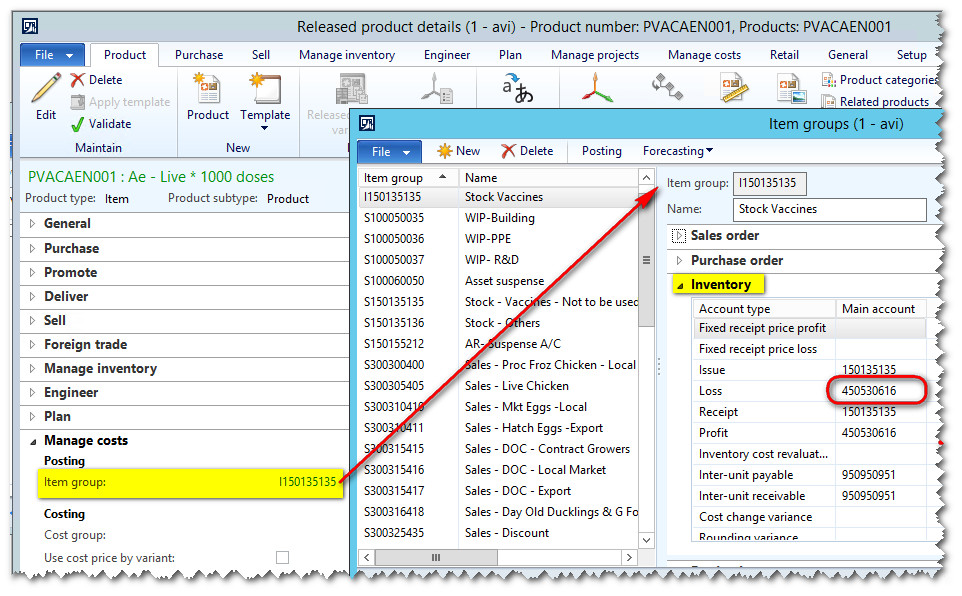
2015_2D00_10_2D00_29_5F00_104219.jpg

The specific value to be used is the 'Loss', which can be read from ItemGroup > Inventory, as shown above.

Now the issue is that, I am unable to see where this value is being recorded.

I tried going through the tables, until I got to the MainAccount. Yet, I don't see where this value is being saved.

I am quite loss in my investigation as to get the 'Loss' number.

Can anyone please help me?

How do I get the Loss number, to override the Offset account number of the movement journal by code?

Thanks,

Nadeem

*This post is locked for comments

I have the same question (0)
  • Ludwig Reinhard Profile Picture
    Microsoft Employee on at

    Hi Nadeem,

    I do not fully understand what you try to achieve? Why can´t you setup a new movement journal that has no default offset account setup and simply import/enter yours there?

    I am not sure but it sounds as if you want to insert the loss account number (right?!) that would automatically be used if you use an inventory adjustment journal. Have you tried using this journal type?

    After posting your inventory journal you can identify the transactions that have been posted on the ledger accounts by checking the item transactions and then checking the physical/financial vouchers created.

    Would be good if you could provide some additional information.

    Many thanks,

    Ludwig

  • Community Member Profile Picture
    on at

    Hi Ludwig,

    Thanks for your reply.

    My issue here is that I want the 'Loss account number' to be used as my Offset Account number, when I create a new line.

    Should be set upon creation of the new line, well before posting the journal.

    Is there a query that can help me retrieve the corresponding 'Inventory Loss Account Number', which I will set as my Offset Account number?

    Thanks,

    Nadeem

  • Suggested answer
    Ludwig Reinhard Profile Picture
    Microsoft Employee on at

    Hi Nadeem, the inventory adjustment journal uses this account by default. Either use the adjustment journal instead or check the code it uses. All the best, Ludwig

  • Verified answer
    5400 Profile Picture
    7,162 on at

    It is very simple. If you want to customize your process, you can use below table and code to mapped the GL account.

    Invt.png

    Please write above code during item id selection or as per your trigger point it should work.

  • Community Member Profile Picture
    on at

    Hi Bhaskar,

    You're just amazing.

    I've added the code to the 'Leave' event of the column and when debugging, it seems to be working fine, and the data is being retrieved correctly.

    But one more question, from the 'Leave' event, how do I set the value of the OffsetAccount column of the same row?

    8737.Untitled.jpg

    Sorry for being such a bug, but I'm quite new to Ax. was previously on .Net and these things is quite simple on .Net. On Ax, I just can't find the properties and all. :(

    Thanks in anticipation,

    Nadeem

  • 5400 Profile Picture
    7,162 on at

    please write same code in ItemID modify method under data source ledgerjournaltrans->itemid-modify -

    inventjournaltrans.ledgerdimension = itg.ledgerdiemnsion.

    Hope, it is clear to you.

Under review

Thank you for your reply! To ensure a great experience for everyone, your content is awaiting approval by our Community Managers. Please check back later.

Helpful resources

Quick Links

Responsible AI policies

As AI tools become more common, we’re introducing a Responsible AI Use…

Neeraj Kumar – Community Spotlight

We are honored to recognize Neeraj Kumar as our Community Spotlight honoree for…

Leaderboard > 🔒一 Microsoft Dynamics AX (Archived)

#1
Martin Dráb Profile Picture

Martin Dráb 4 Most Valuable Professional

#1
Priya_K Profile Picture

Priya_K 4

#3
MyDynamicsNAV Profile Picture

MyDynamicsNAV 2

Last 30 days Overall leaderboard

Featured topics

Product updates

Dynamics 365 release plans
