web
You’re offline. This is a read only version of the page.
close
Skip to main content

Notifications

Announcements

No record found.

Community site session details

Community site session details

Session Id :
Customer experience | Sales, Customer Insights,...
Suggested Answer

Events: letting customers sync events to outlook

(0) ShareShare
ReportReport
Posted on by

Hello,

Currently workign with Dynamics Marketing and more specifically events. One question that has come up is if it's possible for recipients of an event invitation (managed through Dynamics portals) to sync said event to their outlook in some way?

Thank you in advance

Andide

I have the same question (0)
  • Suggested answer
    Nya Profile Picture
    29,060 on at

    Hi Andide,

    You can set the event as a Teams Meeting or Teams Live Event.


    It will be tracked into the calendar in Outlook and Teams of the required ones.


    If this helped you, I'd appreciate it if you'd mark this as a Verified Answer, which may in turn help others as well.

    Best Regards,

    Nya

  • Community Member Profile Picture
    on at

    Thanks,

    We wont be using Teams as the webinar provider, was thinking if the event itself could be considered a meeting and therefore being syncable?

    Br,

    Andide

  • Suggested answer
    Thomas Serpollet Profile Picture
    105 on at

    Hi Andide

    I've done this last week.

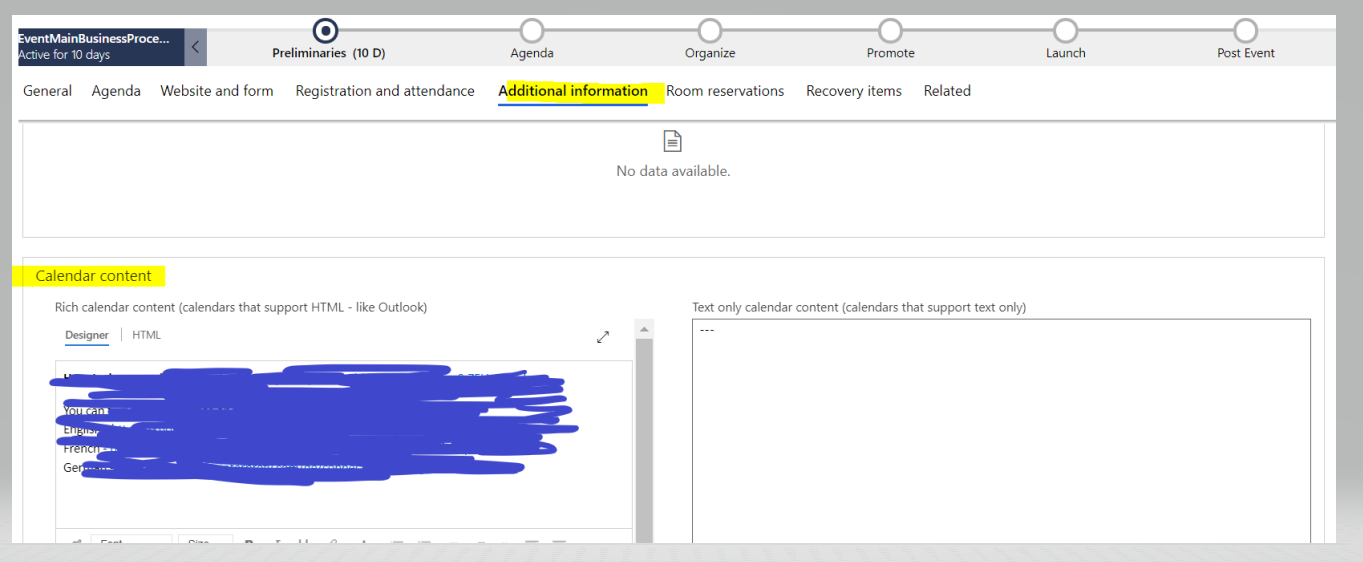
    Please make sure on your event form, 'calendar content' field is displayed as below.

    you can enter all your webinar details.

    Just create customer journey with dynamic segment and email confirmation, with add-to-calendar button

    When you click on 'add-to-calendar' button, Calendar .ics files will contain all your webinar details.

    Please mark this answer as verfied.
    pastedimage1622818205440v1.png

  • Suggested answer
    Nya Profile Picture
    29,060 on at

    Hi Andide,

    Please create a marketing email with a button set as the following screenshot.

     pastedimage1623036244402v1.png

    And send the email to the contacts who have registered the event via a Customer Journey.

     pastedimage1623036252618v2.png

    Then click the button in the received email. It will download the .ics file of the event. You can add it into your Outlook calendar by opening the file with Outlook.

     pastedimage1623036263717v3.png

    If this helped you, I'd appreciate it if you'd mark this as a Verified Answer, which may in turn help others as well.

    Best Regards,

    Nya

  • Stephanie Nichols Profile Picture
    15 on at

    You can but there's a major tradeoff.

    We're doing Teams Webinars through D365 Marketing.  Like others have posted you can add an ICS file for the event.  But when you add the Teams Check-In button in your marketing emails to confirm registration or remind registrants of the event they get a custom URL that not only takes them to the event but also marks them as attended. 

    The automatic check-in is a huge time savings for staff.  So as far as I can tell, you have to prioritize the generic calendar convenience for attendees vs the convenience of not having to check-in everyone by hand - which isn't easy since it's based on a Registration ID and not name or email. 

Under review

Thank you for your reply! To ensure a great experience for everyone, your content is awaiting approval by our Community Managers. Please check back later.

Helpful resources

Quick Links

Responsible AI policies

As AI tools become more common, we’re introducing a Responsible AI Use…

Neeraj Kumar – Community Spotlight

We are honored to recognize Neeraj Kumar as our Community Spotlight honoree for…

Leaderboard > Customer experience | Sales, Customer Insights, CRM

#1
Tom_Gioielli Profile Picture

Tom_Gioielli 70 Super User 2025 Season 2

#2
Gerardo Rentería García Profile Picture

Gerardo Rentería Ga... 33 Most Valuable Professional

#3
Daniyal Khaleel Profile Picture

Daniyal Khaleel 32 Most Valuable Professional

Last 30 days Overall leaderboard

Product updates

Dynamics 365 release plans



