Hi Rits
By default, the same one BPF will applied for all forms of the entity.
Have you done customizations to it, which make it switch process based on different forms?
In general, you can use javascripts to switch Business Process Flow automatically based on current form.
As you mentioned, “But when i switch back again to Form F1, the P2 does not switch back to P1 and the form get switched.”
So you can add following js code as web resource to the form F1 to switch BPF to P1 automatixally:
function switchBPF(executioncontext) {

    var formContext = executionContext.getFormContext();
    formName = formContext.ui.formSelector.getCurrentItem().getLabel();
    if (formName == 'F1') {
        formContext.data.process.setActiveProcess("GUID of P1", callbackFunction); //
    }
     function callbackFunction() {
        }
}
For example:
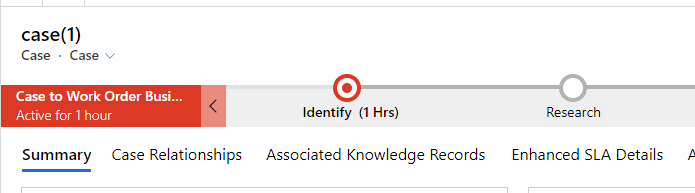
The case form show 'Phone to Case Process' BPF by default, but i want to show 'Case to Work Order Business Process' when load case form.

Js code:
function switchBPF(executionContext) {

    var formContext = executionContext.getFormContext();
    formName = formContext.ui.formSelector.getCurrentItem().getLabel();
    if (formName == 'Case') {
        formContext.data.process.setActiveProcess("989E9B18-57E2-4AF1-8787-D5143B67523B", callbackFunction); // Case to Work Order Business Process
    }
    function callbackFunction() {
        }
}
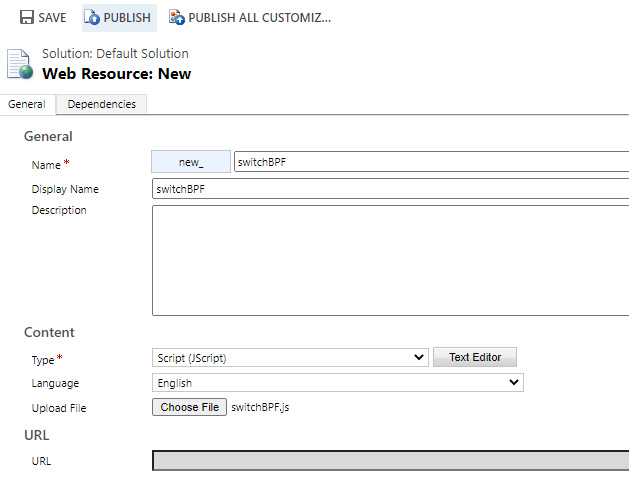
Go to Customizations > Customize the system > Web Resource to create new.
The Expand Entities to find case and open the form you need to add the web resource you just created.


Test Result:
Regards,
Leah Ju
Please mark as verified if the answer is helpful. Welcome to join hot discussions in Dynamics 365 Forums.







