web
You’re offline. This is a read only version of the page.
close
Skip to main content

Notifications

Announcements

No record found.

Community site session details

Community site session details

Session Id :
Finance | Project Operations, Human Resources, ...
Suggested Answer

Actual vs budget not showing in financial report

(1) ShareShare
ReportReport
Posted on by 100

Hi there,

I'm currently updating a financial report so that the months that have occurred within the current financial year pulls in actuals and then the remaining months pull in the budget numbers that have been put in as a budget entry.

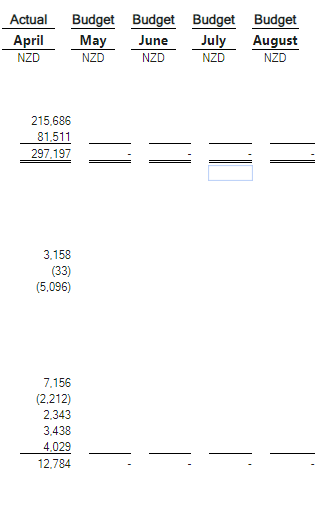
When I load the report, the actual figures are pulling through correctly, however the budget figures aren't coming through and are there is only blanks.

When I run a similar report will all the column months referencing the budget, the figures pull through fine.

Can you please help so that the report can pull in both actuals and budget amounts.

Thanks

Lachie

Photos

1st photo is a screenshot of what the report writer columns look like that I've updated with the different book codes

2nd photo is the report that is getting generated when the book code is split within the report

3rd photo is the report that gets generated when all columns are book code budget

pastedimage1651199642664v1.png

pastedimage1651199799591v2.png

pastedimage1651200299801v4.png

I have the same question (0)
  • Suggested answer
    saurabh bharti Profile Picture
    15,039 Moderator on at

    Did you check standard Actual Vs Budget? Ideally your setup looks fine

    Can you Add Column for BASE-11 and just put Non printing , try ?

  • Suggested answer
    Prem Kumar Bachu Profile Picture
    3,418 on at

    Hi Lachie,

    Try to use "Attribute filter" row and select budget type or budget model.

    Thanks,

    Prem

  • Lachie Profile Picture
    100 on at

    Hi,

    Thanks for your suggestions.

    Standard Actual vs budget report doesn't work unfortunately.

    Have tried putting column BASE-11 as non-printing and the now the entire report has blank info on it.

  • Lachie Profile Picture
    100 on at

    Hi Prem,

    Thanks for responding.

    Have tried updating the attribute filter to select the budget model. However there are still no figures coming through.

Under review

Thank you for your reply! To ensure a great experience for everyone, your content is awaiting approval by our Community Managers. Please check back later.

Helpful resources

Quick Links

Responsible AI policies

As AI tools become more common, we’re introducing a Responsible AI Use…

Neeraj Kumar – Community Spotlight

We are honored to recognize Neeraj Kumar as our Community Spotlight honoree for…

Leaderboard > Finance | Project Operations, Human Resources, AX, GP, SL

#1
Martin Dráb Profile Picture

Martin Dráb 503 Most Valuable Professional

#2
André Arnaud de Calavon Profile Picture

André Arnaud de Cal... 434 Super User 2025 Season 2

#3
BillurSamdancioglu Profile Picture

BillurSamdancioglu 278 Most Valuable Professional

Last 30 days Overall leaderboard

Product updates

Dynamics 365 release plans