web
You’re offline. This is a read only version of the page.
close
Skip to main content

Announcements

News and Announcements icon
Community site session details

Community site session details

Session Id :
Finance | Project Operations, Human Resources, ...
Suggested Answer

Dispatch Board in Service Management

(1) ShareShare
ReportReport
Posted on by 67

Hi All, 

I am trying to create a service order with the dispatch board for knowing how many worker are available and and reserved. 

But the dispatch board is empty , the available is not shown, i am getting the worker and the service order below, i am attaching the screenshot below. 

Have i missed any setups? kindly help through the dispatch board.
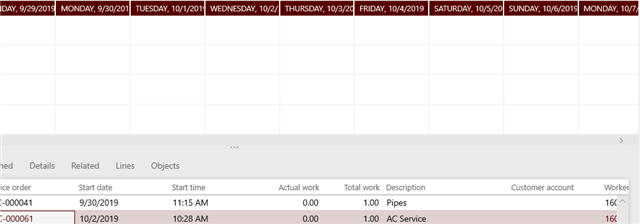
5277.pastedimage1570090525693v1.png

Thanks in Advance

Regards,

Roshan

I have the same question (0)
  • qianwang Profile Picture
    7,168 on at

    Hi Roshan,

    Do you assign the same calendar to workers as is in the service management parameters?

    Regards,

    QianQW

  • roshan m Profile Picture
    67 on at

    Hi Qiyan,

    Appreciate your reply.

    Yes i did assign the same calendar.

    Regards,

    Roshan

  • Suggested answer
    Rakan Zubaidi Profile Picture
    4 on at
    Go to Human resources > Workers > All workers 
    Select the worker you need then from the Action pane select Project
    Under Setup, click on Project setup, define Calender under Resource scheduling


Under review

Thank you for your reply! To ensure a great experience for everyone, your content is awaiting approval by our Community Managers. Please check back later.

Helpful resources

Quick Links

Season of Sharing Community Challenge Winners!

Congratulations to our community stars!

Women in Power Builds Momentum

Expanding mentorship, skilling, and AI innovation

Congratulations to the June Top 10 Community Leaders

These are the community rock stars!

Leaderboard > Finance | Project Operations, Human Resources, AX, GP, SL

#1
André Arnaud de Calavon Profile Picture

André Arnaud de Cal... 445 Super User 2026 Season 1

#2
Subra Profile Picture

Subra 407

#3
Martin Dráb Profile Picture

Martin Dráb 274 Most Valuable Professional

Last 30 days Overall leaderboard

Product updates

Dynamics 365 release plans
