web
You’re offline. This is a read only version of the page.
close
Skip to main content

Notifications

Announcements

No record found.

Community site session details

Community site session details

Session Id :
Microsoft Dynamics NAV (Archived)

More than one row in Cash Receipt Journal?

(0) ShareShare
ReportReport
Posted on by

Hi, there is one row in Cash Receipt Journal, it named "DEFAULT". Is it possible to create one more row?
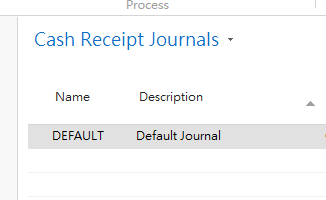
CRJ.PNG

I have input some lines (Payment) in DEFAULT but I don't want to post it. However, I have another payment that I want to apply and post.

So I wonder if I could add one more line in Cash Receipt Journal to input and post another payment? 

Sorry for my bad English.

Thanks a lot.

*This post is locked for comments

I have the same question (0)
  • Verified answer
    Binesh Profile Picture
    7,885 on at

    Hello,

    You can create another "General Journal Batches"

  • Verified answer
    ManishS Profile Picture
    86 on at

    If you document no. are different, you can filter on the document no. and post that specific transaction.

  • Community Member Profile Picture
    on at

    Hi Manish,

    Thanks for your reply.

    I have 3 doc. no, CR170050, CR170051 and CR170052. I filter CR170050 and it can be posted. Then I wanna post CR170052, it failed. The error message is as below:

    ERROE.PNG

    Is it the NAV setting problem? Thanks.

  • Community Member Profile Picture
    on at

    Hi Binesh,

    Thanks for the reply.

    The doc. no is auto-generated by NAV. After I created another "General Journal Batch" and input a new doc in it, the doc no. is same as the other doc in other "General Journal Batch".

    E.g. There are 2 docs in DEFAULT batch, CR170051 and CR170052. When I input a new doc in the NEW batch, the system still assign CR170051 for the new doc.

  • Verified answer
    Indikauk Profile Picture
    1,759 on at

    if you need multiple Batches. then you have 2. options

    1. create separate no. series of each batch

    2. create posting no series for all the batches so while posting system will take the no. what ever the document no. you entered on the journal line will be temporary and once posted it will take no from the posting no. series.

    thanks

    indika

  • ManishS Profile Picture
    86 on at

    Have you defined Posting No. series ?

  • Verified answer
    Yogesh Kulkarni_ Profile Picture
    1,762 on at

    You can have different No. Series and Posting No. Series if you wish so.

    Check No. Series and Posting No. Series in General Journal Batches.


    -Yogesh Kulkarni
    Please verify, if you find answer helpful.

  • Community Member Profile Picture
    on at

    O yes. I have asked my I.T. colleague to fix it.

    Thanks for your reply. 

Under review

Thank you for your reply! To ensure a great experience for everyone, your content is awaiting approval by our Community Managers. Please check back later.

Helpful resources

Quick Links

Responsible AI policies

As AI tools become more common, we’re introducing a Responsible AI Use…

Neeraj Kumar – Community Spotlight

We are honored to recognize Neeraj Kumar as our Community Spotlight honoree for…

Leaderboard > 🔒一 Microsoft Dynamics NAV (Archived)

Last 30 days Overall leaderboard

Featured topics

Product updates

Dynamics 365 release plans



