web
You’re offline. This is a read only version of the page.
close
Skip to main content

Notifications

Announcements

No record found.

Community site session details

Community site session details

Session Id :
Small and medium business | Business Central, N...
Answered

Dampener period - How does it work?

(1) ShareShare
ReportReport
Posted on by 277
I am trying to understand the /Dampener period/ and the way it works. I do not want any explanation from Mircosoft documents. I already read those. 

I will give an example that I tried. I looked for many blog posts. None of them explained it with real examples. 
Still, I did not understand how this works.

Example - I created a finished good item in the item list. Then I created two raw material items. I put those raw material items into a production BOM and attached it as the production BOM for the finished good item. 
 
Then I entered 14D as the dampener period for the finished good item. Screenshot for finished good item,
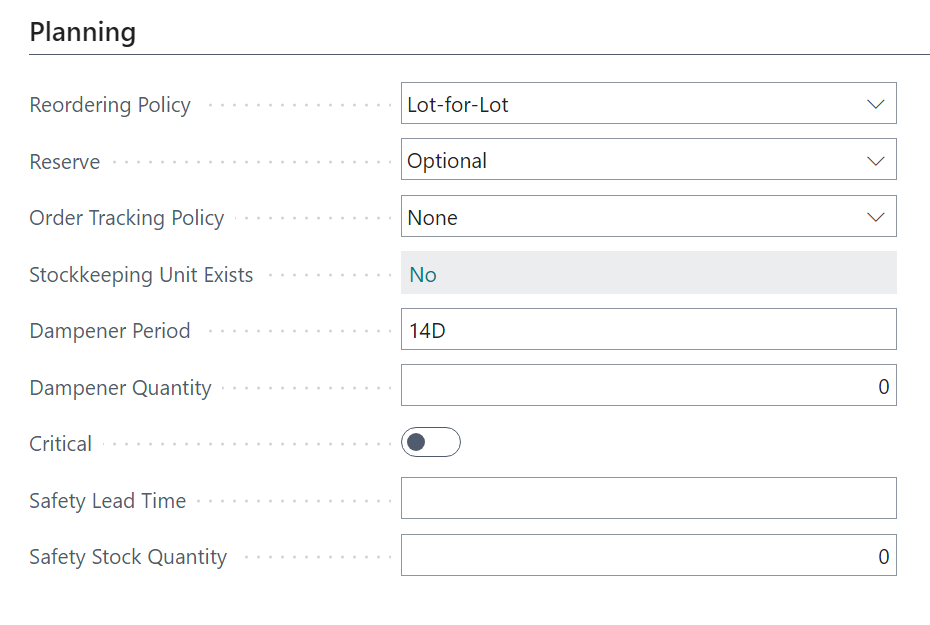
The replenishment system is Production order for the finished good item. 

Then I created a released prodution order for the finished good item with a due date - 18/02/2024.
Created a sales order for the finished good item with a planned delivery date - 29/02/2024. Screenshot, 


As per the dates mentioned in sales order and released production order. There is a gap of 11 days
Production order due date - 18/02/2024
Planned delivery date - 29/02/2024 

Hence, the gap is within the dampener period (14D).

When I ran the planning worksheet, it still suggesting me to cancel the existing released production order and rescheduling it to a later date.


Can somebody explain this dampener period? 
Am I missing something here?
 
 
I have the same question (0)
  • Suggested answer
    YUN ZHU Profile Picture
    95,750 Super User 2025 Season 2 on at
  • Verified answer
    Ben Baxter Profile Picture
    6,620 Super User 2025 Season 2 on at
    I'm happy to explain this a little more.  It looks like you fully understand the concept of the Dampener Period, that it allows for demand dates to shift without impacting supply as long as the shift is within the time period defined.
     
    The dampener period works best on LINKED demand and supply.  In your above example, you mentioned creating the Production Order first before creating your Sales Order.  This means if you go to the Production Order Line and select Order Tracking it won't reference your Sales Order, since they aren't linked.  If you create your Production Order based on the Sales Order (through the Planning Worksheet) it will create a soft link between the demand and supply.  At that point, changing the Planned Shipment Date on your Sales Order (within your Dampener Period) should leave the Production Order dates alone.
     
    Since the two aren't linked, it wants to find the first source of demand and have the supply arrive just prior (hence the 28/02/24 ending date).  Therefore, it cancels the early Prod. Order in favor of a linked Prod. Order.
     
    Please give this a try and see if it resolves your planning issue.  If so, please mark this as a Verified Answer so other forum Users can find the solution as well.
     
    Best Regards,
    Ben Baxter
    Accent Software Inc
  • Nirmala Karunarathna Profile Picture
    277 on at
    Hi Ben Baxter,

    Thanks for your reply. Yes, it worked :)
  • Suggested answer
    Jun Wang Profile Picture
    8,202 Super User 2025 Season 2 on at
    add a few words on Ben's comment
     
    the logic should be
     
    1 create a sales order
    2 create a production order via item planning feature in BC so a link is established between the supply and demand.
    3 the SO due date changed and BC needs to decide if your production order needs to start early or push back.
    If the production needs to start earlier than planned, BC will reschedule when you run the planning worksheet.
    But if the production order needs to be pushed back, say one day later than planned. BC will check if there is a dampener day in place. If the change is within the dampener period, BC won't recommend to change your existing production date in order to reduce the noises of insignificant change.  


Under review

Thank you for your reply! To ensure a great experience for everyone, your content is awaiting approval by our Community Managers. Please check back later.

Helpful resources

Quick Links

Responsible AI policies

As AI tools become more common, we’re introducing a Responsible AI Use…

Neeraj Kumar – Community Spotlight

We are honored to recognize Neeraj Kumar as our Community Spotlight honoree for…

Leaderboard > Small and medium business | Business Central, NAV, RMS

#1
OussamaSabbouh Profile Picture

OussamaSabbouh 2,132

#2
Khushbu Rajvi. Profile Picture

Khushbu Rajvi. 675 Super User 2025 Season 2

#3
YUN ZHU Profile Picture

YUN ZHU 665 Super User 2025 Season 2

Last 30 days Overall leaderboard

Featured topics

Product updates

Dynamics 365 release plans
