web
You’re offline. This is a read only version of the page.
close
Skip to main content

Notifications

Announcements

No record found.

Community site session details

Community site session details

Session Id :
Microsoft Dynamics AX (Archived)

Can't call form method from inside form - I get "The class FormRun does not contain this function"

(0) ShareShare
ReportReport
Posted on by 130

Hopefully someone has some clue as to why Dynamics is spitting the dummy here.

I have a method called writeQuoteTable declared under classDeclaration in a Form. It compiles fine with no errors.

I also have a closeOk method underneath it. It currently looks like this:

public void closeOk()
{
    element.writeQuoteTable();
    super();
}


But it won't compile. element.writeQuoteTable(); gets the red squiggly line under it and the Compiler output says
"The class FormRun does not contain this function"

Yet if I type "element." then as soon as I type the "." I see the method appearing in the list
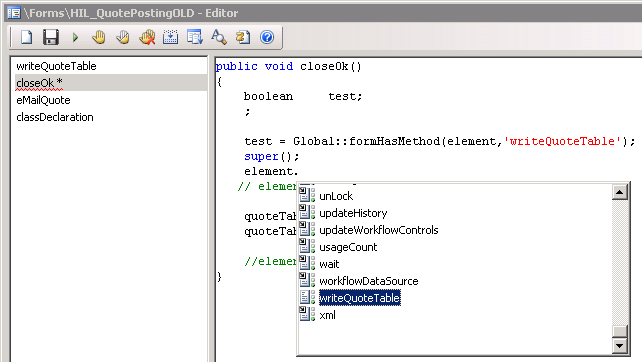
FormRunFunction.png

But if I select it and add a "();" at the end then "The class FormRun does not contain this function"

as you can see in the picture I've also added this code

    test = Global::formHasMethod(element,'writeQuoteTable');

and I put a breakpoint in the method and checked the value of test and its True so I just don't get what's going on here. The method exists.

I created a new form and wrote two methods and had one call the other just fine so I don't think its syntax error
I commented out all of the code inside writeQuoteTable to see if it was something inside it that broke it somehow. Same issue.
I created a new form and started setting it up just like my broken form but after only adding in about half of the design elements I had the same problem reoccur.
I recompiled the entire code last night before I left for home as once before when I had something kind of unexplainable, that fixed it. I had high hopes for it this time but alas... no.

I guess I'm going to duplicate the broken form and just start deleting design components until it works again to try and work out what's causing it, but if someone has seen this sort of thing before I'd love some other suggestions.

*This post is locked for comments

I have the same question (0)
  • Adam Duckworth Profile Picture
    130 on at

    Oh something is definitely screwy. Like I said, I started deleting design components and editing my remaining methods so that they still compiled. Eventually I was left with one button in the form and one datasource and it still wouldn't compile. I kept going. Deleted everything until I now have a form with 3 methods in it.

    1. classDeclaration (empty)

    public class FormRun extends ObjectRun
    {
    }

    2. writeQuoteTable - which looks like this:

    void  writeQuoteTable()
    {
        ;
        info ('working');
    }


    3. clicked - which looks like this

    void clicked()
    {
        element.writeQuoteTable();
    }

    And lo & behold element.writeQuoteTable() doesn't compile with "The class FormRun does not contain this function"

  • Suggested answer
    Vilmos Kintera Profile Picture
    46,149 on at

    Sometimes forms can break if you drag/drop/copy/paste objects around. Also if you by accident hit special "escape characters" on your keyboard which are not visible, but prevents the compilation or causes strange behavior.

    The only way to fix such odd issues is indeed to delete the customization, reimport the object from your Version Control System, and reapply the new changes.

  • Verified answer
    Adam Duckworth Profile Picture
    130 on at

    I ended up restarting the AOS service and voila! everything is working as it should.

    I'm grateful that I don't have to rebuild anything to fix it, but angry that I didn't try something that simple sooner :(

  • Adam Duckworth Profile Picture
    130 on at

    Update: Turns out that it wasn't "just" restarting the AOS service because the problem came back. I tried lots of things and ultimately have concluded that it was ALSO something to do with those form methods being static. I had copied some code off the web and although I can't find the web page now I'm thinking that it was likely code from a class and I went and copied it into a form method. I later deleted the reference to static but once I had the problem about it not seeing the function, that issue persisted and the AOS needed to be restarted before the method would compile. I've repeated this now and had it recur so I'm pretty confident that's what it was.

    Stepping back I'm thinking that if you compile a form that has a static method in it then the compiler should warn you about that as you can't call a static method on a form, statics have to be on a table or a class, right?

Under review

Thank you for your reply! To ensure a great experience for everyone, your content is awaiting approval by our Community Managers. Please check back later.

Helpful resources

Quick Links

Responsible AI policies

As AI tools become more common, we’re introducing a Responsible AI Use…

Neeraj Kumar – Community Spotlight

We are honored to recognize Neeraj Kumar as our Community Spotlight honoree for…

Leaderboard > 🔒一 Microsoft Dynamics AX (Archived)

#1
Martin Dráb Profile Picture

Martin Dráb 4 Most Valuable Professional

#1
Priya_K Profile Picture

Priya_K 4

#3
MyDynamicsNAV Profile Picture

MyDynamicsNAV 2

Last 30 days Overall leaderboard

Featured topics

Product updates

Dynamics 365 release plans
