web
You’re offline. This is a read only version of the page.
close
Skip to main content

Notifications

Announcements

No record found.

Community site session details

Community site session details

Session Id :
Microsoft Dynamics NAV (Archived)

How to resolve this SMTP Error?

(0) ShareShare
ReportReport
Posted on by

Hi All,

in my smtp mail setup i got these error
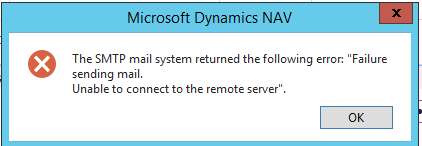
 123.png

any one face this issue and my setup is 
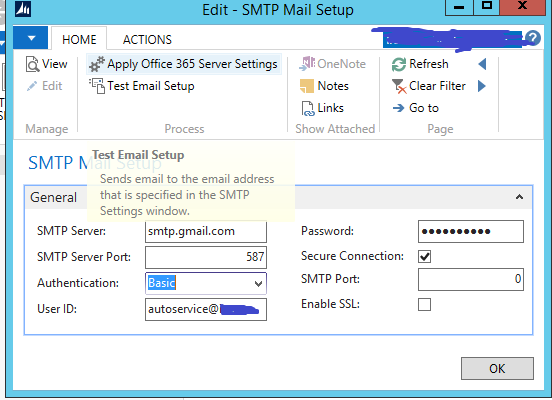
6835.2.png

before face this issue i got an network problem in my server i.e internet connection problem.

is there any setting will i modify can any please let me know?

Regards,

Ramesh.

*This post is locked for comments

I have the same question (0)
  • Suggested answer
    keoma Profile Picture
    32,729 on at

    deactivate firewall then try again. if it works add needed rule to firewall.

    what kind of network problem did you have ?

  • mmv Profile Picture
    11,471 on at

    Hi,

    Have you tried Jonathan's suggestion?

    Have you tried using another smtp server?

  • Suggested answer
    Miguel Llorca Gómez Profile Picture
    7,019 User Group Leader on at

    Try using port 465 and SSL :-)

  • Community Member Profile Picture
    on at

    Hi Ramesh.

    check the firewall setup , try to ping smtp.gmail from server as well,   Since its using gmail you have to enable Turn on access for less secure apps setup  , check this link support.google.com/.../6010255

Under review

Thank you for your reply! To ensure a great experience for everyone, your content is awaiting approval by our Community Managers. Please check back later.

Helpful resources

Quick Links

Responsible AI policies

As AI tools become more common, we’re introducing a Responsible AI Use…

Neeraj Kumar – Community Spotlight

We are honored to recognize Neeraj Kumar as our Community Spotlight honoree for…

Leaderboard > 🔒一 Microsoft Dynamics NAV (Archived)

#1
HoangNam Profile Picture

HoangNam 7

Last 30 days Overall leaderboard

Featured topics

Product updates

Dynamics 365 release plans



