web
You’re offline. This is a read only version of the page.
close
Skip to main content

Notifications

Announcements

No record found.

Community site session details

Community site session details

Session Id :
Microsoft Dynamics AX (Archived)

Set cost price to items per Batch number

(0) ShareShare
ReportReport
Posted on by 3,371

Hi,

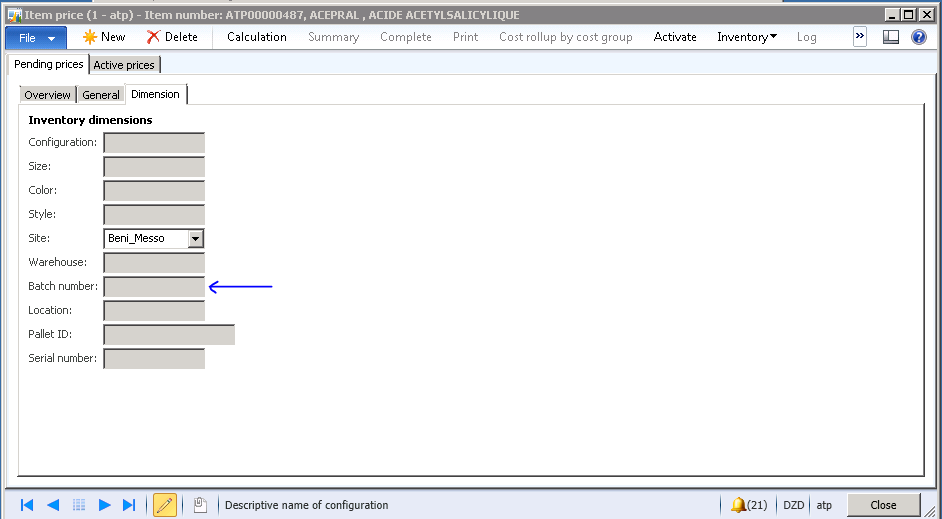
I've seen in Item price form that I can insert different types of prices per item, that's great buy, I need to do that by Batch number, I've checked the Dimension Tab and have found Batch number choice's disabled.

Is there a way to make that choice list enabled?

If not possible, How can I set Item's cost price per Batch number?
*This post is locked for comments

I have the same question (0)
  • Suggested answer
    Gertjan Profile Picture
    1,200 on at

    Good afternoon,

    For the item price form you mention the option to define prices per batch number is not available by default. For the product dimensions (color, size, etc..) it is possible to distinguish prices if the checkbox 'Use cost price by variant' is checked on the item master (for items with variants only). Prices per tracking dimensions (serial, batch) are not possible. For the storage dimensions, only the site is enabled. (I did a check in the code for you).

    However: You can also define your prices using the trade agreements (for purchase and sales agreements) and in these agreements you can define prices per batch number. To enable this you must check 'For purchase price' or 'For sales price' on the tracking dimension group linked to the item master. You can go their via the 'Product Information Management' module > Setup > Dimension groups > Tracking Dimension groups.

    Hopefully you can use this in your scenario.

    Gertjan

  • Tim Schofield Profile Picture
    on at

    Have you tried enabling 'Financial inventory' by batch number in the Tracking dimensions group form?

  • André Arnaud de Calavon Profile Picture
    301,035 Super User 2025 Season 2 on at

    Hi Hichem,

    The Item price form you have opened is intended for planned and actual prices In upfront it is normally not known which batch numbers you will get in your stock.

    It is possible to keep track of the cost price per batch number, but not within the form you are referring to. It depends on the inventory model and the 'Financial inventory' checkbox as mentioned by Tim.

    It will be dependent on the actual receipts. If you have a receipt today with batch 'A' and next week batch 'D', they will get a cost price related to the price the vendor will invoice you. This will not work for inventory model standard cost.

    For sales prices there is a new functionality for attribute based pricing. This is related to potency management.

    blogs.msdn.com/.../what-s-new-in-microsoft-dynamics-ax-2012-r2-attribute-based-pricing-and-batch-balancing.aspx

Under review

Thank you for your reply! To ensure a great experience for everyone, your content is awaiting approval by our Community Managers. Please check back later.

Helpful resources

Quick Links

Responsible AI policies

As AI tools become more common, we’re introducing a Responsible AI Use…

Neeraj Kumar – Community Spotlight

We are honored to recognize Neeraj Kumar as our Community Spotlight honoree for…

Leaderboard > 🔒一 Microsoft Dynamics AX (Archived)

#1
Martin Dráb Profile Picture

Martin Dráb 4 Most Valuable Professional

#1
Priya_K Profile Picture

Priya_K 4

#3
MyDynamicsNAV Profile Picture

MyDynamicsNAV 2

Last 30 days Overall leaderboard

Featured topics

Product updates

Dynamics 365 release plans



