web
You’re offline. This is a read only version of the page.
close
Skip to main content

Notifications

Announcements

No record found.

Community site session details

Community site session details

Session Id :
Microsoft Dynamics AX (Archived)

EU sales list - 'investment and Not assigned amounts will not be reported'

(0) ShareShare
ReportReport
Posted on by

Hi all,

Trying to set up EU sales list reporting in test environment, I'm getting this error when I try to run 'reporting'for a month:
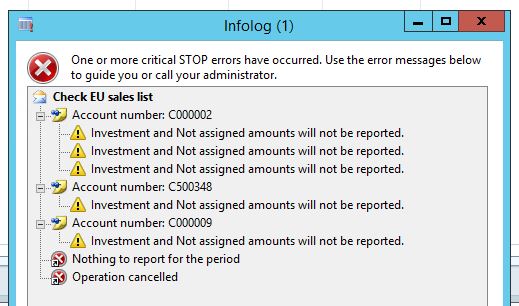
ec-sales-error.JPG

the only figures we have are in the 'not assigned' column of the EC sales form after 'transfer', so these need to be reported.  any ideas what this means?  Im sure there will be more changes to set up required but I can't see what needs changing.

thanks

AXF

*This post is locked for comments

I have the same question (0)
  • Suggested answer
    Ludwig Reinhard Profile Picture
    Microsoft Employee on at

    Hi AXF,

    To get the EU sales list report right you have to assign the reporting types to your item sales tax groups in GL. Note that the investment type is typically not required except for companies operating in Belgium if I remember it correctly.

    So please check and modify your tax setup.

    Best regards,

    Ludwig

  • Community Member Profile Picture
    on at

    thanks Ludwig, the reporting types are all set to 'blank' on the item VAT groups as I can't specify item or service for any of them, they could be anything.  According to TechNet I saw somewhere the 'not assigned' is supposed to capture any transactions that are set as 'blank'.  It seems to do this as I am getting some transactions in the form, but it fails on the reporting part,

    AXF

  • Suggested answer
    Ludwig Reinhard Profile Picture
    Microsoft Employee on at

    Hi AXF,

    After transferring your data to the EU sales reporting form your transactions should be grouped based on your item sales tax group setup. If you have not specified this you need to do this manually otherwise your report will be wrong and you'll get this error.

    Best regards,

    Ludwig

  • Community Member Profile Picture
    on at

    I only have 5 lines/transactions in my test form, for 3 different customers.  I don't see any option to group by item sales tax group, and I cannot personalise the form to show this field either.  The paper form just asks for details by customer.

  • Verified answer
    Ludwig Reinhard Profile Picture
    Microsoft Employee on at

    Hi AXfinance,

    In the Eu sales list form you should be able to edit the amount fields (that are automatically filled based on your sales tax setup) and if you find something in the not assigned value column, you can move it to one of the others before creating the report.

    If you are working in a contoso demo environment, try to test this in the demf company.

    The setups there should be ok to generate a proper eu sales list report there.

    Best regards,

    Ludwig

    eu-sales-list1.png

  • Community Member Profile Picture
    on at

    Hi Ludwig,  yes moving the figures into one of the other columns worked, thanks.

    AXF

Under review

Thank you for your reply! To ensure a great experience for everyone, your content is awaiting approval by our Community Managers. Please check back later.

Helpful resources

Quick Links

Responsible AI policies

As AI tools become more common, we’re introducing a Responsible AI Use…

Neeraj Kumar – Community Spotlight

We are honored to recognize Neeraj Kumar as our Community Spotlight honoree for…

Leaderboard > 🔒一 Microsoft Dynamics AX (Archived)

#1
Martin Dráb Profile Picture

Martin Dráb 4 Most Valuable Professional

#1
Priya_K Profile Picture

Priya_K 4

#3
MyDynamicsNAV Profile Picture

MyDynamicsNAV 2

Last 30 days Overall leaderboard

Featured topics

Product updates

Dynamics 365 release plans



