web
You’re offline. This is a read only version of the page.
close
Skip to main content

Notifications

Announcements

No record found.

Community site session details

Community site session details

Session Id :
Finance | Project Operations, Human Resources, ...
Answered

Negative Sales Tax - Wrong Calculation

(0) ShareShare
ReportReport
Posted on by 151

Dear All,

On Accounts Payable > Invoice > Invoice Journal > Setup > Sales Tax. I enable Amount Include Sales Tax which is very important in my scenario because I am facing this issue when amount include sales tax option is on.

pastedimage1583922271336v2.png

Example: I have created vendor invoice journal with amount of 1000 and applied 15% sales tax. System calculate sales tax of 130.43 (So far so good).

pastedimage1583923423022v2.png

Wrong Calculation: When I apply Negative sales tax of -15% on same invoice then system is calculating 176.47 but it should give 130.43.

pastedimage1583923375651v1.png

Setup: This is the sales tax code setup for negative sales tax. 

pastedimage1583922739443v4.png

I have the same question (0)
  • SouravDam Profile Picture
    11,730 on at

    Hello Zeeshan.Rahim,

    1 query.

    How come 15% sales tax is calculating on amount of 1000 and giving result as 130.43 ? It should be (1000 * 15%) = 150.00 right !

    Is there any other additional tax % linked ?

    This tax structure is for which country / region specific ?

    Best regards,
    Sourav Dam

  • Zeeshan.Rahim  Profile Picture
    151 on at

    Hi Sourav,

    With reference to start of my question, I enable Sales Tax Inclusive option (see screenshot) due to which it is calculating as 1000*15/115=130.43. If I turn off Sales Tax inclusive option then system will calculate as 1000 * 15% = 150. 

    Accounts Payable > Invoice > Invoice Journal > Setup > Sales Tax

    pastedimage1583929237606v1.png

  • MM-20051452-0 Profile Picture
    on at

    Hi Zeeshan,

    Can you share with us the setup on sales tax group & the tax localization country?

    Thanks in advance.

  • Zeeshan.Rahim  Profile Picture
    151 on at

    Hi Momen,

    I am using UK localization. Sales tax group setup is given below for you information. 

    pastedimage1583932589614v1.png

  • Suggested answer
    MM-20051452-0 Profile Picture
    on at

    Hi Zeeshan,

    First I do not know why you have the extra -20% tax code which is also set as Reverse charge, Can you validate on the Sales tax codes calculation on this voucher? and the item sales tax group as well?

    And also, have you followed the official documentation for UK reverse charge setup?

    docs.microsoft.com/.../united-kingdom

  • Liana Profile Picture
    135 on at

    Hi Rahim,

    is the amount from 1000 with 15 % sales tax or without? If you have  activate in Journal setup "Amount include sales tax" you must give in the invoice journal the brut amount. For example for Germany:

    Invoice amount 119 € (net amount 100 + 19% VAT)

    pastedimage1583934028798v1.png

    pastedimage1583934217517v2.png

    pastedimage1583934294294v3.png

    Now to your problem:

    I create a VAT Code "VAT - 19%"

    pastedimage1583936591538v4.png

    Sales tax Group:

    pastedimage1583937052901v6.png

    Item sales tax group:

    pastedimage1583937137995v7.png

    Create a new invoice journal:

    pastedimage1583937360544v9.png

    pastedimage1583937479156v10.png

    Many regards from Germany

    Liliana

  • Zeeshan.Rahim  Profile Picture
    151 on at

    Hi Momen, 

    -20% code is also required in this group, user deduct -20% sales tax on top of 15% (VAT-15%BRA) when vendor is unregistered. This is the ultimate code due to which I posted this. Sales Tax codes, sales tax group and Item sales tax groups setups are given below for your information. Secondly, Lets ignore reverse charge, I unchecked reverse charge option. System is calculating same sales tax when reverse charge option is not selected.

    Sales Tax Group Setup (PK-BRA)
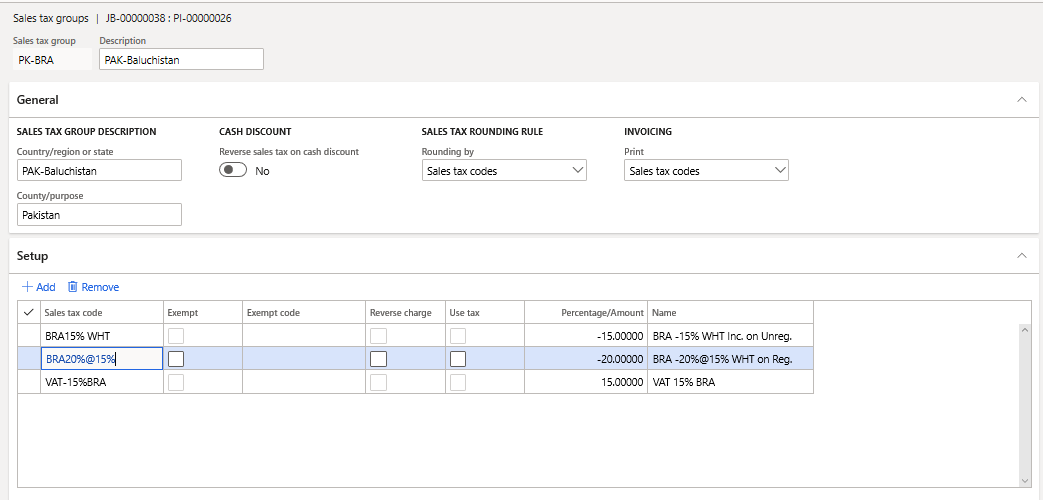
    pastedimage1583996186502v1.png

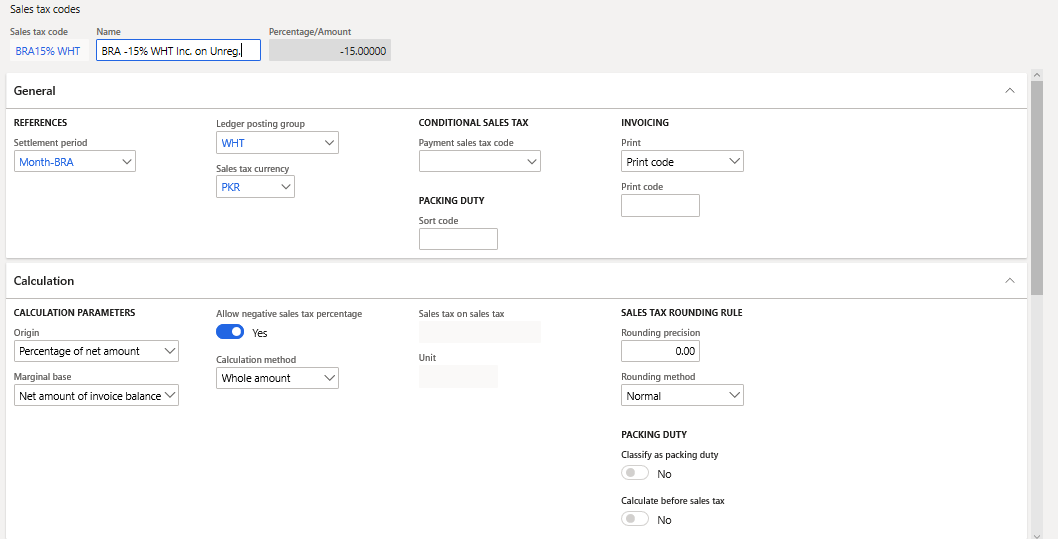
     1. Item Sales Tax Group Setup (BRA15% WHT)
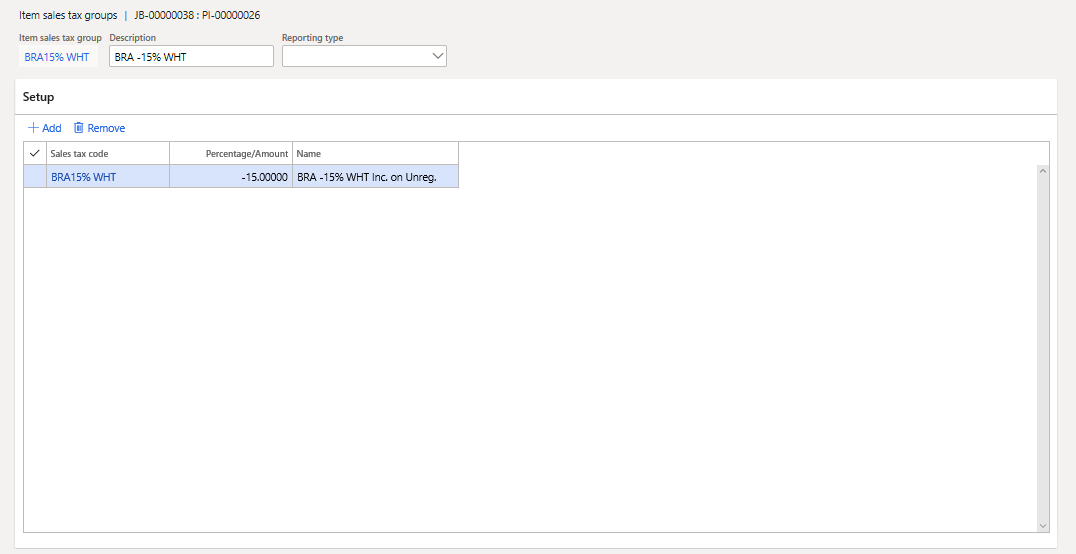
    pastedimage1583996758093v3.png

    1.1 Sale Tax Code (BRA15% WHT)

    pastedimage1583997943444v5.png

    2. Item Sales Tax Group Setup (BRA-15%)
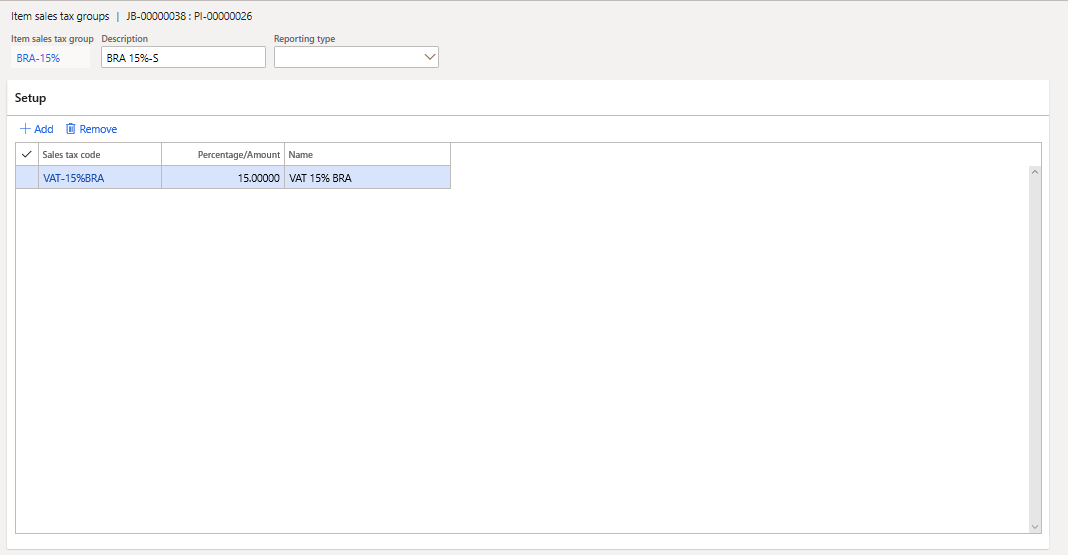
    pastedimage1584002849595v13.png

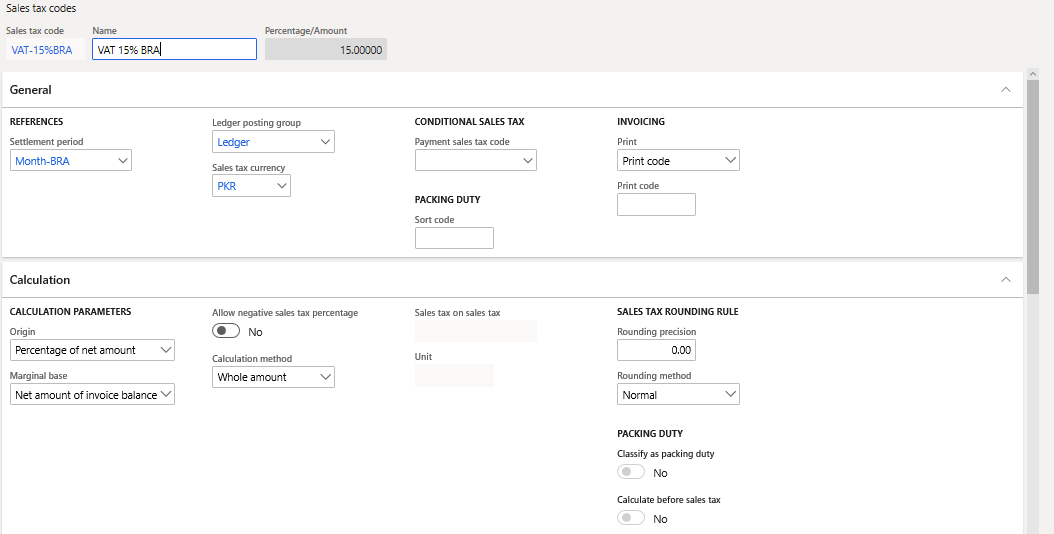
    2.1 Sales Tax Code (VAT-15%BRA)

    pastedimage1584002896160v14.png

    3. Item Sales Tax Group Setup (BRA20%@15%)
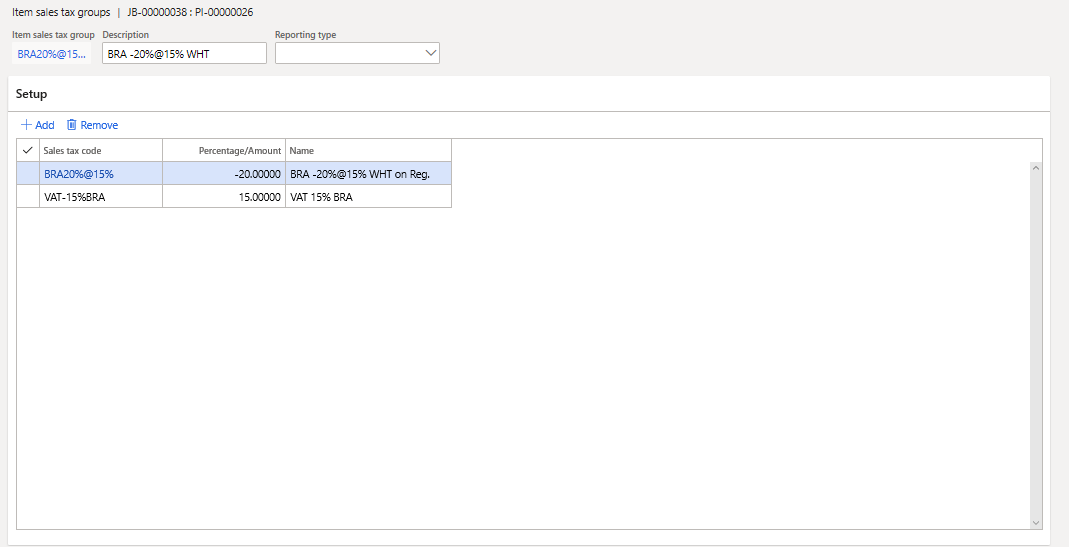
    pastedimage1583997786548v4.png

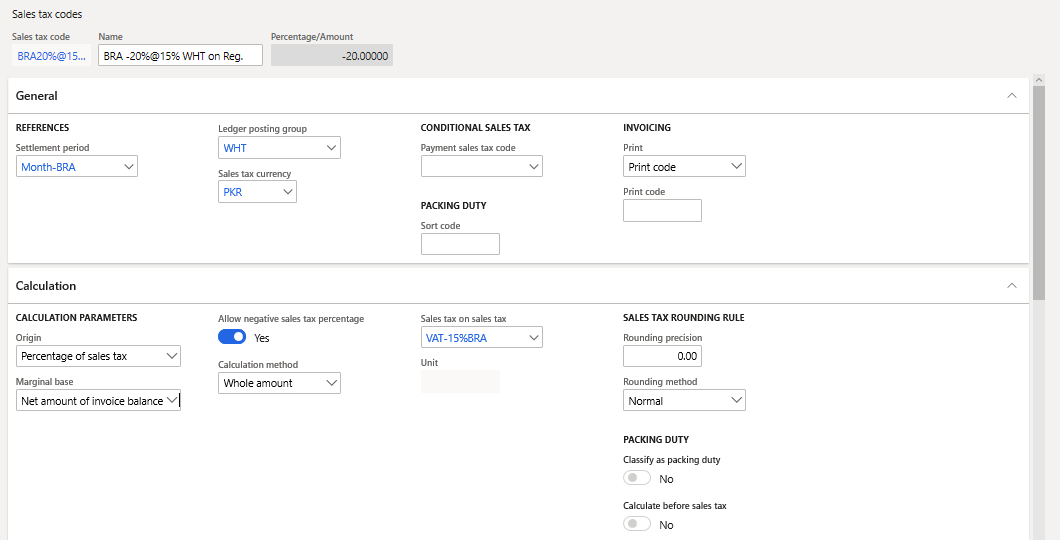
    3.1 Sale Tax Code (BRA20%@15%)

    pastedimage1583998029488v7.png

    1. Transaction (Case 1)

     Invoice Journal: Correct Calculation when using  15% tax 

     Item Sales Tax: BRA-15%
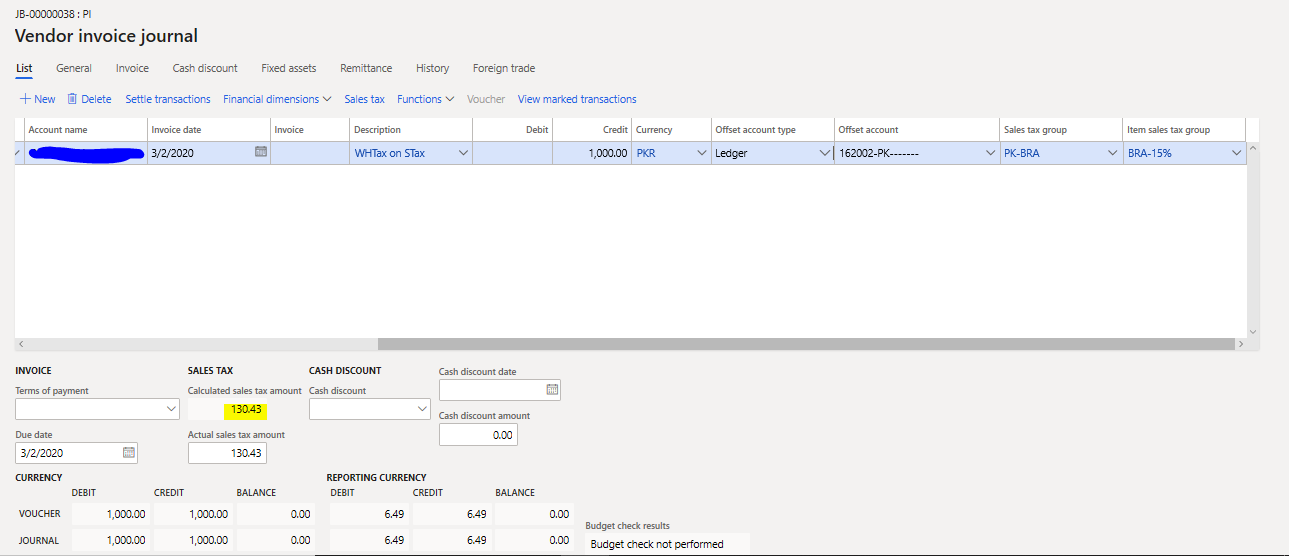
    pastedimage1583998465638v8.png

    Invoice Journal: Wrong Calculation when using  -15%

     Item Sales Tax: BRA15% WHT

    System should calculate 1000*15/115=130.43 however it is calculating 176.47  
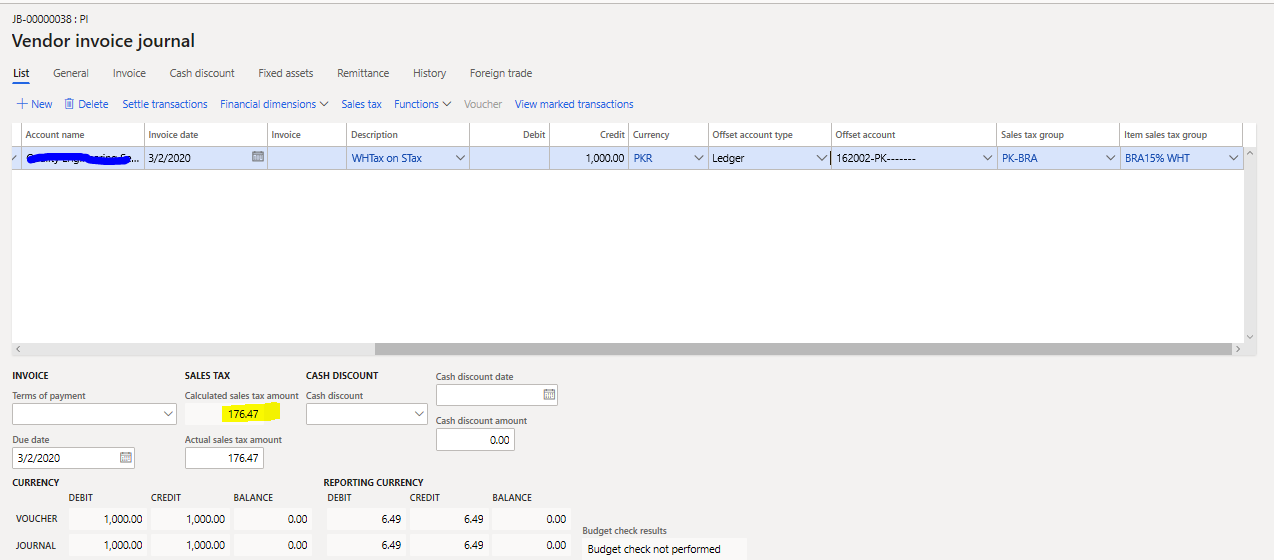
    pastedimage1583996696443v2.png

    2. Transaction (Case 2)

    Now lets talk about the -20% code which is the ultimate goal to achieve correct calculation for.

    Invoice Journal: Wrong Calculation when using 15%-20%

     Item Sales Tax: BRA20%@15% 
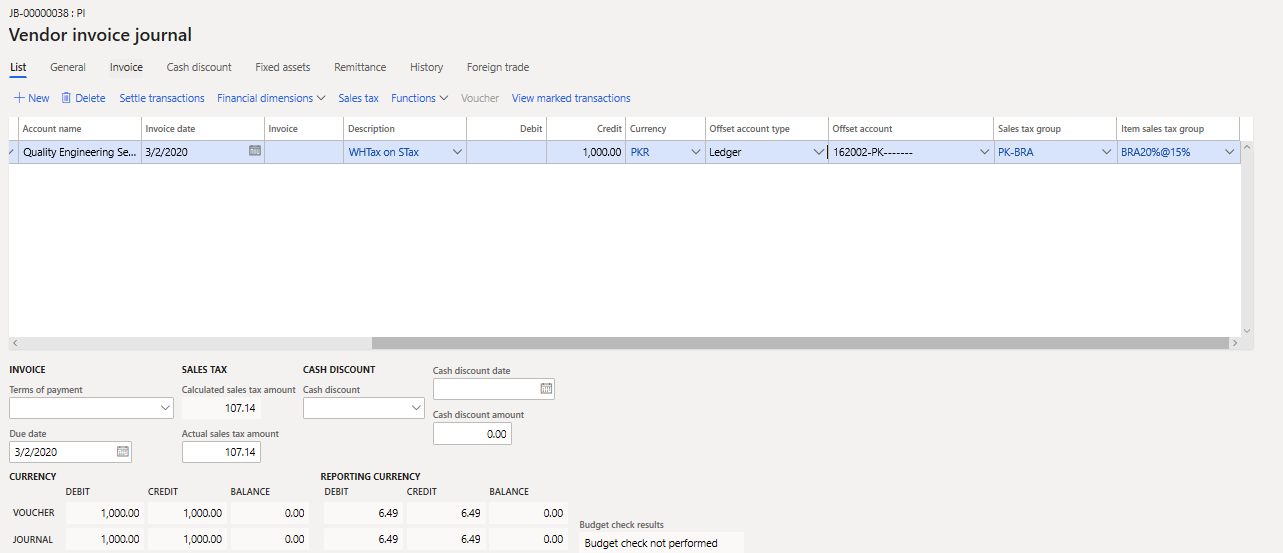
    pastedimage1583998703640v9.png

    System should calculate 1000*15/115=130.43 however it is calculating 133.93.  
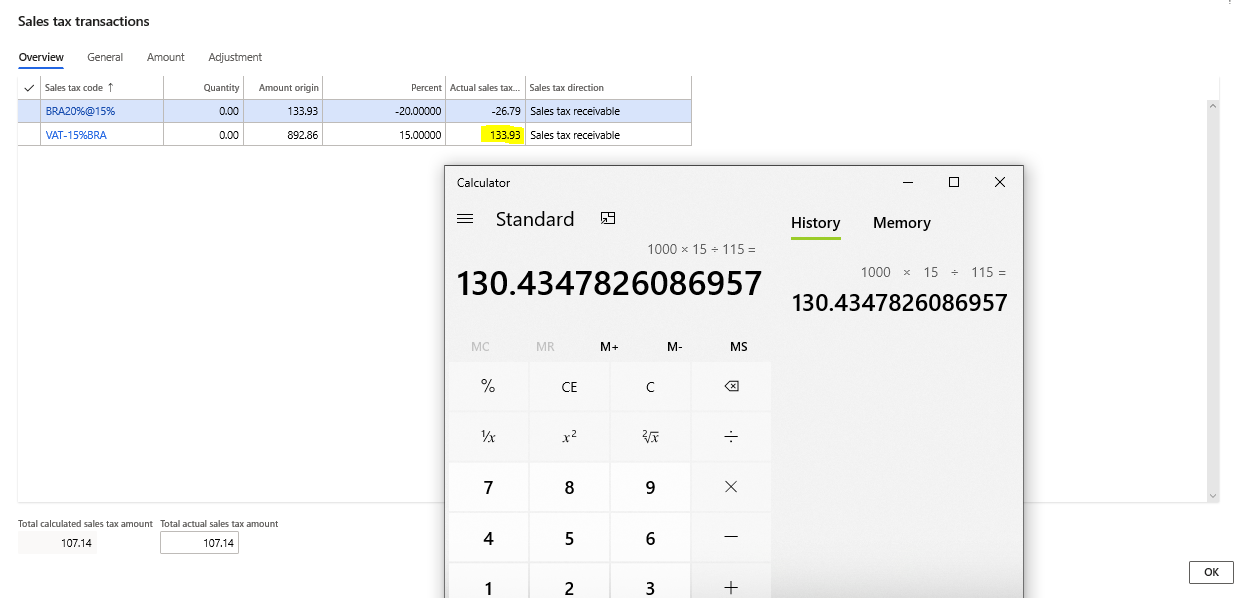
    pastedimage1584000803166v11.png

    This is because system is using wrong amount origin, it should be 869.56 instead of 892.86.
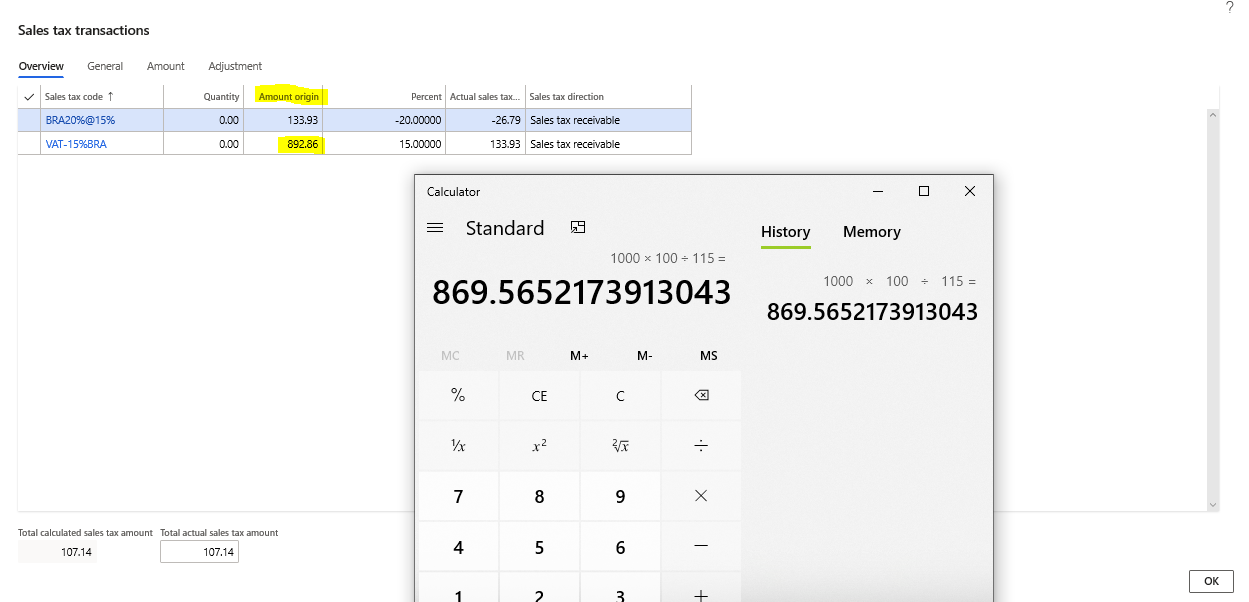
    pastedimage1584001028616v12.png

  • Zeeshan.Rahim  Profile Picture
    151 on at

    Hi Liana,
    Thank you for the suggestion, I am aware that if we use net amount for the invoice then system calculate correct sales tax. This is same as, If we turn off 'Amount include sales tax' option and add net invoice amount. But this solution is not giving desired result when we apply complex code. For example with reference to Transaction 2 (Case 2) in my last reply, lets apply 15%Tax-20% code.
    Invoice amount 115 (Net amount 100 + 15% VAT)

    pastedimage1584013657432v3.png

    System is calculating 13.39 sales tax which is wrong, it should calculate 15. Secondly, Amount origin should not 89.29. It should be 100.

    pastedimage1584014121115v4.png

    Lastly, user receive invoices including sales tax. They don't want to use calculator to get net amount for each invoice and then enter in the system. That's why we need solution to be able to enter invoice amount with sales tax.    

  • MM-20051452-0 Profile Picture
    on at

    Hi Zeeshan,

    Thanks for your patience, I succeeded to reproduce the issue with -15WHT item sales tax group on our standard environment.

    Action Plan

    1- I will check internally with our Engineering team for validation.

    2- Could you please let me know as you are using UK localization, why you are using -ve sales tax as Withholding tax and do not use the standard functionality localization for Withholding tax calculation for UK????

    Regards,

    Momen

  • Zeeshan.Rahim  Profile Picture
    151 on at

    Hi Momen,
    Standard functionality only have option to apply withholding tax on Net amount or Gross amount of Invoice balance however our requirement is to apply percentage on Sales tax amount (not invoice amount). This is why I am not able to use standard functionality of UK localization. 

    Standard Functionality of Withholding Tax which apply percentage on Invoice amount:

    pastedimage1586163647482v1.png

    Requirement is to withheld sales tax amount by applying percentage on sales tax amount (Not invoice amount) this is why I am using negative sales tax code

    pastedimage1586164601332v3.png

Under review

Thank you for your reply! To ensure a great experience for everyone, your content is awaiting approval by our Community Managers. Please check back later.

Helpful resources

Quick Links

Responsible AI policies

As AI tools become more common, we’re introducing a Responsible AI Use…

Neeraj Kumar – Community Spotlight

We are honored to recognize Neeraj Kumar as our Community Spotlight honoree for…

Leaderboard > Finance | Project Operations, Human Resources, AX, GP, SL

#1
André Arnaud de Calavon Profile Picture

André Arnaud de Cal... 467 Super User 2025 Season 2

#2
Martin Dráb Profile Picture

Martin Dráb 420 Most Valuable Professional

#3
BillurSamdancioglu Profile Picture

BillurSamdancioglu 241 Most Valuable Professional

Last 30 days Overall leaderboard

Product updates

Dynamics 365 release plans