web
You’re offline. This is a read only version of the page.
close
Skip to main content

Notifications

Announcements

No record found.

Community site session details

Community site session details

Session Id :
Microsoft Dynamics AX (Archived)

Cannot enter values less than 0.25 in a timesheet in AX 2012

(0) ShareShare
ReportReport
Posted on by

Hi,

Today I changed the Minimum time increment from 0.25 to zero because several people at my place have a need to enter 0.1, 0.15, 0.2, etc. (i.e. less than 0.25). I though after changing this value setting to zero, every one can enter any positive value. However AX doesn't allow me to enter 0.1 (for example) & it keeps pops up a message "Minimum time increment is 0.25". Please advice me!
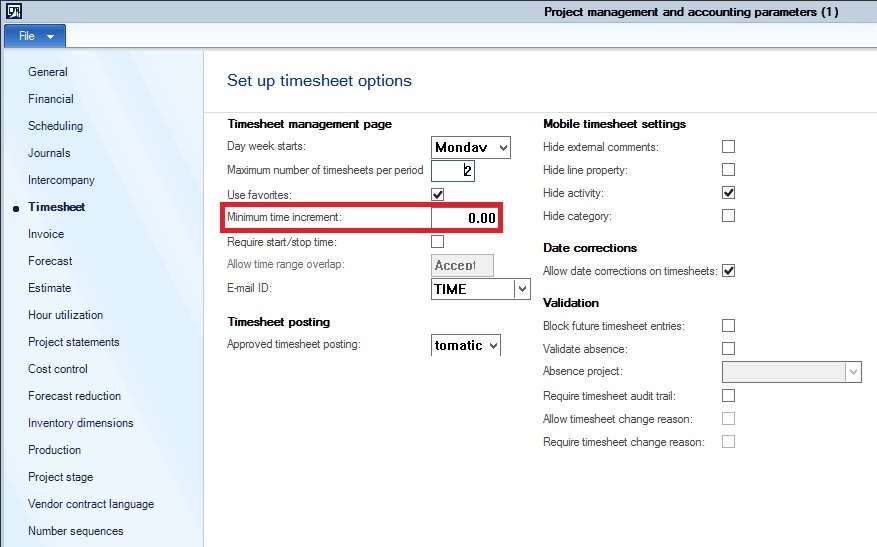
4667.MininumTimeIncrement-In-AX.jpg

Thanks,

Thai

*This post is locked for comments

I have the same question (0)
  • Ludwig Reinhard Profile Picture
    Microsoft Employee on at

    Hello Thai,

    Have you closed and opened your session again before you re-tried entering the transactions?

    Have you Setup anything in the workflow that would prevent you from entering something less than 0.25 hrs?

    Ludwig

  • Verified answer
    Community Member Profile Picture
    on at

    Hi All,

    I've just found out my mistake. In AX, the minimum increment for value is defined in two places:

    1. In Project management and accounting > Setup > Project management and accounting parameters > Timesheet. This value of minimum increment will become default value for the field minimum increment for all new projects that we create in AX.

    2. In each project that we create in AX. Therefore although I set minimum increment is zero for timesheets, I still got error message saying that "Minimum increment is 0.25" because the minimum increment of project that I enter number of hours was still 0.25 at that time I did data entries for my timesheet.

    MininumTimeIncrement-Specified-in-Project-In-AX.jpg

    Thanks

    Thai

  • Community Member Profile Picture
    on at

    Hi Ludwig,

    Thanks for your reply. I'd appreciate about that. I've just learned suddenly that the minimum increment in AX is stored in two places: in parameter setup & in each project. Now I have to come to each project that I work for & adjust the minimum increment to zero. Then I can enter any value less than 0.25.

    Thanks

    Thai

  • arey Profile Picture
    369 on at

    Thanks, This helped me.

Under review

Thank you for your reply! To ensure a great experience for everyone, your content is awaiting approval by our Community Managers. Please check back later.

Helpful resources

Quick Links

Responsible AI policies

As AI tools become more common, we’re introducing a Responsible AI Use…

Neeraj Kumar – Community Spotlight

We are honored to recognize Neeraj Kumar as our Community Spotlight honoree for…

Leaderboard > 🔒一 Microsoft Dynamics AX (Archived)

#1
Martin Dráb Profile Picture

Martin Dráb 4 Most Valuable Professional

#1
Priya_K Profile Picture

Priya_K 4

#3
MyDynamicsNAV Profile Picture

MyDynamicsNAV 2

Last 30 days Overall leaderboard

Featured topics

Product updates

Dynamics 365 release plans



