web
You’re offline. This is a read only version of the page.
close
Skip to main content

Notifications

Announcements

No record found.

Community site session details

Community site session details

Session Id :
Finance | Project Operations, Human Resources, ...
Suggested Answer

Configure office preview (WOPI) with for bussiness applications

(0) ShareShare
ReportReport
Posted on by 75

Hi,

In Dynamics 365 Finance and the upper top right you have the "Open in Microsoft Office" button which allows you to Download/Open or save documents (Excel). 
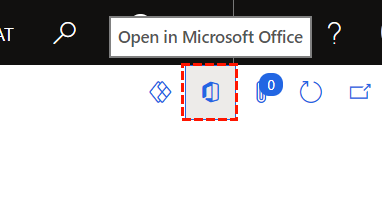
FO_2D00_OfficeButton.png

When clicking the "Download" button (in my example for the Trial balance but its consistent for other exports) then the Excel file is opened in the Office Web Preview (WOPI) where you then can see "Save a copy to OneDrive" button.
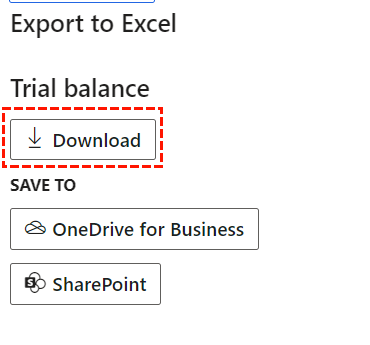
FO_2D00_DownloadButton.png

Web preview after clicking the Download button (https://view.officeapps.live.com/) where you can see the Save a copy to OneDrive:

FO_2D00_OneDriveButton.png

Clicking the "Save a copy to OneDrive" presents a sign in option to a Microsoft Personal account (https://login.live.com/) and not the Work account sign in (which would be expected). My question is there a way to configure or change this behavior so when clicking the "Save a copy to OneDrive" actually uses "for Business" sign-in. Preferably SSO and the user that is signed in the Edge browser which is the default behavior when using other Microsoft applications?

I have the same question (0)
  • Suggested answer
    Komi Siabi Profile Picture
    13,107 Most Valuable Professional on at
    [quote user="Adam A"]Clicking the "Save a copy to OneDrive" presents a sign in option to a Microsoft Personal account (https://login.live.com/) and not the Work account sign in (which would be expected). My question is there a way to configure or change this behavior so when clicking the "Save a copy to OneDrive" actually uses "for Business" sign-in. Preferably SSO and the user that is signed in the Edge browser which is the default behavior when using other Microsoft applications?[/quote]

    I think, this is because the primary Microsoft account on that browser is the Personal account. You should sign out from it, clear cache, then logon to your mail with the work account.

    When you try this in a private window where the work account is the primary one, you should be fine. Please, let us know the outcome.

  • Adam A Profile Picture
    75 on at

    Hi,

    Thanks for the suggestion and to confirm the primary account is my work account and I have deleted browser cache, cookies etc. To confirm it's my work account, if I navigate to office.com and sign in then I'm ending up on my work profile office portal as I'm automatically signed in.

    Strange behavior though: If I test this out in Chrome and click the "Download" button then the document is downloaded and no Web View of the document the same happens when in Edge InPrivate mode.

    In Edge when signed in with my work account however I'm presented with the Web View as described above.

    Strange behavior and something I need to investigate further but don't like the inconsistent behavior between Chrome, Edge and Edge InPrivate mode.

Under review

Thank you for your reply! To ensure a great experience for everyone, your content is awaiting approval by our Community Managers. Please check back later.

Helpful resources

Quick Links

Responsible AI policies

As AI tools become more common, we’re introducing a Responsible AI Use…

Neeraj Kumar – Community Spotlight

We are honored to recognize Neeraj Kumar as our Community Spotlight honoree for…

Leaderboard > Finance | Project Operations, Human Resources, AX, GP, SL

#1
Martin Dráb Profile Picture

Martin Dráb 646 Most Valuable Professional

#2
André Arnaud de Calavon Profile Picture

André Arnaud de Cal... 529 Super User 2025 Season 2

#3
Sohaib Cheema Profile Picture

Sohaib Cheema 285 User Group Leader

Last 30 days Overall leaderboard

Product updates

Dynamics 365 release plans
