web
You’re offline. This is a read only version of the page.
close
Skip to main content

Notifications

Announcements

No record found.

Community site session details

Community site session details

Session Id :
Microsoft Dynamics AX (Archived)

Extend/customize a Map - how is this done?

(0) ShareShare
ReportReport
Posted on by

I'm trying to extend an existing map (SourceDocumentHeaderImplementation) in the SourceDocumentation package.

First problem is that it won't allow me to Extend.... only Customize. Not ideal, but let's run with it.

So I select the Customize option, and strangely the Mappings node is completely empty - I would expect to see the standard mappings here, but for some reason, I don't:
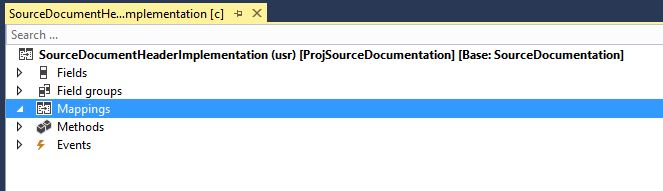
01-No-mappings.JPG

It allows me to add a new Mapping, but there doesn't seem to be anywhere to specify which table it maps to:
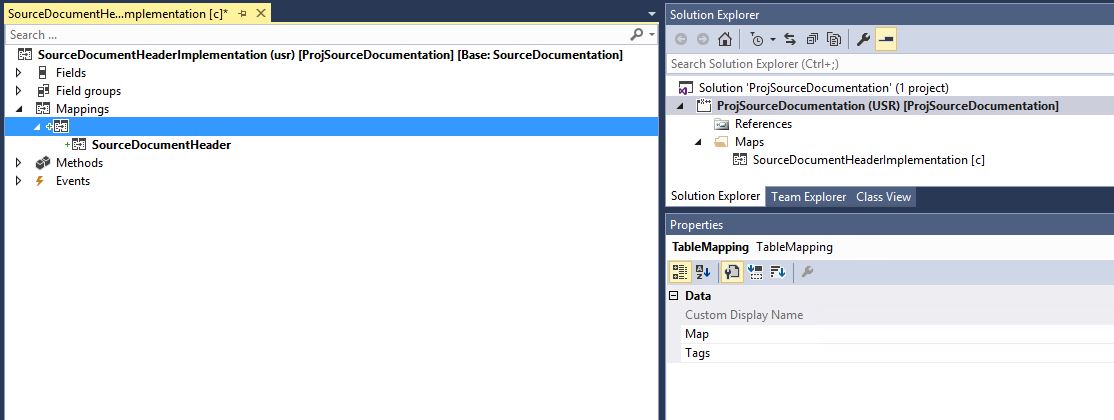
02-Cant-specify-table.JPG

How do maps work in AX7??

*This post is locked for comments

I have the same question (0)
  • Verified answer
    Mea_ Profile Picture
    60,284 on at

    Hi David Hand,

    If you want to add new table (Table1) to SourceDocumentHeaderImplementation map you need to go to new Table1, expand Mappings node and add new Mapping to SourceDocumentHeaderImplementation map there. It was changed this way in AX 7, because now you can add new tables into maping without modifying a map.

    4338.Untitled.png

  • David Hand Profile Picture
    on at

    Awesome! Thanks Ievgen! Another AX7 mystery solved.

  • David Hand Profile Picture
    on at

    Can you do this on an extension to the table? Or only a customization? I'm trying to add a Mapping on an extension of ProjTable, but there is no option to Add mapping.

  • Suggested answer
    Mea_ Profile Picture
    60,284 on at

    Sure you can, option is called "New mapping"

    6835.Untitled.png

  • David Hand Profile Picture
    on at

    Strange. I don't get that option on my extension. Only available when I do customization. Perhaps I'm working on an earlier version of the platform.

  • Mea_ Profile Picture
    60,284 on at

    It's available on update 2, what version do you have ?

  • Suggested answer
    Community Member Profile Picture
    on at

    Hi ievgen ,

    I have a similar Issue,

    I have two extension table (Purchtable.Extension) and PurchaseTableHistory.Extension

    I have created additional field destinationCodeId in both of these table .

    I want to use map/PurchTableMap for insertion of records .

    But my problem is that, i am not able to create relation on PurchtableMap mapping nodes of both the tables (Purchtable.Extension ,PurchaseTableHistory.Extension) .

    I am using RTM version of AX365.

    Can you please help !!

    BR,Arpit

  • Mea_ Profile Picture
    60,284 on at

    Hi Arpit,

    As I mentioned this is available on Update 2 not RTW, so you have either update or go with customization. I prefer update because new versions have bunch of bugs fixed and new extensions capabilities and anyway you will have to update at some point, better earlier than later.

  • Community Member Profile Picture
    on at

    Hi,

    Is there any way to map the new fields added in table extension to a new field added in a map through customisation.

    Because, I have added new fields into the map through  customisation. I want to map this new field to a new field in table extension. In my scenario, map is already been added in the table mappings. So, I no need to add the map again.

    But I cant able to view the new field added in map, in the mappings node.

    I have done synchronising database and also built the models ins D365. But mappings didnt list the newly added fields in map.

    Is there any way to solve this problem?

    Thanks in advance,

    Elamathi. S

  • Community Member Profile Picture
    on at

    Did you manage to find the solution to your issue?

    I'd encountered almost the same issue. I'm using Update 3 version.

    I had added 2 new fields in a MAP and 2 new fields on the table thru customization

    then when I try to add the mapping for these 2 new fields I cannot see the 2 new fields on the mapping. Both MAP and table sits on the same model.

    To be able  to see the 2 new fields I need to changed the mapping table and put it back so that the field list will be refreshed the only problem doing that is you need to remapped again those other fields that was previously mapped.

Under review

Thank you for your reply! To ensure a great experience for everyone, your content is awaiting approval by our Community Managers. Please check back later.

Helpful resources

Quick Links

Responsible AI policies

As AI tools become more common, we’re introducing a Responsible AI Use…

Neeraj Kumar – Community Spotlight

We are honored to recognize Neeraj Kumar as our Community Spotlight honoree for…

Leaderboard > 🔒一 Microsoft Dynamics AX (Archived)

#1
Martin Dráb Profile Picture

Martin Dráb 4 Most Valuable Professional

#1
Priya_K Profile Picture

Priya_K 4

#3
MyDynamicsNAV Profile Picture

MyDynamicsNAV 2

Last 30 days Overall leaderboard

Featured topics

Product updates

Dynamics 365 release plans



