Hi Tez,
You could refer to following approach:
1. Create a custom channel tile: create a custom entity and add a lookup field(the source entity is Event) to the custom entity.
From beginning, please take some time to learn about what Custom Channel is.
https://docs.microsoft.com/en-us/dynamics365/marketing/developer/extend-customer-journeys-custom-channels
Those two articles are composed by community member, which would be easier than the documentation to understand Custom Channel and how to create it.
https://community.dynamics.com/365/marketing/b/dynamics-365-for-marketing-community-blogs/posts/custom-touch-point-custom-tile-in-customer-journey-in-less-than-10-minutes
https://community.dynamics.com/365/marketing/b/dynamics-365-for-marketing-community-blogs/posts/firetext-sms-
When a custom channel activity record is created, we can get following important information from its fields data.
Entity ID: ID of corresponding custom entity record.
Contact (Value): ID of contacts who went through custom journey.
Customer journey (Value): ID of the customer journey which generates the custom channel activity.
2. Create a flow on creation of Custom Channel Activities.
Action 1: use Contact (value) of the custom channel activity to retrieve contact.(First Name, Email address)
Action 2: use Entity ID to retrieve the corresponding custom entity record, due to the record will be associated with a specific event, therefore, we can get event ID from it.
Action 3: use event ID from the custom entity record to retrieve event information(Name, Start Date)
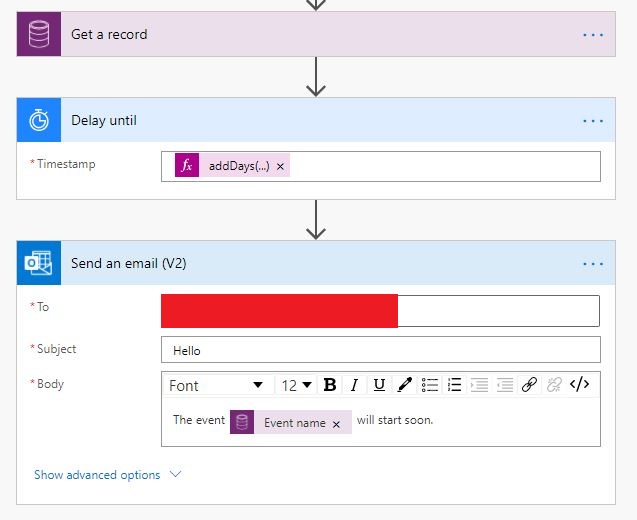
Action 4: Before sending reminder email, add "Delay..until" action.
In screenshot below, "Get a record" is used to retrieve the event.
Therefore, I use such expression to get the last day before the event start date.
addDays(outputs('Get_a_record')?['body/msevtmgt_eventstartdate'], -1, 'yyyy-MM-ddTHH:mm:ssZ')
By doing that, the flow will delay until 1 day before the event start date, then reminder email will be sent to contacts.
The whole process is bit complex, if you had encountered any trouble, please feel free to ask question.
Regards,
Clofly


