Hi,
I have customized Sales Transaction Entry form. When Entry Details form (GRID) has vertical scrollbar and i follow below scenarios, QTY/Unit Price set automatically to default. (Qty :1 and Unit Price: item price)
- Created quote with 10 line items
- Open existing quote
- Select Item Number in first line item in scrolling window (GRID) (Currently Cursor focus on Line 1 item number: e.g. Line 1 has Qty :50 and Price : $199)
- scrolling down using Mouse Scroll wheel or clicking on down arrow from grid vertical scrollbars
- Once scroll down, item 1 gets hidden
- Click on Item number on line 9 (GRID)
- Qty and unit price updated automatically to default on Line 1 item number. (e.g Qty : 1 and unit price default: $120)
This issue is happened when i manually scroll down/up using Mouse Scrolling wheel or clicking on Up/Down Arrow of Vertical Scroll bars. If I navigate through tab or up/down key, everything is working fine.
I have attached my issue below.
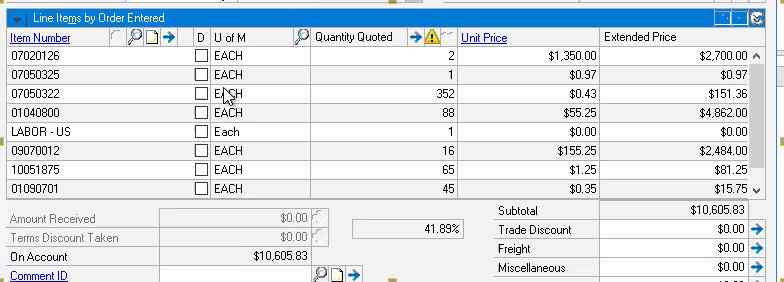
How can i resolve this issue? Please help
For the customization, SOP entry form has two custom fields. One is on Sales Transaction Entry Form and another is on Sales Transaction Entry Detail form (GRID). Field at GRID level shows margin % on the fly while field at Entry form level shows margin % coming from database using VBA code.
Thanks,
Atul







