web
You’re offline. This is a read only version of the page.
close
Skip to main content

Notifications

Announcements

No record found.

Community site session details

Community site session details

Session Id :
Finance | Project Operations, Human Resources, ...
Answered

Fixed price completed contract method - revenue recognition

(2) ShareShare
ReportReport
Posted on by 1,282

Hello community members,

I have created a fixed price project (completed contract method) with a total revenue of $1,000 and I have one item on item requirement and on item forecast  which is shipped and posted. I have no hour and expenses. My invoice is posted in May too. My cost template is based on quantity (not on cost). But when I try estimation process, I get 0 revenue for accrual as depicted below while the project is 100% completed based on quantity.

80445.png 

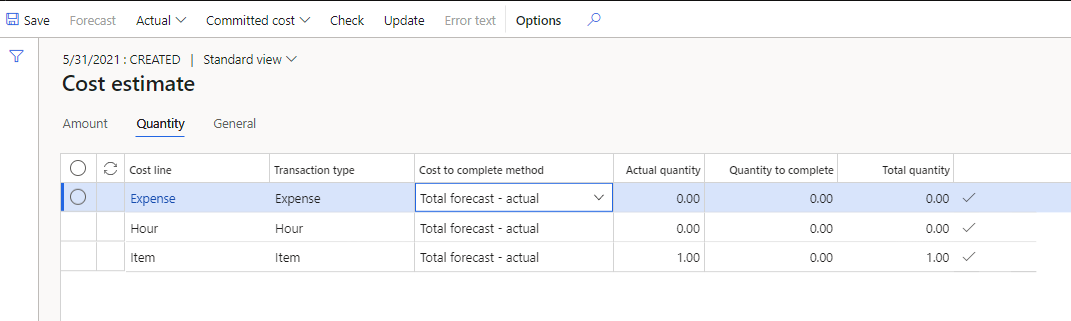
My cost template based on qty:

836585.png

Based on amount:

686558.png

What could be the reason for the 0 accrual value here? Is it linked to item cost which is 0 or has it do with something else? 

Please advise.

I have the same question (0)
  • Kumar_Sat Profile Picture
    1,282 on at

    Or may be, please help with the revenue recognition process for a fixed price completed contract method project.

  • Verified answer
    Kumar_Sat Profile Picture
    1,282 on at

    Never mind, I got it. I think I need to post and eliminate the project for the invoice revenue to be recognized.

  • MATTGUO Profile Picture
    22,349 Moderator on at

    Thanks for your update.

  • Mubeen Faizullah Profile Picture
    139 on at

    Hi

    Dear You wrote u got the solution?

    Im trying the post/eliminate but accrued revenue is coming zero just like ur first pic.

    What did u get as a solution?

  • Mubeen Faizullah Profile Picture
    139 on at

    Hi

    Dear You wrote u got the solution?

    Im trying the post/eliminate but accrued revenue is coming zero just like ur first pic.

    What did u get as a solution?

  • PD-06020722-0 Profile Picture
    57 on at
    Hi all, just a quick guideline here: 1. Create the forecast, 2. Create the on account transactions, 3. Post the journals against the forecast, 4. Post the invoices for the on account transactions, 5.  4. Recognize the revenue, 6. On the last line of revenue recognition with Percentage completed 100%, the eliminate button will be available and you can do the elimination process. With this voucher, WIP invoiced - on account gets debited and the accrued revenue - sales value credited. So the WIP transactions from point 4 are balanced.
     
    Elimination entries:   On Account transactions invoiced 1 of 2 in total (20000)
    Hope it helps!

Under review

Thank you for your reply! To ensure a great experience for everyone, your content is awaiting approval by our Community Managers. Please check back later.

Helpful resources

Quick Links

Responsible AI policies

As AI tools become more common, we’re introducing a Responsible AI Use…

Neeraj Kumar – Community Spotlight

We are honored to recognize Neeraj Kumar as our Community Spotlight honoree for…

Leaderboard > Finance | Project Operations, Human Resources, AX, GP, SL

#1
Martin Dráb Profile Picture

Martin Dráb 544 Most Valuable Professional

#2
André Arnaud de Calavon Profile Picture

André Arnaud de Cal... 450 Super User 2025 Season 2

#3
Sohaib Cheema Profile Picture

Sohaib Cheema 250 User Group Leader

Last 30 days Overall leaderboard

Product updates

Dynamics 365 release plans