web
You’re offline. This is a read only version of the page.
close
Skip to main content

Notifications

Announcements

No record found.

Community site session details

Community site session details

Session Id :
Finance | Project Operations, Human Resources, ...
Answered

Excel templates not publishing into D365FO

(0) ShareShare
ReportReport
Posted on by 344

Hi all,

I have created a custom  excel template by downloading an excel template under common>common> office integration>document templates.

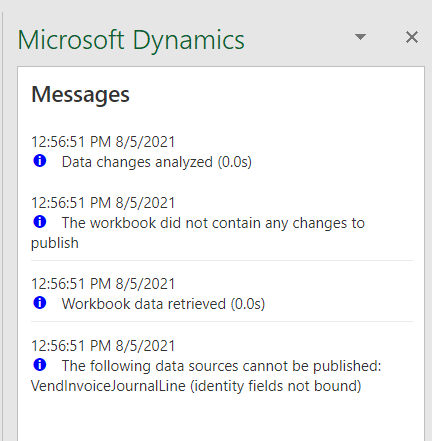
I have added columns and removed some columns. i have created an invoice journal populated 1 line and viewed in Excel. When i change the amount, or add any other details and click publishing, it is not publishing.  Message action centre is showing that no changes were detected.
pastedimage1628162496681v1.png

I am kindly requesting for your assistance

I have the same question (0)
  • Suggested answer
    Gaurangkumar Jani Profile Picture
    4,534 User Group Leader on at

    Hi Alexio,

    Did you provide the Journal number on the journal line?

    Thanks,

  • Alexio Pfumai Profile Picture
    344 on at

    Hi G thanks for your response, the journal number is there on the journal lines

  • Suggested answer
    Gaurangkumar Jani Profile Picture
    4,534 User Group Leader on at

    Hi Alexio,

    Can you share a screenshot of fields you have added to your template?

    Thanks,

  • André Arnaud de Calavon Profile Picture
    301,130 Super User 2025 Season 2 on at

    Hi Alexio,

    Please provide some more information how you created the Excel template. Did you create one from scratch or did you use one out of the box as start?

  • Suggested answer
    SouravDam Profile Picture
    11,730 on at

    Hi ALEXIO PFUMA,

    Also check from this angle too. Once you have published the data with this template and tried again to publish using the same template, may not work this time. Alternatively, you have to generate the template again, update the data and then publish back.

    Regards,
    Sourav

  • Verified answer
    greengrimms Profile Picture
    1,400 on at

    Hi Alexio,

    I ran into the same issue a while ago. Please check if you included all the fields that compose the data entity key in your excel template. You probably removed some of the columns that are a part of that key.

    That should fix it.

  • Suggested answer
    SouravDam Profile Picture
    11,730 on at

    Hi ALEXIO PFUMAI,

    One more point would like to highlight. Is there any Line number available in this template?

    Please make sure each invoice line should be maintained with a line number.

    Regards,
    Sourav

  • Verified answer
    Prem Kumar Bachu Profile Picture
    3,418 on at

    Hi Alexio,

    Does this issue resolved? If these answers helped you to fix the issue please mark as verified.

    One of the Microsoft site says "All key and required fields must be present to publish data back to the entity. Try to edit the design to add more fields to the binding."

    Thanks,

    Prem

Under review

Thank you for your reply! To ensure a great experience for everyone, your content is awaiting approval by our Community Managers. Please check back later.

Helpful resources

Quick Links

Responsible AI policies

As AI tools become more common, we’re introducing a Responsible AI Use…

Neeraj Kumar – Community Spotlight

We are honored to recognize Neeraj Kumar as our Community Spotlight honoree for…

Leaderboard > Finance | Project Operations, Human Resources, AX, GP, SL

#1
Martin Dráb Profile Picture

Martin Dráb 451 Most Valuable Professional

#2
André Arnaud de Calavon Profile Picture

André Arnaud de Cal... 428 Super User 2025 Season 2

#3
BillurSamdancioglu Profile Picture

BillurSamdancioglu 239 Most Valuable Professional

Last 30 days Overall leaderboard

Product updates

Dynamics 365 release plans
