web
You’re offline. This is a read only version of the page.
close
Skip to main content

Announcements

No record found.

News and Announcements icon
Community site session details

Community site session details

Session Id :
Customer experience | Sales, Customer Insights,...
Suggested Answer

Dynamics CRM 365 Plugin disregarding isolation mode

(1) ShareShare
ReportReport
Posted on by 25

Hi all,

I am developing a plugin that would get send the XML data to the external web-service and the plugin would consume the response and finally display the result to the end-user.

Version is Microsoft Dynamics 365 (8.2.2.112) (DB 8.2.2.112) on-premises.

I am stuck at getting the response from the external web-service, I am attempting to save the response to "VAR" (the response is returned as string, also tried to save it as a string, no luck).

Problem is that I am getting the "System.Security.Permissions.EnvironmentPermission" exception. The plugin is non-sandboxed.

One interesting thing that I've noticed, that when the plugin is debugged using the profile from the plug-in profiler and when the "Isolation mode" is set to "none" on the "Settings" tab debug window, the plugin works perfectly fine (example below).

I am debugging on my local machine on the company network.

Has anyone encountered similar issues? I have tried to search for the System.Security.Permissions.EnvironmentPermission exception, however the results were not helpful in resolving this situation.
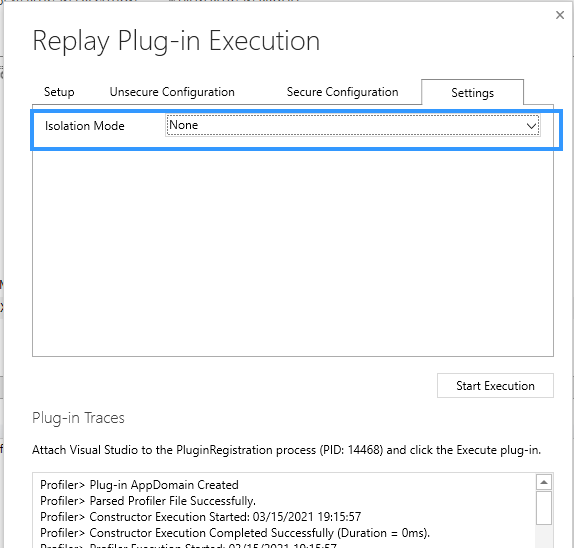
2021_2D00_03_2D00_15-19_5F00_18_5F00_30_2D00_Plugin-Registration-Tool.png

I have the same question (0)
  • Suggested answer
    Johao Larios Profile Picture
    1,795 on at

    How is the plugin registered?

    When you are registering it, try by choosing None in Specify the Isolation Mode

  • rv1911 Profile Picture
    25 on at

    That's the way it is registered now:

    2021_2D00_03_2D00_15-22_5F00_36_5F00_53_2D00_PluginRegistrationView.png

  • rv1911 Profile Picture
    25 on at

    Update:

    I am wondering if this could be related to a security issue, maybe the account that tries to save the value on the server doesn't have the rights to do so? I am wondering how such variables are stored in CRM plugins.

  • Suggested answer
    Johao Larios Profile Picture
    1,795 on at

    Hello rv1911

    For this one I recommend you to open a ticket with Microsoft, as you mentioned, it seems that something else may be occurring over there. 

Under review

Thank you for your reply! To ensure a great experience for everyone, your content is awaiting approval by our Community Managers. Please check back later.

Helpful resources

Quick Links

Introducing the 2026 Season 1 community Super Users

Congratulations to our 2026 Super Stars!

Meet the Microsoft Dynamics 365 Contact Center Champions

We are thrilled to have these Champions in our Community!

Congratulations to the April Top 10 Community Leaders

These are the community rock stars!

Leaderboard > Customer experience | Sales, Customer Insights, CRM

#1
ManoVerse Profile Picture

ManoVerse 73 Super User 2026 Season 1

#2
Muhammad Shahzad Shafique Profile Picture

Muhammad Shahzad Sh... 69 Most Valuable Professional

#3
11manish Profile Picture

11manish 50

Last 30 days Overall leaderboard

Product updates

Dynamics 365 release plans
