web
You’re offline. This is a read only version of the page.
close
Skip to main content

Announcements

News and Announcements icon
Community site session details

Community site session details

Session Id :
Dynamics 365 Community / Forums / Finance forum / i want to English to a...
Finance forum

i want to English to arabic convert in X++ on D365

(0) ShareShare
ReportReport
Posted on by 1,215

Hi, guys

i need it English to Arabic convert so that what to be done?

regards,

Riyas 

I have the same question (0)
  • Marcel Ferreira Profile Picture
    Microsoft Employee on at

    Hi Riyas,

    We need more context to be able to help.

    Are you using label files? What do you want to translate? why?

    Is this what you want?

    docs.microsoft.com/.../create-localizable-labels-client

    Regards,

    Marcel

  • Riyas ahamed F Profile Picture
    1,215 on at

    Hi marcel,

    i need it translate English to Arabic in x++.

  • Martin Dráb Profile Picture
    240,534 Most Valuable Professional on at

    Unfortunately you still didn't tell us what you want to transalate.

    If you're talking about data (and not labels), you can utilize a translator service such as Google Translate or Microsoft Translator (if the quality of this kind of translation is sufficient for your purposes).

  • Riyas ahamed F Profile Picture
    1,215 on at

    Hi martin sir,

    i have a two fields in Company name(English) and Company name(Arabic)

    once i'll set to company name automatically converted in same name Arabic on D365FO.

  • André Arnaud de Calavon Profile Picture
    306,859 Super User 2026 Season 2 on at

    Hi Riyas,

    In addition, if you need to translate your application labels, you can use the Microsoft Dynamics Translation Service from LCS.

    docs.microsoft.com/.../translation-service-overview

  • Verified answer
    Marcel Ferreira Profile Picture
    Microsoft Employee on at

    Hi Riyas,

    [quote user="Riyas ahamed F"]

    Hi martin sir,

    i have a two fields in Company name(English) and Company name(Arabic)

    once i'll set to company name automatically converted in same name Arabic on D365FO.

    [/quote]

    Do you mean convert or translate?
    If you want to convert you need to define what do you mean by that.
    If you want to automatically translate - you have to follow Martin's recommendation and use a translation service.


    or... 

    You could use the same pattern as the Released product and have a translation table.
    Using this approach you can have as many languages as you want. But requires to manually fill the field.

    Have a look in the release products form:
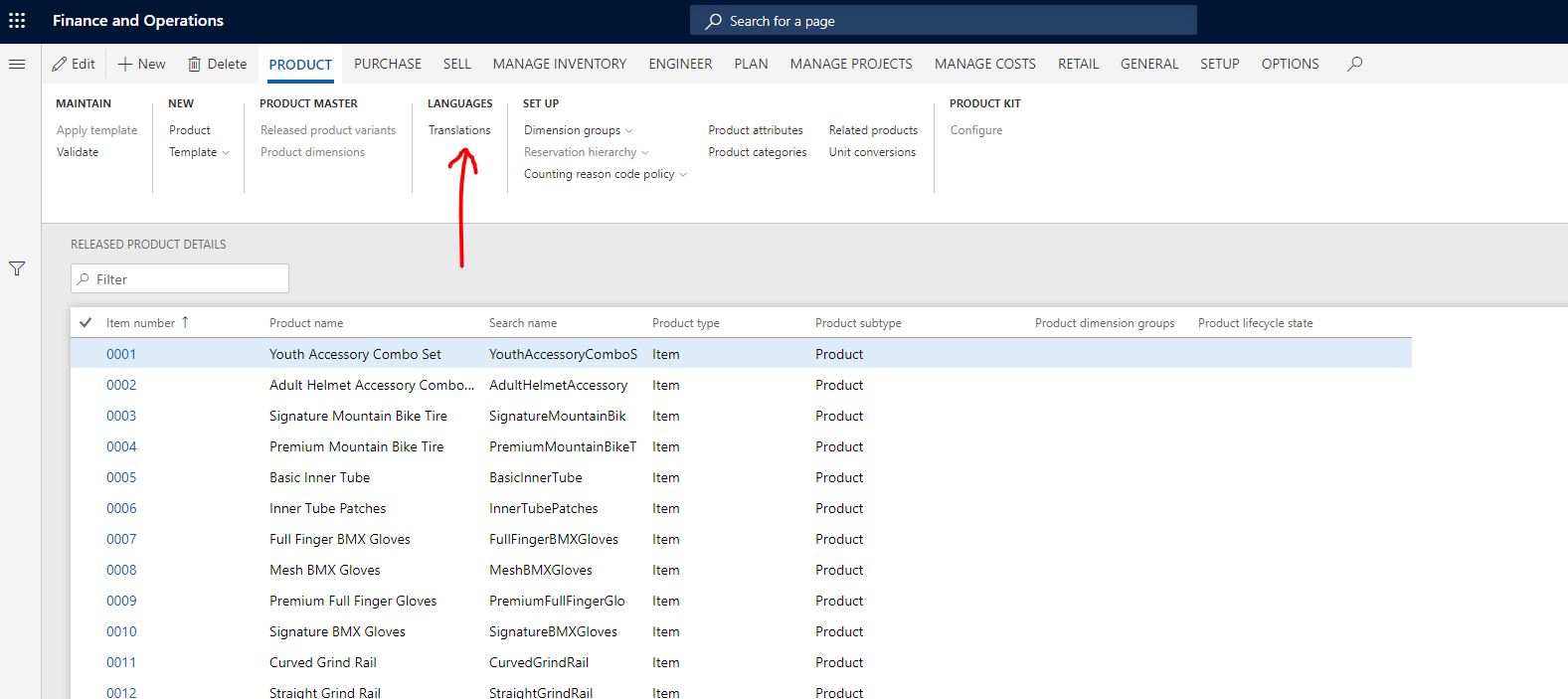
    7380.Capture1.PNG

    Cheers,

    Marcel

Under review

Thank you for your reply! To ensure a great experience for everyone, your content is awaiting approval by our Community Managers. Please check back later.

Helpful resources

Quick Links

November Spotlight Star - Khushbu Rajvi

Congratulations to a top community star!

Forum Structure Changes Coming on 11/8!

In our never-ending quest to help the Dynamics 365 Community members get answers faster …

Dynamics 365 Community Platform update – Oct 28

Welcome to the next edition of the Community Platform Update. This is a status …

Leaderboard > Finance

Last 30 days Overall leaderboard

Featured topics

Product updates

Dynamics 365 release plans
