web
You’re offline. This is a read only version of the page.
close
Skip to main content

Notifications

Announcements

No record found.

Community site session details

Community site session details

Session Id :
Customer experience | Sales, Customer Insights,...
Answered

How to remove the tab from Related tab.

(0) ShareShare
ReportReport
Posted on by 425

Hi,

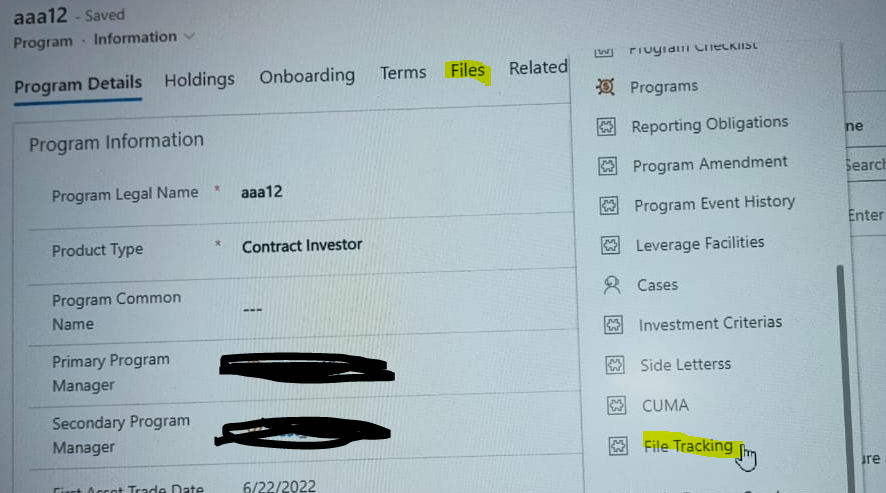
I have an entity  Program(Custom), I have a tab name "File Tracking" in the related option, but I want to remove it from related and want to add it into the form.

And there is one tab "File" on the form, I want to add this "File" to the related tab.

I have attached the SS below, so basically according to SS, I want to replace the positions of highlighted tabs, need to put "File tracking" Outside of the Related tab, and add the "File" to the related tab.
pastedimage1659953099549v2.png

I have the same question (0)
  • Verified answer
    Bipin D365 Profile Picture
    28,983 Moderator on at

    Hi,

    Please check below post which will give you info on how to hide related tab item.

    community.dynamics.com/.../how-to-remove-disable-custom-entities-from-related-tab-for-default-view-of-new-main-form

  • Verified answer
    Community Member Profile Picture
    on at

    Hi Himanshu,

    1.Add "File" to the related tab.

    When i access File tab, there is one documents sub-grid in the  section:

    pastedimage1660014373110v3.png

    1:N relationship between current entity and Sharepoint Document entity:

    You can click 'Navigation' button in the form, and add Documents from right pane to the left pane.

    pastedimage1660014339736v2.png

    Change show label through double-clicking documents in the left pane:

    pastedimage1660014815736v2.png

    Hide the original File tab

    pastedimage1660014714024v1.png

    2.Add File Tracking into the form tab.

    Move to Insert,add Tab and add sub-grid related to File Tracking into the tab.

    pastedimage1660014557944v4.png

Under review

Thank you for your reply! To ensure a great experience for everyone, your content is awaiting approval by our Community Managers. Please check back later.

Helpful resources

Quick Links

Responsible AI policies

As AI tools become more common, we’re introducing a Responsible AI Use…

Neeraj Kumar – Community Spotlight

We are honored to recognize Neeraj Kumar as our Community Spotlight honoree for…

Leaderboard > Customer experience | Sales, Customer Insights, CRM

#1
Tom_Gioielli Profile Picture

Tom_Gioielli 81 Super User 2025 Season 2

#2
Gerardo Rentería García Profile Picture

Gerardo Rentería Ga... 49 Most Valuable Professional

#3
#ManoVerse Profile Picture

#ManoVerse 40

Last 30 days Overall leaderboard

Product updates

Dynamics 365 release plans



