web
You’re offline. This is a read only version of the page.
close
Skip to main content

Notifications

Announcements

No record found.

Community site session details

Community site session details

Session Id :
Microsoft Dynamics AX (Archived)

Issue while using .Net DLLs in AX 2012

(0) ShareShare
ReportReport
Posted on by 10,796 User Group Leader

Hi Guys,

I created a class library project in Visual Studio 2010 and have already deployed it. It created .dll files in %USERPROFILE%\AppData\Local\Microsoft\Dynamics AX\VSAssemblies folder. Till now works fine!

I set following properties while deploying VS project and save to AOT.

Deploy Client = Yes
Deploy Server = Yes

This is how project (class library looks like)
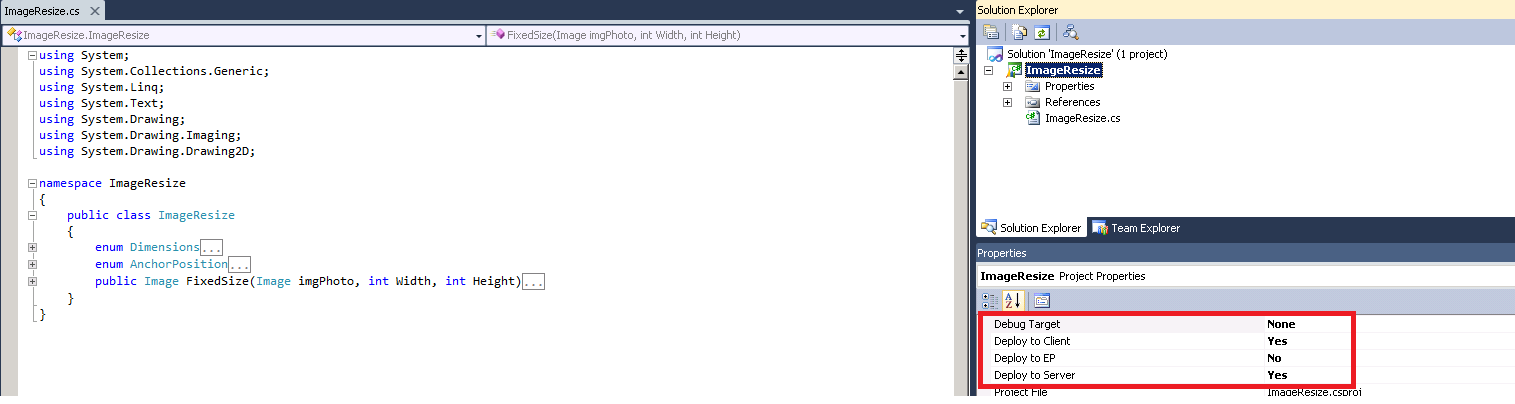
1805.AOTJob.png

I created a job within AOT and tried to call this class library but it did not get recognized in AX.

This is how I am using it in a job
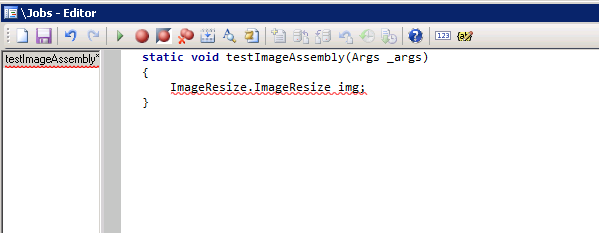
I have already copied .pdb and .DLL files again from Visual studio project folder into %USERPROFILE%\AppData\Local\Microsoft\Dynamics AX\VSAssemblies.

Can anyone please tell me what step I am missing as I have followed all the steps defined on this thread.

AOS server has also been restarted and Hotswapping is also enabled on server (I know its not good to enable it but its just testing purpose.)

Any help or any pointer will highly be appreciated.

*This post is locked for comments

I have the same question (0)
  • MukeshHirwani Profile Picture
    1,180 on at

    Hi Faisal,

    Did u deploy VS project AFTER setting Deploy to Server & Client?

  • Suggested answer
    Tommy Skaue Profile Picture
    Moderator on at

    Let me get this straight. Your assembly is compiled and available in X++?

    Do you get intellisense when you start typing the namespace?

    The article you have linked to sort of says it all. This should work, unless you have a mix of environments here, and things are being deployed to a different AOT, and not the one you are trying to consume the assembly from.

  • Faisal Fareed Profile Picture
    10,796 User Group Leader on at

    Hi Mukesh, Yes I deployed it and I have checked DLL files created in my %USERINFO folder its there.

  • Faisal Fareed Profile Picture
    10,796 User Group Leader on at

    Assemnly has been compiled and it is showing in AOT.

    No I am not getting intelligence in X++ I am getting upto ImageResize.ImageResize which is Namespace.ClassName in .Net. I am not able to create any object for this class in order to access Class method in my case it is FixedSize().

  • Faisal Fareed Profile Picture
    10,796 User Group Leader on at

    Hi Tommy,

    How can I confirm this point "unless you have a mix of environments here, and things are being deployed to a different AOT, and not the one you are trying to consume the assembly from"?

    I Edit visual studio project from AOT and deployed it. Later I deleted .DLL file and comiled the visual project from AOT itself and it generated .DLL files.

  • MukeshHirwani Profile Picture
    1,180 on at

    Faisal,

    try on other machine.. it works perfectly in d same manner... might b dr is some issue wd ur configuration.

  • Faisal Fareed Profile Picture
    10,796 User Group Leader on at

    Mukesh,

    Can you please tell me where should I see these configuration issues? I mean where and what I can double check?

  • Tommy Skaue Profile Picture
    Moderator on at

    Check one more thing; do you have one dll in the root folder of your bin-folder (Client), and another one in your Assembly folder (..\AppData\Local\Microsoft\Dynamics AX\VSAssemblies\)?

    Make sure things doesn't get mixed up by two different versions being picked up by the client. If you find only one dll, try "peek" inside of it using Jetbrains dotPeek (Bing it) and make sure it is the latest and most correct build.

  • Community Member Profile Picture
    on at

    Check if all things are public in your visual Studio development. I can see at least the enums are not public, maybe this causes ax to fail here?

  • Verified answer
    Tommy Skaue Profile Picture
    Moderator on at

    Ok. First of all, when writing X++ code that refers .Net assemblies or simply compiling X++ code that refers .Net assemblies, this will only work if those .Net assemblies are available client side. This means you need to make sure they are in the scope of the AX Client.

    The scope is limited to :

    * Global Assembly Cache (GAC). Example look under \windows\assembly\

    * Client bin folder. Program Files (x86\....Client\bin\

    * Your own users VSAssembly hive. %appdata%\..\Local\....\VSAssembly

    This scope gets refreshed and reloaded when the Client starts, each time, to the best of my knowledge.

    This is all good when writing the code, getting intellisense, compiling and everything looks good.

    However, if the code is actually supposed to run server side (by the AOS), then it *also* needs to be in the scope of the AOS:

    * GAC

    * Server bin folder. \Program Files\....\Server\YOURAOS\bin\

    * Server VSAssembly-folder. Same as above, but with VSAssembly at the end. ;-)

    This scope gets refreshed when the actual AOS Service gets restarted. The only exception is any assemblies in the VSAssembly folder *IF* "HotSwap assemblies" is enabled on the AX Service Configuration. Do not enable this setting in Production, but if you are the only developer on this AOS, feel free to enable it while developing your assembly. Not sure when it gets reloaded, but my guess is when the project is compiled in Visual Studio.

    So think about where the code/assembly is being loaded/picked up, and think about scope. I would recommend to avoid having the dll both in the root bin folder *and* the VSAssembly folder. I'm not sure what version of the dll it will pick up first and give precedence over the other.

    :-)

Under review

Thank you for your reply! To ensure a great experience for everyone, your content is awaiting approval by our Community Managers. Please check back later.

Helpful resources

Quick Links

Responsible AI policies

As AI tools become more common, we’re introducing a Responsible AI Use…

Neeraj Kumar – Community Spotlight

We are honored to recognize Neeraj Kumar as our Community Spotlight honoree for…

Leaderboard > 🔒一 Microsoft Dynamics AX (Archived)

#1
Martin Dráb Profile Picture

Martin Dráb 4 Most Valuable Professional

#1
Priya_K Profile Picture

Priya_K 4

#3
MyDynamicsNAV Profile Picture

MyDynamicsNAV 2

Last 30 days Overall leaderboard

Featured topics

Product updates

Dynamics 365 release plans



