web
You’re offline. This is a read only version of the page.
close
Skip to main content

Notifications

Announcements

No record found.

Community site session details

Community site session details

Session Id :
Microsoft Dynamics 365 | Integration, Dataverse...
Answered

Appointment Invitation

(0) ShareShare
ReportReport
Posted on by 85

Can you Suppress Appointment Invitations inD365 CE?

I have the same question (0)
  • Verified answer
    LeoAlt Profile Picture
    16,331 Moderator on at

    Hi partner,

    Sending invitations automatically for appointment is by design in D365, and if you want to stop it, you need to stop it in exchange cause it will sending emails by exchange. I created an appointment in my instance and I monitored the system jobs, I found that there was no jobs triggered after created the appointment, so it's exchange that send the emails.

    No such job that send invitations.
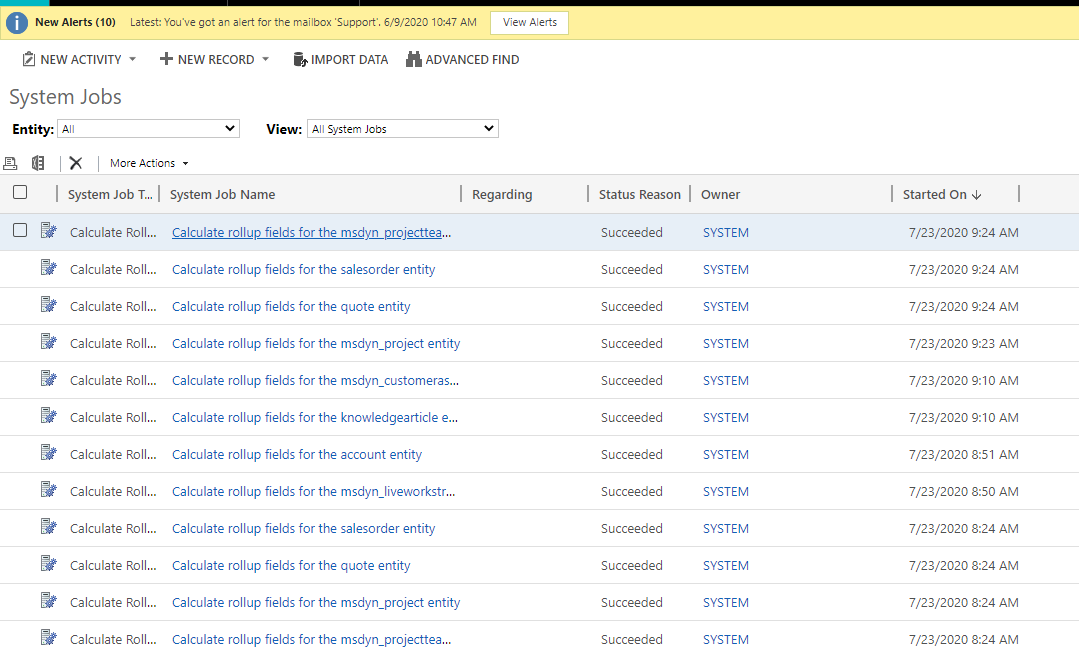
    pastedimage1595468923688v1.png

    You should create a plug-in in D365 when creating and updating the appointment to add special tag in the body to let the exchange know it is an appointment invitation send from D365 and then create exchange rule to prevent sending these emails which contains the special body.

    You could refer to this blog for more details.

    https://dynamics.mittermair.pro/2019/01/06/stop-sending-appointment-invitation-to-attendees/

    In the first step, to add special text in body, you could also use FLOW to do this.

    pastedimage1595469254208v2.png

    pastedimage1595469272146v3.png

    pastedimage1595469365786v4.png

    Best Regards,

    Leo

  • RZP Profile Picture
    85 on at

    If you update the appointment, is the update sent to the attendees as well?

  • RZP Profile Picture
    85 on at

    BY default the initial invitation is sent, however it appears that if the Appointment is modified in CE, an update is not sent.

  • RZP Profile Picture
    85 on at

    I just tested and if you update a native field for an appointment in the future, an updated invite is in fact sent.

  • LeoAlt Profile Picture
    16,331 Moderator on at

    Hi partner,

    In my answer, I only created a FLOW triggered when creating the appointment, so you also need to create another FLOW when updating the appointment with the same action.

    Regards,

    Leo

Under review

Thank you for your reply! To ensure a great experience for everyone, your content is awaiting approval by our Community Managers. Please check back later.

Helpful resources

Quick Links

Responsible AI policies

As AI tools become more common, we’re introducing a Responsible AI Use…

Neeraj Kumar – Community Spotlight

We are honored to recognize Neeraj Kumar as our Community Spotlight honoree for…

Leaderboard > Microsoft Dynamics 365 | Integration, Dataverse, and general topics

#1
Siv Sagar Profile Picture

Siv Sagar 93 Super User 2025 Season 2

#2
#ManoVerse Profile Picture

#ManoVerse 76

#3
Martin Dráb Profile Picture

Martin Dráb 64 Most Valuable Professional

Last 30 days Overall leaderboard

Product updates

Dynamics 365 release plans



