Hi
Link shared by Goutam has all the details and additional details are in related links.
I just wanted to highlight few key points related to your question.
Your question is related to Service Protection API Limits. The service protection is enforced based on the following 3 factors
- The number of requests were sent by a user.
- The combined execution time was required to process requests sent by a user.
- The number of concurrent requests sent by a user.
By default maximum concurrent requests a user account can make to Dynamics CRM is 52, please see below.
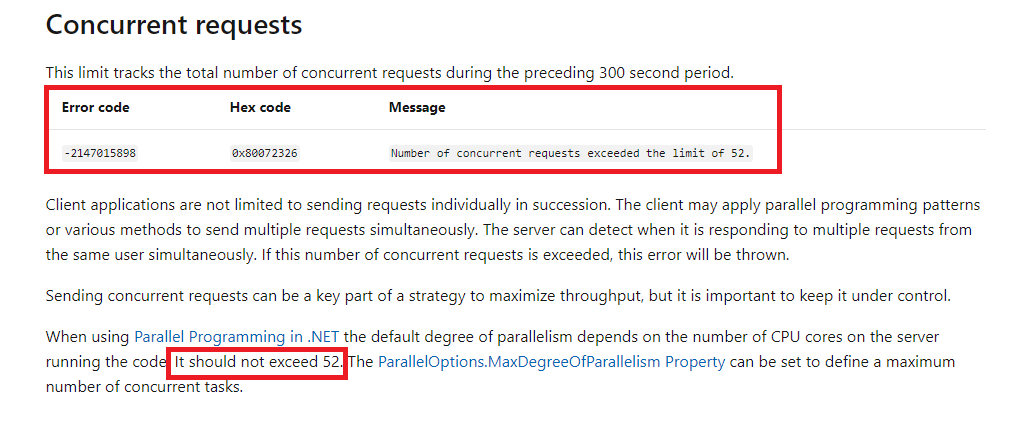
If this limit is exceeded, error message highlighted in the screenshot will be returned.
The concurrent limit 52 is imposed by the CRM web server that serves the requests.Typically the request to CRM is handled by multiple web servers with load balancing in place. Lets assume 100 simultaneous requests are coming from your public website, and the load balancer has split these into 50, 50 and passed on to two web servers, the service protection limit may not kick in.
If your Portal code hits the limit, as long as you have error handling and re-try mechanism in place, the requests could still be executed in second or third attempt depending on how many re-try you plan to have.
You could consider local caching to reduce requests to CRM. If your web site could cache frequently accessed data locally as much as it can, this would massively reduce the number of concurrent requests that hit CRM and might also make your web site respond faster if its serving from cache rather than requesting data from CRM every time.
I also found the following para is relevant to your question from the link
"Portal applications
Portal applications typically send requests from anonymous users through a single service principal account. Because the service protection API limits are based on a per user basis, portal applications can hit service protection API limits based on the amount of traffic the portal experiences. Like interactive client applications, it isn't expected that the service protection API limits errors should be displayed to the portal end user. It is expected that the UI should disable further requests and display a message that the server is busy. The message may include the time when the application can begin accepting new requests."
https://docs.microsoft.com/en-us/powerapps/developer/common-data-service/api-limits#service-protection-api-limit-errors-returned
Hope this helps


