web
You’re offline. This is a read only version of the page.
close
Skip to main content

Notifications

Announcements

No record found.

Community site session details

Community site session details

Session Id :
Microsoft Dynamics AX (Archived)

The Fiscal year that ends with the date is already closed

(0) ShareShare
ReportReport
Posted on by 446

Hi,

We have MS Dynamics AX 2012 R3 CU8, We are trying to close year 2017.

The fiscal year close parameters into the "General Ledger Parameters" as follow:
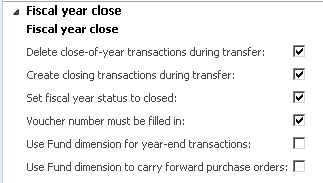
FSP.png

While trying to transfer the opening balances by using the "Opening transactions" form we got the below error message.

2364.Eroor.png

Then we received a notification message "The batch job Rebuild balances completed successfully"

Not.png

I though that the error message is due to rounding setup so I amended it but now I am trying to transfer the opening balances again but unfortunately I am getting a warning message "The fiscal year that ends with the date 12/31/2017 is already closed".
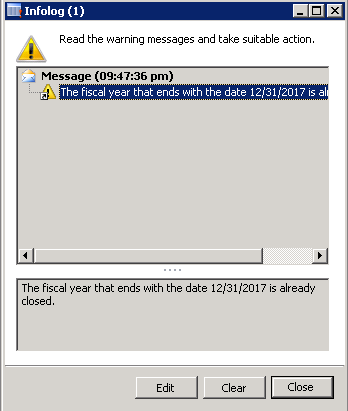
War.png

Now I am not able to transfer the opening balance to 2018 so please advise!!

*This post is locked for comments

I have the same question (0)
  • Suggested answer
    Mahmoud Hakim Profile Picture
    17,887 on at

    Can you check the staus from ledger calendar closed or not?

  • Suggested answer
    Ludwig Reinhard Profile Picture
    Microsoft Employee on at

    Hello Peter,

    Please check solution no. 3656289 on LCS.

    https://fix.lcs.dynamics.com/Issue/Details?bugId=3656289&qc=2586c54c1f391f20857083286ff0458ddb2bef12db92ba1a9ec4e1c2c447ca89

    There it says

    Problem: When running the year end close process AX2012 R3 throws an error message "Total of the transactions in the year is not 0.00. Total is#####. This is a serious error. Run \"Check\" on ledger transactions" . This only occurred if an account has Opening account in the main account setup.

    Mitigation: If the Delete close-of-year transactions during transfer check box is selected in the General ledger parameters form, opening transactions and system-generated closing transactions that exist for the year to be closed are deleted when the transfer is processed again in the Opening transactions form.


    Best regards,

    Ludwig

  • Peter Samir Profile Picture
    446 on at

    Hi Mahmoud,

    The closing period  "Period 13" status is "Closed" as shown below.

    According to the Fiscal Year Close parameters, we checked "Set Period status to year closed" which require all the fiscal period of the year to be closed.

    Our financial manager changed all the periods status of 2017 manually to be "Closed" including the closing period  "Period 13".

    Close.png

  • Peter Samir Profile Picture
    446 on at

    Hi Ludwig,

    I had seen your reply into another post with the same solution but actually I didn't try it where according to the procedure I mentioned above, now I am not able to run the "Opening Transactions" form. I am getting a warning message "The fiscal year that ends with the date 12/31/2017 is already closed".

    Do you mean uncheck "Delete close-of-year transactions during transfer" may solve this warning message too?

  • Suggested answer
    Ludwig Reinhard Profile Picture
    Microsoft Employee on at

    Hello Peter,

    Yes, please try unchecking the "Delete close-of-year transactions during transfer" button.

    Best regards,

    Ludwig

  • Peter Samir Profile Picture
    446 on at

    Hi Ludwig,

    I tried to uncheck "Delete close-of-year transactions during transfer" but unfortunately I got the same message  "The fiscal year that ends with the date 12/31/2017 is already closed".

  • Suggested answer
    Ludwig Reinhard Profile Picture
    Microsoft Employee on at

    Hello Peter,

    Can you check

    (a) whether the previous year transactions are already closed as indicated in the message?

    (b) If the process runs through if you also uncheck the 'set fiscal year status to closed' parameter?

    Best regards,

    Ludwig

  • Suggested answer
    Khaled Alloud Profile Picture
    3,658 on at

    Hello,

    Something i don't get, if you have your periods already closed then how are you going to write any transaction in the same fiscal year.

    Therefore the 1st and the 3rd checkbox should be unchecked from the GL parameters form.

    Note that the 1st checkbox would remove the transaction what would be created while closing expenses and revenues if checked, recommended to be unchecked for reference and history

    Thank you,

  • Suggested answer
    MuhammadFaisal Profile Picture
    329 on at

    Hi Peter Samir

    From your parameter screen, Third check box is enabled, according to my knowledge it is used if we want to close the year permanently which can not be reopened. I think due to this reason you are unable to re-close this year. I think you should discuss this matter with your developers to change the status of year.

    Kindly Correct me if i am wrong.

    Faisal

  • Suggested answer
    Mahmoud Hakim Profile Picture
    17,887 on at

    Hi Peter Samir

    As per your attached, period closed and no way to post any transaction in a closed period.

    IN TEST SERVER, try to open the closed period by a developer and complete your transaction.

    after checking in the test,

    if ok then apply on live

Under review

Thank you for your reply! To ensure a great experience for everyone, your content is awaiting approval by our Community Managers. Please check back later.

Helpful resources

Quick Links

Responsible AI policies

As AI tools become more common, we’re introducing a Responsible AI Use…

Neeraj Kumar – Community Spotlight

We are honored to recognize Neeraj Kumar as our Community Spotlight honoree for…

Leaderboard > 🔒一 Microsoft Dynamics AX (Archived)

#1
Martin Dráb Profile Picture

Martin Dráb 4 Most Valuable Professional

#1
Priya_K Profile Picture

Priya_K 4

#3
MyDynamicsNAV Profile Picture

MyDynamicsNAV 2

Last 30 days Overall leaderboard

Featured topics

Product updates

Dynamics 365 release plans
