web
You’re offline. This is a read only version of the page.
close
Skip to main content

Notifications

Announcements

No record found.

Community site session details

Community site session details

Session Id :
Customer experience | Sales, Customer Insights,...
Suggested Answer

User cannot view any Sharepoint Document Locations when they don't have permissions for a single document location

(0) ShareShare
ReportReport
Posted on by 15

I have recently enabled the sharepoint server integration with a default site that automatically creates folders per contact.

My user test user 1 has access to the sharepoint default site. 

When I open a contact record and then files, I can see the document location and update as necessary. Here's a screenshot of this: 
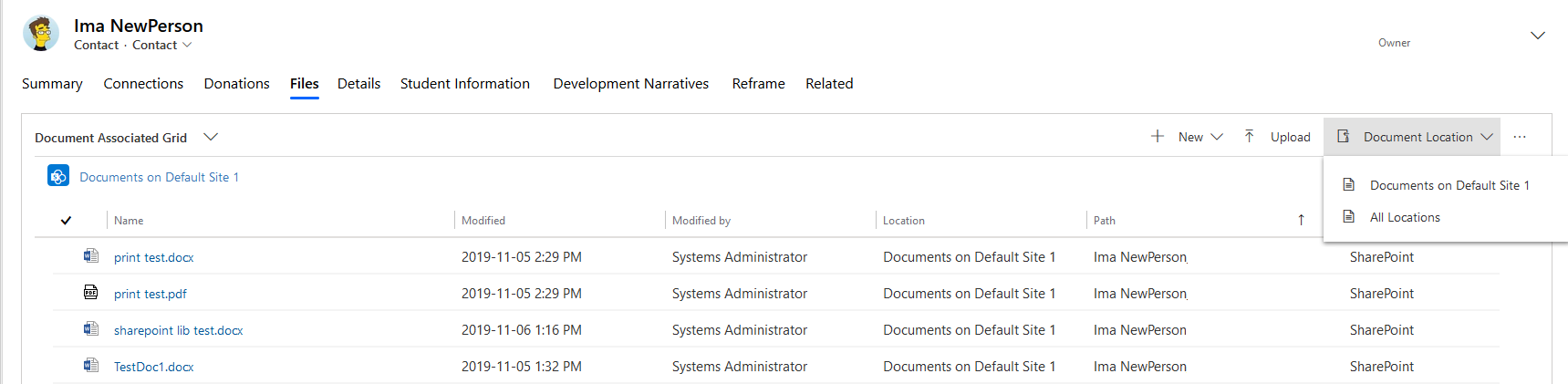
5670.pastedimage1573158240837v4.png

However, if I add a new sharepoint document location that my user doesn't have access to, then I get a permission error and I can't open either document location. I get the following error whether I click on the "Enrollment", or the "Documents on Default Site 1" or the "All Locations" document locations. 

If I choose a new document location, I see the spinning dots for quite a few seconds. 

2318.pastedimage1573158281853v5.png

Is there a way to enable users to see the document locations that they are able to see, and to not see the ones they don't have access to or to simply hide the folders that they don't have access to? I've set the permissions in sharepoint for each of these sharepoint sites. I haven't updated any permissions within Dynamics 365 itself. 

This looks like a bug to me, but I would appreciate any help. 

I have the same question (0)
  • Suggested answer
    Henry J. Profile Picture
    5,237 on at

    Hi Cody, 

    This doesn't look like an issue specifically related to the Unified Interface, so I'll move it to a different channel.

    On that note, this looks to me like standard behavior. Is there a particular why you don't want all users to see all document locations?
    Default SharePoint integration doesn't synchronize access rights, so users would see all folders and files anyway?
    https://docs.microsoft.com/en-us/power-platform/admin/manage-documents-using-sharepoint

    Henry

  • Cody Rigg Profile Picture
    15 on at

    Hi Henry,

    thanks for responding and for moving my question to the appropriate forum. We have quite a few different teams, with different security levels and we have confidential records that we don't want everyone to have access to.

    For example, I made a document library on a new sharepoint site and gave permissions to that sharepoint site only to the people who can see transcripts.

    A different team will only be working with donations. I don't want them to see the transcripts, but I want them the be able to see donations. So I want to have 2 different document locations tied to a single contact, and I want each team to only see the appropriate sharepoint records for that contact.

    This seems like a bug to me, because it says I don't have permission to see the files on Default Site 1, even though I do have permission to see that. I just don't have permission to see Enrollment documents. So when I try to see the enrollment document location, I should get the permission error, which is what I see. But when I try to see the Default Site 1 document location, I shouldn't get an error, because I have permission to see that, but I still see the permission error.

  • Juan Burgos Profile Picture
    10 on at

    Hello Cody,

    Could you find a solution for this problem?

    I am facing the exact same issue as you did and cannot find any information about it.

  • Henry J. Profile Picture
    5,237 on at

    I understand that you have setup multiple SharePoint Sites integration (so different libraries) for your users for the same Dynamics 365 environment, with different permissions on the SharePoint side.

    From a Dynamics 365 security standpoint, have you tried to make sure that the security roles users had only allow them to see the SharePoint Site records they had access to?
    I've never tested that scenario, but I'm wondering what is confusing Dynamics 365 when displaying the record related Document Location documents.

  • Cody Rigg Profile Picture
    15 on at

    I didn't find an answer to this. We found a workaround instead. We wanted one document library associated with a contact, and another with another entity, so we simply mapped each to their respective entity. The end user can then view the library with the entity that they work with. It would give an error if they tried to view the other entity and didn't have permission though. 

  • Juan Burgos Profile Picture
    10 on at

    Thank you for your reply. We cannot use this kind of workaround as both libraries are associated to the same entity, so we will have to find another solution for the issue.

  • PhilMoore Profile Picture
    10 on at

    I am having the same issue since changing our integration from SharePoint On Prem using the List Component to the Microsoft recommended Server to Server and SharePoint Online. As long as the record only contains the "public" default folder the the user can access those documents, but after another user adds a location the first user does not have access to the error  message comes up and the user can no longer access documents in default location.  When using the old list component method, no errors occurred and the user was able to access the documents in the default location without even knowing or seeing the second location. Opening the default location directly in SP works fine, but seems like a clunky work around considering the whole point of the integration is to allow access to docs from within the Dynamics record directly.

    If anyone can figure this out I'd love to hear the answer

  • @iainwickscrm Profile Picture
    52 on at

    Hi Cody, 

    did you ever get a resolution to this?

    I have the same issue today .

  • PhilMoore Profile Picture
    10 on at

    No.  I have opened a bug with MS though and waiting to hear back. I will post back the outcome from the bug.

  • Tyson Bosse Profile Picture
    on at

    Thanks for opening up this request to Microsoft Support Phil. We now have an internal repro of the issue and have this in the hands of our Development Team to look into a code change or design change request to resolve this issue. We will post an update once we have further information on a fix.

Under review

Thank you for your reply! To ensure a great experience for everyone, your content is awaiting approval by our Community Managers. Please check back later.

Helpful resources

Quick Links

Responsible AI policies

As AI tools become more common, we’re introducing a Responsible AI Use…

Neeraj Kumar – Community Spotlight

We are honored to recognize Neeraj Kumar as our Community Spotlight honoree for…

Leaderboard > Customer experience | Sales, Customer Insights, CRM

#1
Tom_Gioielli Profile Picture

Tom_Gioielli 108 Super User 2025 Season 2

#2
Jimmy Passeti Profile Picture

Jimmy Passeti 50 Most Valuable Professional

#3
Gerardo Rentería García Profile Picture

Gerardo Rentería Ga... 49 Most Valuable Professional

Last 30 days Overall leaderboard

Product updates

Dynamics 365 release plans
