web
You’re offline. This is a read only version of the page.
close
Skip to main content

Notifications

Announcements

No record found.

Community site session details

Community site session details

Session Id :
Microsoft Dynamics AX (Archived)

Request for the permission of type 'FileIOPermission' failed

(0) ShareShare
ReportReport
Posted on by 313

Hi,

I'm using this code for Export CSV file through batch job but got the FileIOPermission error.

fileName = "\\sssdt-006\\ExportCSV\\" + "ItemDetails" + ".csv";

filepermission = new FileIoPermission(fileName, 'w');
commaIO       = new CommaIO(fileName, 'r');
filepermission.assert();
q       = new Query();
qbds = q.addDataSource(tablenum(InventTable));
qbr   = qbds.addRange(fieldnum(InventTable,ItemId));
qr     = new QueryRun(q);
commaIO.write("ItemId");
while (qr.next())
{
inventTable = qr.get(tablenum(InventTable));
commaIO.write(inventTable.ItemId);
commaIO.write(output);
}
CodeAccessPermission::revertAssert();
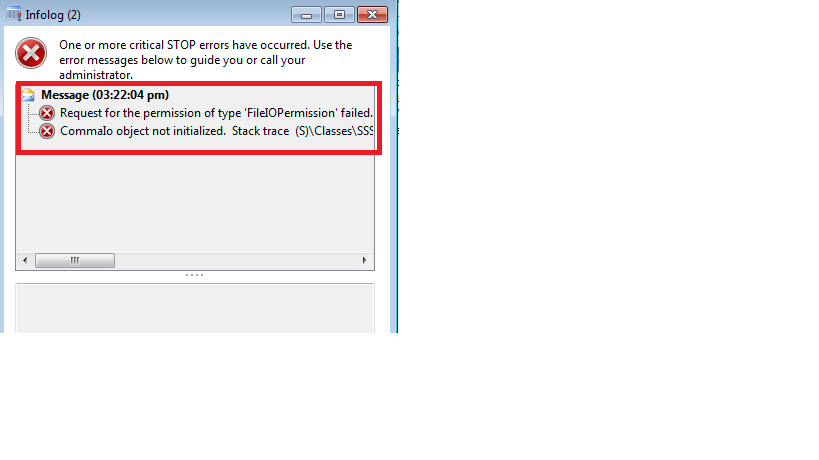
4011.Error.png

Thanks for the help in advance.

*This post is locked for comments

I have the same question (0)
  • Suggested answer
    Community Member Profile Picture
    on at

    Hi Prabakaran

    You could see tutorial below : 

    https://community.dynamics.com/ax/b/dynamicsaxinsideout/archive/2015/11/13/x-export-data-from-table-to-a-csv-file

    NB : If it resolve your problem please mark as answered :D

  • Prabakaran.R Profile Picture
    313 on at

    Hi Mehdi

    Thank you for reply your above link is working fine only for normal job and class but unfortunately its not work for batch job, i got same error, please suggest me some other solution to solve this.

    Thank you

  • Community Member Profile Picture
    on at

    Hi Prabakaran,

    Coul you please send me your code ?

    Thanks

  • Prabakaran.R Profile Picture
    313 on at

    Hi Mehdi,

    Thank you for your response

    This my code , this code take from above link,

    Query q;

    QueryBuildDataSource qbds;

    QueryBuildRange qbr;

    QueryRun qr;

    CommaIO commaIO;

    FileName fileName;

    InventTable inventTable;

    ;

    fileName = "C:\\ExportFile\\" + "ItemDetails" + ".csv"; //Destination of the file

    commaIO = new CommaIO(fileName,'W');

    q = new Query();

    qbds = q.addDataSource(tablenum(InventTable));

    qbr = qbds.addRange(fieldnum(InventTable,ItemId)); //Range

    qr = new QueryRun(q);

    commaIO.write("ItemId","Item Type"); //Header of the CSV File

    //Loop to insert values in the csv from the table

    while( qr.next() )

    {

    inventTable = qr.get(tablenum(InventTable));

    commaIO.write(inventTable.ItemId,enum2str(inventTable.ItemType));

    }

    WINAPI::shellExecute(fileName);

    }

    Thank you

  • Community Member Profile Picture
    on at

    Have you put this code in a class that extends RunBaseBatch ?

  • Prabakaran.R Profile Picture
    313 on at

    Hi Mehdi,

    Thank you for reply, I have used that.

    Thank you

  • Suggested answer
    Rudi Hansen Profile Picture
    4,075 on at

    You need to check if the user that your AOS runs under has access to the folder you are trying to write the file too.

  • Suggested answer
    Community Member Profile Picture
    on at

    Please invert the position of your code:

    your code: filepermission = new FileIoPermission(fileName, 'w');

    commaIO       = new CommaIO(fileName, 'r');

    filepermission.assert();

    the correct code:

    filepermission = new FileIoPermission(fileName, 'w');

    filepermission.assert();

    commaIO       = new CommaIO(fileName, 'r');

  • Community Member Profile Picture
    on at

    Hi Prabakaran,

    So check the file permission or folder permission if user has access to it in write mode

Under review

Thank you for your reply! To ensure a great experience for everyone, your content is awaiting approval by our Community Managers. Please check back later.

Helpful resources

Quick Links

Responsible AI policies

As AI tools become more common, we’re introducing a Responsible AI Use…

Neeraj Kumar – Community Spotlight

We are honored to recognize Neeraj Kumar as our Community Spotlight honoree for…

Leaderboard > 🔒一 Microsoft Dynamics AX (Archived)

#1
Martin Dráb Profile Picture

Martin Dráb 4 Most Valuable Professional

#1
Priya_K Profile Picture

Priya_K 4

#3
MyDynamicsNAV Profile Picture

MyDynamicsNAV 2

Last 30 days Overall leaderboard

Featured topics

Product updates

Dynamics 365 release plans



