web
You’re offline. This is a read only version of the page.
close
Skip to main content

Announcements

No record found.

News and Announcements icon
Community site session details

Community site session details

Session Id :
Dynamics 365 general forum

Duplicate detection & data Import

(0) ShareShare
ReportReport
Posted on by 13,218 User Group Leader

Hey, 

Please can i disable the choice for some users and force YES as default ?

4478.duplicate-import.png

I have the same question (0)
  • Suggested answer
    Johnny Gong Profile Picture
    6,482 Moderator on at

    Hi meelamri,

    You could directly force 'Yes' to allow duplicate records from Settings>Data Management > Duplicate Detection Settings to uncheck 'Duplicate Detection'.

    Duplicate.PNG

    While this function couldn't be enabled or disabled for specified user or security role. The following doc document could help:

    https://docs.microsoft.com/en-us/dynamics365/customer-engagement/admin/set-up-duplicate-detection-rules-keep-data-clean

    https://docs.microsoft.com/en-us/dynamics365/customer-engagement/admin/turn-duplicate-detection-rules-off-whole-organization

    Regards

    Johnny

  • meelamri Profile Picture
    13,218 User Group Leader on at

    Thank you for your reply :)

    is that possible to Force "Not Allow duplicate" for the whole organization ?

  • Suggested answer
    Johnny Gong Profile Picture
    6,482 Moderator on at

    Good day meelamri,

    Yes. You could force "Not Allow duplicate" for whole organization users while not for whole instance entity.

    It depends on your duplicate detection rule like you don't want Account with the same account name or same mail address.

    dupcase.PNG

    If you haven't created any detection rules on any entity & its related field. The 'Allow Duplicate' window wouldn't be popped out like following example:

    I have enabled duplicate detection while have no rule on case entity. So when I create one case with the same name under the customer. There's no more warning after I created it.
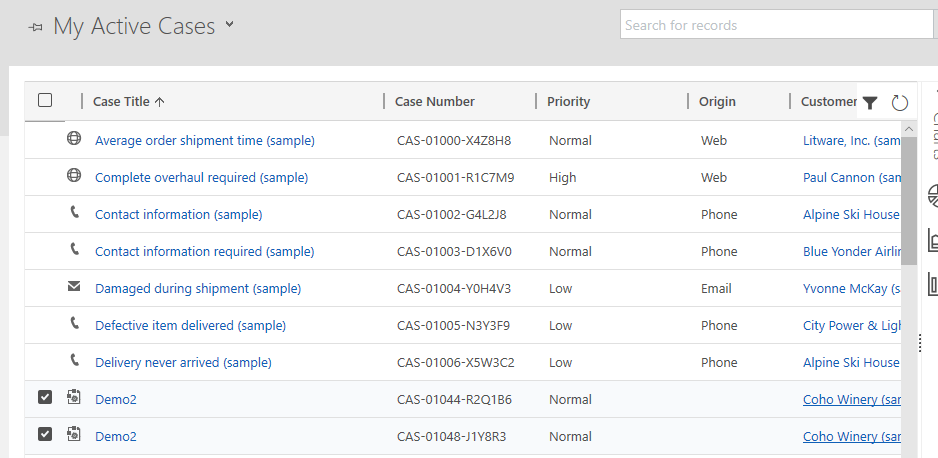
    dupcase.PNG

    Above info is also mentioned in Doc:

    To determine whether a record is a potential duplicate, Dynamics 365 for Customer Engagement apps uses duplicate detection rules. When publishing a duplicate detection rule, a matchcode is created for each existing record. A matchcode is also created when a record is created or updated. When a record is in the process of being created or updated, its matchcode can be checked automatically against the matchcodes of existing records. By default, Dynamics 365 for Customer Engagement apps has simple duplicate detection rules for accounts, contacts, and leads. For example, you detect duplicates by matching the record fields, such as email address, first name, and last name.

    https://docs.microsoft.com/en-us/dynamics365/customer-engagement/admin/detect-duplicate-data

    Hope above info could help.

    Regards

    Johnny

Under review

Thank you for your reply! To ensure a great experience for everyone, your content is awaiting approval by our Community Managers. Please check back later.

Helpful resources

Quick Links

November Spotlight Star - Khushbu Rajvi

Congratulations to a top community star!

Forum Structure Changes Coming on 11/8!

In our never-ending quest to help the Dynamics 365 Community members get answers faster …

Dynamics 365 Community Platform update – Oct 28

Welcome to the next edition of the Community Platform Update. This is a status …

Leaderboard > Dynamics 365 general

Last 30 days Overall leaderboard

Featured topics

Product updates

Dynamics 365 release plans
