web
You’re offline. This is a read only version of the page.
close
Skip to main content

Notifications

Announcements

No record found.

Community site session details

Community site session details

Session Id :
Finance | Project Operations, Human Resources, ...
Unanswered

InventTrans form grid is not getting reflect when I add range in extension/ event

(0) ShareShare
ReportReport
Posted on by 3,732

Hello Alll,

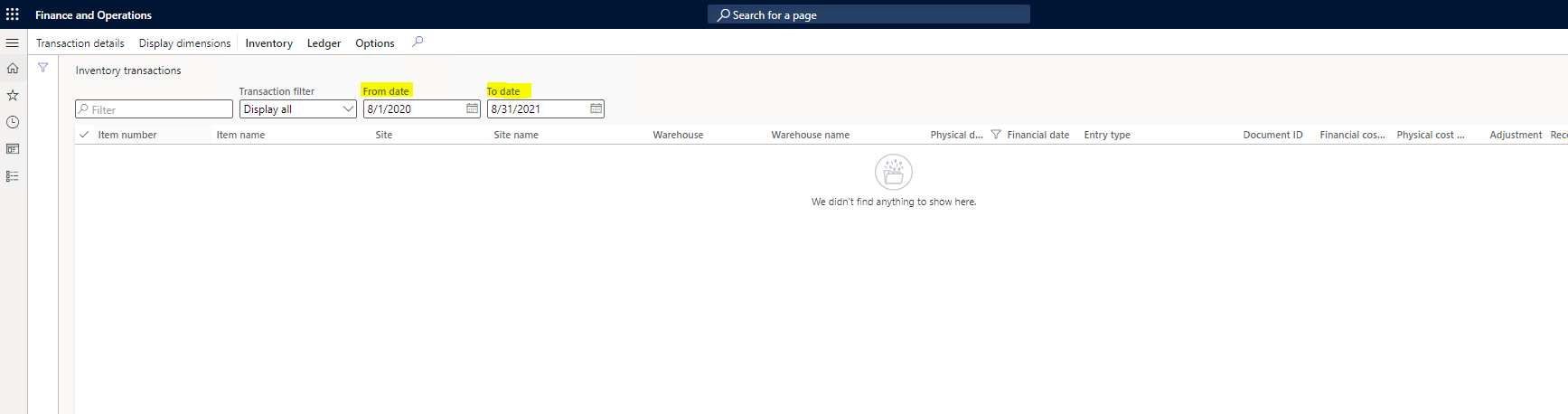
I'm trying to add a date filter to the inventory transaction form, From date and to date is unbound control
3678.pastedimage1629873985058v1.png

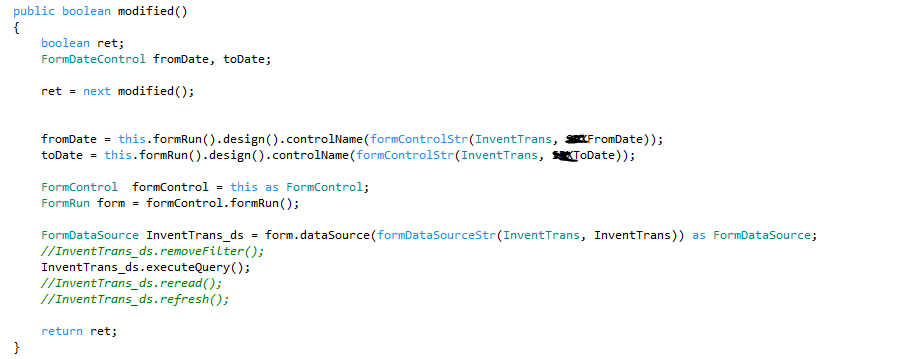
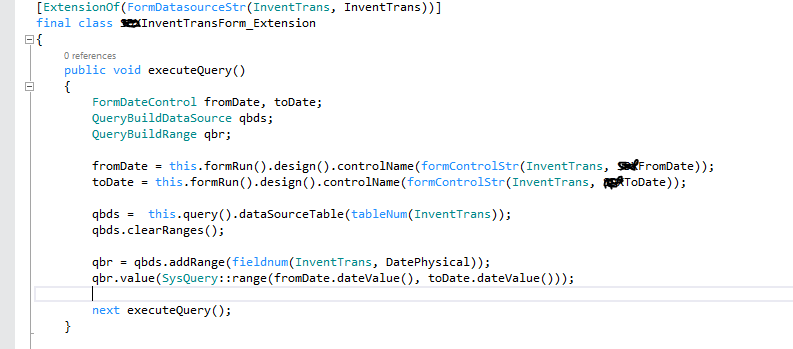
My problem is whenever I modify the date range the grid is not getting changed. I have written code on the onmodified event handler and as well as the extension also.
2318.pastedimage1629874162805v2.png

Execute query on the inventTrans datasource
1205.pastedimage1629874225172v3.png

Please let me know If I'm doing anything wrong.

I have the same question (0)
  • nmaenpaa Profile Picture
    101,162 Moderator on at

    Hi Sathish,

    could you please provide more information about your scenario:

    1) The first screenshot - what is it related to? We can see that it's a modified method, but modified method of what exactly? Also it seems to have some unnecessary code that fetches "fromDate" and "toDate" that you don't use for anything in the method

    2) Please share all the details that you noticed when you debugged your code. 

    Thanks!

    Ah, and one hint: when you add date ranges to x++ queries, please use date2strxpp function to format the dates.
    For example "myDateRange.value(date2strxpp(myDate));"

  • nmaenpaa Profile Picture
    101,162 Moderator on at
    [deleted]
  • Martin Dráb Profile Picture
    237,976 Most Valuable Professional on at

    I wouldn't use date2strXpp() in this case. It's needed when writing expressions in query ranges, but not when merely setting the value.

    SysQuery::range() is a correct approach for using a range of values. And queryValue() does the job for a single value, regardless of the data type:

    myDateRange.value(queryValue(myDate));

Under review

Thank you for your reply! To ensure a great experience for everyone, your content is awaiting approval by our Community Managers. Please check back later.

Helpful resources

Quick Links

Responsible AI policies

As AI tools become more common, we’re introducing a Responsible AI Use…

Neeraj Kumar – Community Spotlight

We are honored to recognize Neeraj Kumar as our Community Spotlight honoree for…

Leaderboard > Finance | Project Operations, Human Resources, AX, GP, SL

#1
André Arnaud de Calavon Profile Picture

André Arnaud de Cal... 449 Super User 2025 Season 2

#2
Martin Dráb Profile Picture

Martin Dráb 422 Most Valuable Professional

#3
BillurSamdancioglu Profile Picture

BillurSamdancioglu 239 Most Valuable Professional

Last 30 days Overall leaderboard

Product updates

Dynamics 365 release plans



