web
You’re offline. This is a read only version of the page.
close
Skip to main content

Notifications

Announcements

No record found.

Community site session details

Community site session details

Session Id :
Finance | Project Operations, Human Resources, ...
Suggested Answer

Can't create new reports in Report Designer

(0) ShareShare
ReportReport
Posted on by 5

I am trying to create new financial reports in D365 for F&O. I have been granted the relevant security permissions and when viewing the Financial Reports in General Ledger I have a "New" button which is now available to me to open the Report Designer one click app and begin editing. 

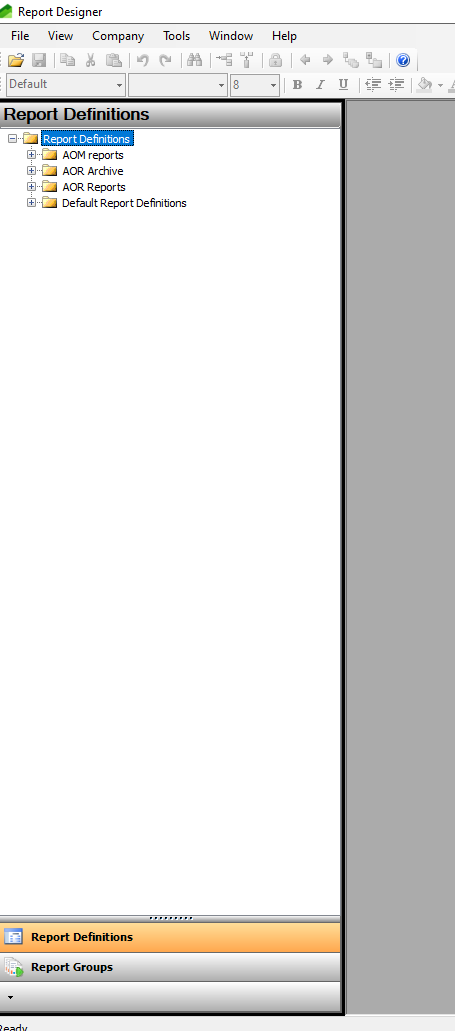
When I open Report Designer though, I am not able to view Column or Row Definitions and commands such as "New" are not available.

Is there additional security privileges which are required?

I have used this page to get a view of what permissions are needed, and at present I have both: Security Administrator and Accounting Manager added as roles to my account. 0334.Designer.png
I have the same question (0)
  • Suggested answer
    Ramit Paul Profile Picture
    22,797 Most Valuable Professional on at

    Have you checked with System admin role?

    Also, can you follow the below roles?

    pastedimage1677241263426v1.png

  • Liam S Profile Picture
    5 on at

    Hi Ramit,

    I was briefly granted system admin by one of our D365 team and this didn't enable me to edit or create anything new in Report Designer. In addition, it still did not enable me to view any of our row or column definitions.

    I've been granted Security Administrator & Accounting Manager separately and neither of these roles allow me to view this information either.

    Do you have any more ideas?

    Thanks!

  • Ramit Paul Profile Picture
    22,797 Most Valuable Professional on at

    I don't see any other reason for this behavior, I would suggest creating a support ticket for this case.

  • Suggested answer
    Liam S Profile Picture
    5 on at

    Just wanted to update you to  explain this is now fixed and is was a separate issue. 

    The data mart wasn't updating which meant that user permissions weren't carrying over to report designer correctly. My account was down as a generate-only role and meant I couldn't create new reports, even though my permissions in D365 were correct.

  • Rui Reis Profile Picture
    20 on at

    Hello there Ramit, reviving this topic to ask if you know how to past this error when opening report designer: can´t connect to the default company!

    I choose yes to the question "do you want to connect to a different company", and got to the report designer, seeing a popup with the companies list. It seems the "set as default" button doesn´t do anything.. It just opens the security menu with our users.

    I then go to Tools, import default reports, and then I get the error: "A default company must be specified before you can import a building block group".

    So, i´m in a kind of a cycle.. how to be sure I have a default company?

    Thank you.

  • Morgan Bazin Profile Picture
    95 on at

    Please create a new question as this is unrelated to the question it is nested under, thanks!

Under review

Thank you for your reply! To ensure a great experience for everyone, your content is awaiting approval by our Community Managers. Please check back later.

Helpful resources

Quick Links

Responsible AI policies

As AI tools become more common, we’re introducing a Responsible AI Use…

Neeraj Kumar – Community Spotlight

We are honored to recognize Neeraj Kumar as our Community Spotlight honoree for…

Leaderboard > Finance | Project Operations, Human Resources, AX, GP, SL

#1
Martin Dráb Profile Picture

Martin Dráb 451 Most Valuable Professional

#2
André Arnaud de Calavon Profile Picture

André Arnaud de Cal... 428 Super User 2025 Season 2

#3
BillurSamdancioglu Profile Picture

BillurSamdancioglu 239 Most Valuable Professional

Last 30 days Overall leaderboard

Product updates

Dynamics 365 release plans
